Accelerate Image Drag And Drop
- GitHub project page
- Add-on page
What’s this?
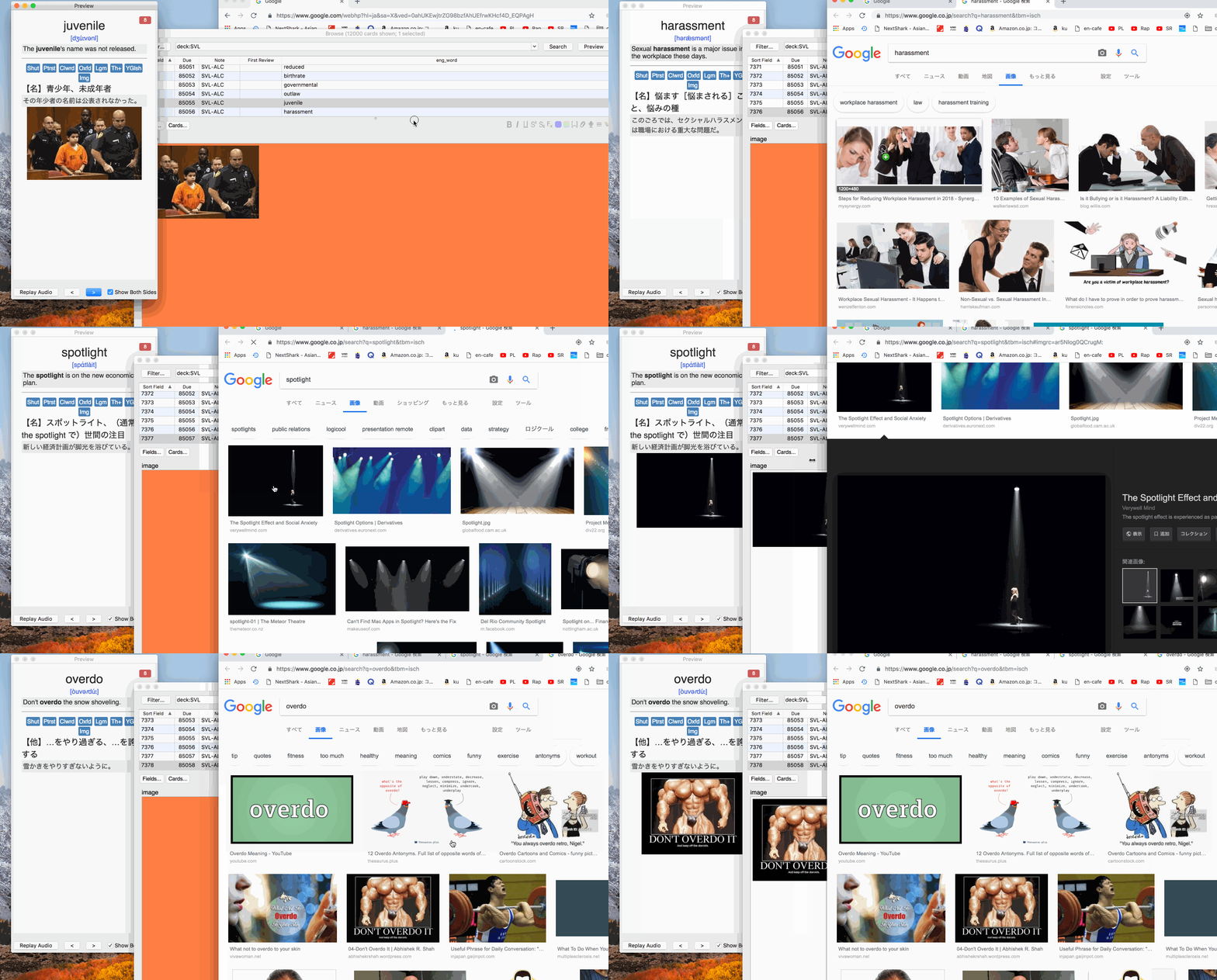
This Anki add-on is not for daily use, instead, it helps a very specific situation where you add images to a bunch of notes intensively for a specific period. This add-on provides following features which hopefully make drag&drop of an image from browser far easier.
- Maximize first field of the editor of Note in Browser by shortcut (
Shift-Ctrl-E) or (Shift-Cmd-E). - Preview Previous via shortcut regardless of the focus of fields or window (
Shift-Ctrl-P) or (Shift-Cmd-P). - Preview Next via shortcut regardless of the focus of fields or window (
Shift-Ctrl-N) or (Shift-Cmd-N). - Preview Next and auto-open hyperlink for
id="primal-image-link". (Shift-Ctrl-O) or (Shift-Cmd-O).
How to use
Preparation
- Open Anki browser
- Choose deck which has notes which you want to add images to them.
- Necessary only once: Create field and make it come very 1st field.
- From menu bar execute
Widen First fieldor hitShift-Cmd-E, then you see 1st field become widen. - Open preview window
Repeated steps until you exhausted by adding images to all cards.
- Drag&drop image from a web browser to wide-orange-1st-field. Then check the preview window.
- Hit
Shift-Cmd-O, it renders a preview of next card then automatically open image search result. So, continue drag&drop!
Notes
- You need to reorder field for image dropping to come very first field in a card.
- Preview Next/Previous shortcut do nothing unless preview window is already opened.
- If you want
Preview Next And Click Primal Image Linkwork, you need to set a card to have a hyperlink with idprimal-image-link. ex)Img.
Background why I created this add-on
This add-on is basically for my own benefits, so I will explain some background. Remembering completely vocabulary is always difficult. To aid to create some clue in my brain, I found associating an image with the vocabulary is really efficient. So I started associating images with each word in my decks which have 12000 vocabularies. Then I noticed
- If the target field for image drag&drop(from a browser) is more broaden, it would be a lot easier to drop an image from a browser.
- That’s why I make the 1st field of editor maximize(
800px) and colorize with orange via shortcut.
- That’s why I make the 1st field of editor maximize(
- When I drag&drop image, I use mouse or trackpad, so focused window or field is not consistent, I wanted to make select next/previous word via shortcut regardless of current focus.
- That’s’ why I created a shortcut for previewing next/previous. Note: I intentionally override original
Shift-Cmd-Pwhich was assigned toPreviewaction.
- That’s’ why I created a shortcut for previewing next/previous. Note: I intentionally override original
How I use this.
Please ignore this if you find it TOO complex!
I use
Screenshots
Liên kết hỗ trợ
Reviews (2)
👍 2020-01-04
My god this rocks!.
Thanks so much
👍 2019-06-28
Really useful!
