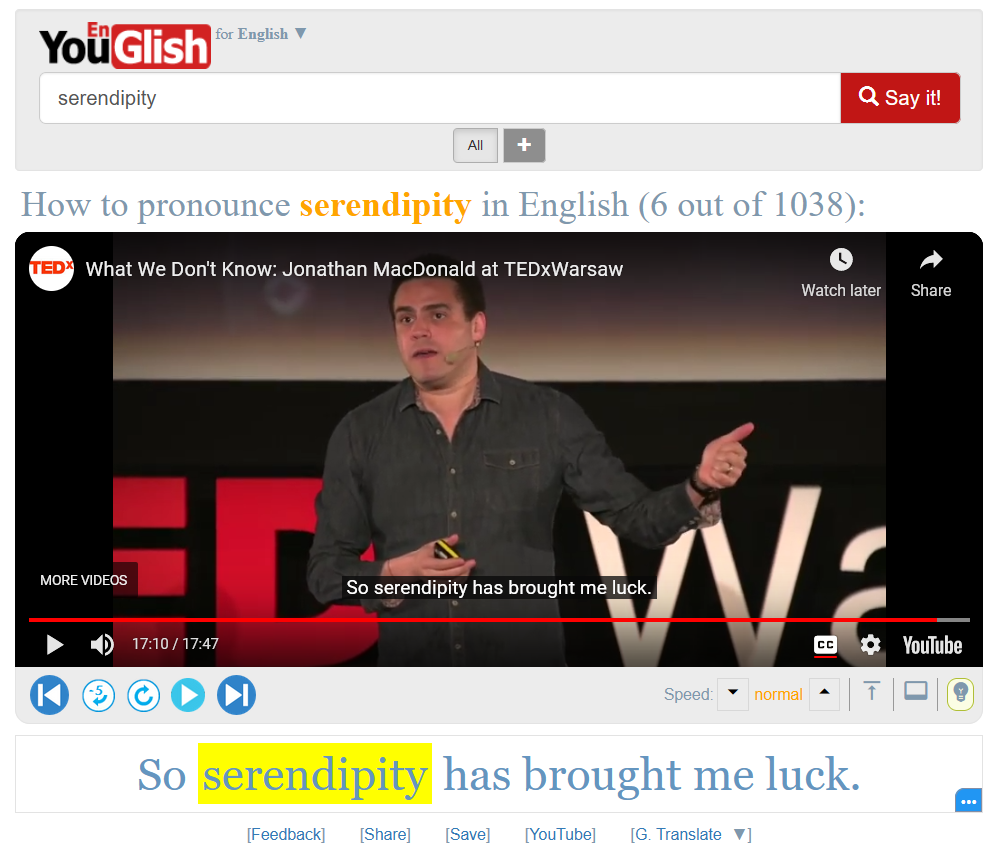
Add-on for YouGlish; a YouTube search engine for language learning that helps you learn vocabulary in context.
YouGlish supports many languages and customizations of the interface. This add-on supports all languages supported by YouGlish and customizations.
Usage The add-on integrates YouGlish with Anki through a custom filter you put in your card templates (e.g. {{aglish:Front}}). Its usage is quite simple. Let’s go through some examples:
{{aglish lang=english accent=uk:Front}} This will show you video usage examples of the text in your Front field in British English. The video widget will be hidden behind a button by default. You can change the text shown on the button via the label option (no spaces allowed for now): {{aglish lang=english accent=uk label=youglish_english_uk:Front}} Alternatively, You can make the video play automatically by using the autoplay option: {{aglish lang=english accent=uk autoplay:Front}} Bear in mind that if you review a lot of cards quickly with autoplay enabled, you may get temporarily blocked or asked to solve a captcha. It’s recommended to enable autoplay only when the main focus of your note type is the YouGlish videos, so that you won’t go to the next card before watching a clip, or you will be just answering cards without thinking. You can combine Anki’s cloze-only filter with the aglish filter to query only elided sections in cloze note types: {{aglish lang=english:cloze-only:Text}} The cloze-only filter only works on the back side, so this add-on provides a similar option (clozeonly) that works on both sides as a bonus: {{aglish lang=english clozeonly:Text}} The nocaps option is useful here to hide captions when watching clips containing elided text in the front side: {{aglish lang=english clozeonly nocaps:Text}} You can also change the widget theme using the theme option: {{aglish theme=dark:Text}} Available values are light, dark, and anki (theme used in Anki’s interface, the default). The width and height of the widget can be customized using the width and height options: {{aglish lang=arabic width=600 height=500:Front}} The widget will expand to the window size if these options are not specified. You can enable “Restricted mode” to block potentially inappropriate content to be displayed (aka Kids Mode) by setting the “restrict” option, like this: {{aglish restrict:Front}} You can set hotkeys to trigger non-autoplayed widgets using the hotkey option: {{aglish hotkey=k:Front}} Only single keys work for now. (no combinations like Ctrl+K) You can alternatively set a similar hotkey config option under Tools > Add-ons > Config to trigger all non-autoplayed widgets without having to specify the hotkey in each filter.
All options have default values so they can be omitted; {{aglish:Front}} assumes English in all accents, showing a widget in Anki’s theme with captions. For a list of all supported languages and accents, see YouGlish documentation (scroll down to the documentation of the widget.fetch function).
Widget Components You can toggle widget’s components like the search bar via the config’s components key (Tools > Add-ons > Config). See this page to experiment with available components. For example to hide the search bar, you can set search_box to false: “components”: { “search_box”: false, … … }
Styling You can style the buttons by targeting the yg-btn CSS class in the styling section. E.g. .yg-btn { opacity: 0.8; background-color: #c11615; color: white; border: 1px solid black; border-radius: 5px; }
.yg-btn:hover { box-shadow: 1px 1px 1px black; }
Demo Watch this video for a demo of the add-on.
Experimental Support for YouGlish login I’ve recently added experimental support to allow users to use their YouGlish account and premium subscription plans in the add-on. This is not tested. I appreciate if someone can test it with their premium plan and tell me about the result. To use your YouGlish account with the add-on, go to Tools > Aglish > Log in to YouGlish. You’ll be presented with the YouGlish login page. After logging in successfully, you can close the window. The add-on will now use your login information when showing the widget on cards.
References YouGlish widget API:
https://youglish.com/api/doc/widget https://youglish.com/api/doc/js-api
YouGlish & YouTube Terms of Service You may want to read the Privacy & Terms of Service pages of both YouGlish and YouTube:
https://youglish.com/terms https://www.youtube.com/t/terms https://policies.google.com/privacy
Changelog See CHANGELOG.md for a list of changes.
Support & feature requests Please post any questions, bug reports, or feature requests in the support page or the issue tracker. If you want priority support for your feature/help request, I’m available for hire. You can get in touch from the aforementioned pages, via email or on Fiverr.
Support me Consider supporting me if you like my work:
I’m also available for freelance add-on development on Fiverr:
Screenshots




Liên kết hỗ trợ
Reviews (17)
👍 2025-02-24
Pretty pretty pretty good!
👍 2025-02-09
Great! The only thing that I am missing is the record option or alternatively open it in browser to have the full YouGlish functionality.
👍 2025-01-01
I would like to specify which text to use inside the query of Youglish, and not the whole text of the FRONT of the flashcard. However, the idea it’s still pretty good.
👍 2024-02-20
Hey, I’ve tested the premium subscription with the addon, and it worked. The only problem I think the price is just ridiculously unreasonable for this kind of service.
👍 2023-12-28
I love your widget. However, I found it work so well on the Anki desktop, but on mobile. When I opened the card on mobile, the widget didn’t show up. Doesn’t this widget work on Anki Mobile version? Comment from author Add-ons don’t work on mobile. I might add a way to make this work in the future.
👍 2023-03-02
Very useful addon, so cool!
👍 2023-02-28
This add-on is excellent and provides learners with an interactive learning method.
Besides, could you add a feature to hide the “Search bar” and “Title bar” at the back screen? Because we already type words on the front screen and on the back screen, we do not need to show the “Search bar” and “Title bar” anymore. Due to the display of the search bar and title bar, I have to scroll the mouse to fit the Youtube screen every time I study a card even after I change the width and height to fit t
👍 2022-12-19
Thanks! Very useful!
👍 2022-08-05
works on mac anki. Thank You!
But it seems not compatible on ios. I use the template {{aglish lang=english accent=uk:Front}} , I press the button but don’t work. I guess my iphone need inistall some video software or it doesn’t support it at all. lol Comment from author Yes, the widget doesn’t currently work on mobile. I plan to add a feature that allows users to opt in to include some code in templates that will make the widget work on mobile platforms too.
👍 2022-07-04
Excellent! Thank you.
👍 2022-04-03
It is briliiant an addon indeed however it doesn’t update existing cards to make addon works you have to add an card after installing the addon
Q: How can I also update existing decks with that feature? Comment from author You can update existing cards, and you don’t have to add any new cards. Just update your template from the Cards button in the editor window of an existing card, as described in the Usage section.
👍 2022-02-12
this is a good value to anki
Thanks Comment from author before post was edited You have to put the filter text described above in your card template. You can access the card templates screen by clicking the “Cards” button in the editor. I’ll try to make a video when I have the time.
For more info about card templates, see https://docs.ankiweb.net/templates/intro.html
UPDATE: I made a short video demo: https://www.youtube.com/watch?v=aqc98e5ar64
👍 2022-02-03
I have the same problem of asking for premium subscription after 4 cards.
is there anyway to bypass this? Comment from author Maybe you can bypass it by using a VPN and switching your IP address periodically.
I’m investigating a way to use YouGlish’s subscription plans in the add-on, if you’re willing to subscribe to one of the plans listed in their site at https://youglish.com/subscribe
👍 2022-01-10
Your daily search quota has exceeded.
Please come back tomorrow or upgrade to one of YouGlish’s Premium account plans.
Can you help solve this error ? I tried looking more information where to get premium. Didnt find anything. Comment from author The message refers to premium use of YouGlish API as shown here under the “REST API Plans” section: https://youglish.com/api/plans
Unfortunately, the premium plan can’t be used with this add-on as far as I know, as the add-on uses a different me
👍 2021-10-28
I like your addon, I just have one problem.
The autoplay option doesn’t show anything.
{{aglish lang=english accent=us autoplay:Vocab}} Comment from author Autoplay works for me.
Could you post more info like your Anki version and an export of a sample deck in https://forums.ankiweb.net/t/aglish-youglish-widget-for-anki-official-thread/14503 ?
👍 2021-09-15
very good!
👍 2021-07-16
Can you help us to give more information about how to use it? I don’t know how to use
So I tried to add a field to the current note type, and in Card template. I add this code
{{aglish lang=english accent=uk:front}}
but it doesn’t seem to work :( Comment from author You don’t have to add any new field. Just add the code to your card template (accessible from the Cards button in the editor) in either the front or back sides, changing “Front” to an existing field in your note type that you w
