Kanji Dojo Buddy
This is an early release and while the application is very unlikely to cause issues, please ensure you always retain backups of your Kanji Dojo data!
Kanji Dojo Buddy is a plugin that lets you analyze your Anki cards for Japanese characters—hiragana, katakana, and kanji—and add them into your Kanji Dojo backup file.
Your mature Anki cards will be sorted in order of maturity and each unique character added to Kanji Dojo in that order. This means that, as long as you turn shuffle off in Kanji Dojo, you can practice writing characters that you are most familiar with first, making it easier to match your writing practice to your Anki vocab and sentence reviews.
Usage
Make sure at least one Kanji Dojo character deck already exists (even if it’s empty) before you begin.
First, from Kanji Dojo, create a backup from the backup menu.
Next, within Anki, select the Update Kanji Dojo Backup from the Tools menu.
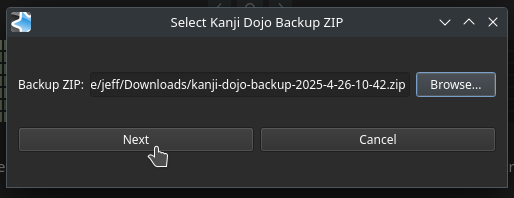
You will be prompted to select your backup file:
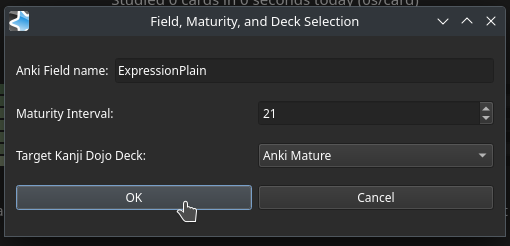
Once you’ve done so, click next. The next dialog will prompt you for three things:
Anki Field Name—name of the Anki field to scan for unique Japanese characters Note: characters unsupported by Kanji Dojo will be automagically filtered out Maturity Interval—the interval in days which should be considered as ‘mature’ default is 21 days Target Kanji Dojo Deck—which existing Kanji Dojo character deck to which new characters will be added
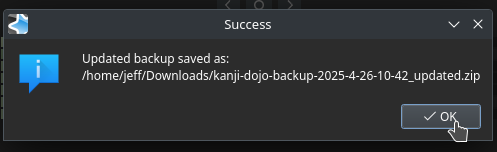
Once complete, an update backup zip will be created:
Note: The original backup zip is never modified.
From within Kanji Dojo, simply use the backup restore feature to restore this new, modified backup zip.
License
This project is licensed under the GNU General Public License, version 2.
Version history 0.1—initial release
Screenshots