AI Card Explainer
Get instant explanations for flashcards.
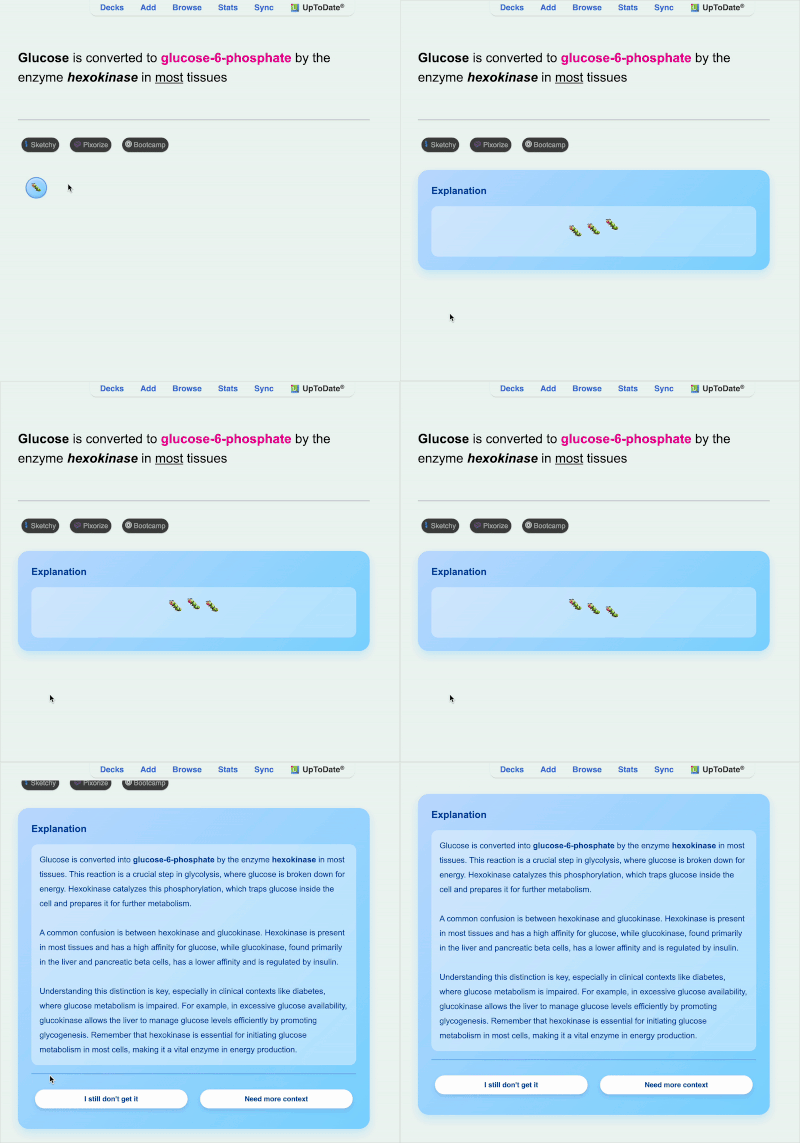
HOW TO USE: Flip to the answer side of any card Press ‘L’ or click the caterpillar button (🐛) Get an AI explanation If you need more detail, click “I still don’t get it” or “Need more context” Press ‘L’ again to hide SETUP Install add on and then restart anki. Once you restart anki, you will be guided through set up You will need an OpenAI API key, platform.openai.com/api-keys Add payment method to OpenAI account Enter API key in the setup dialog Cost: $0.01 per ~100 explanations
Your API key is stored locally and only sent to OpenAI. Each user pays for their own usage.
What is an API key? It’s a unique code that you generate from an OpenAI account to let this add-on use ChatGPT to generate explanations. It’s basically just a way for each person that uses this to pay for their own chatgpt use You can add a minimum of $5 to your API key, and will be billed directly by OpenAI based on usage You can generate over 100 explanations before you’ll even be charged 1 cent
Screenshots
Reviews (1)
👍 2025-11-17
Could it be possible for you to add open-router among the options?
