This tiny add-on adds a play button to the Anki Browser’s toolbar. When clicked, it looks for [sound:…]-tags on the selected note and plays them in the order of their appearance on the note’s fields. If there is selected text, the action is limited to the sound tags that appear only in the selected text. If you select Play field in the context menu, the action is limited to the currently selected field. Each field that contains audio has a play button next to its name. Pressing on the button plays all audio files in the field. Audio can be directly played with a shortcut: alt + m. A demo can be viewed on .
Screenshot.
Configuration
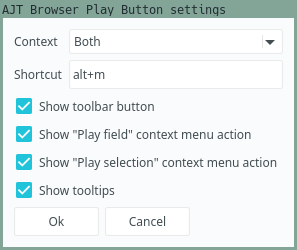
To configure the add-on, open the Anki Add-on Menu via Tools > Add-ons and select AJT Browser Play Button. Then click the Config button on the right-side of the screen. Alternatively, open the Anki Browser and click Edit > AJT Browser Play Button settings…
Settings.
If you hover over a setting, it brings up a tooltip explaining what it does.
Support what I do
I would not have been able to develop this add-on without the support of my patrons. Thanks so much!
Join our community
Want to discuss the add-on? Join our chat room.
Contribute
Click here if you would like to contribute on GitHub.
Screenshots





Liên kết hỗ trợ
Reviews (15)
👍 2025-12-09
one of the essential addons
👍 2025-08-01
great play button
👍 2024-11-12
Another AJT banger. Thank you!
👍 2024-09-30
Kind of ridiculous that Anki doesn’t just use the <audio> tag for audio files (like it uses the <img> tag for images) but this is the next best thing.
👍 2024-08-27
Great extension. Allows autoplay of audio fields in the file browser, which is amazing for quickly scrolling through cards when deleting/marking/CLOZEing them.
👍 2024-04-13
Very helpful add-on, thank you! Any chance an option could be added that limits the “Play Audio Automatically” to just the first audio source? When browsing around it can get a bit annoying having the full sentence audio played back on every click (especially if a note has multiple sentences with audio). Just having the word audio play automatically would be a nice feature, I think! Comment from author I’ve saved this idea and will try to address it, but bear in mind that Ajatt-Tools is funded b
👍 2024-02-12
Very useful addon. However the per-field play button seems only appearing on qt6, but not on qt5. Due to Japanese input bug in Anki 23.12.1 qt6, I have to resort to qt5 version at the moment.
👍 2024-02-04
This works really well
👍 2023-10-20
Very useful when learning languages, should be a built-in feature.
👍 2023-02-14
This is a really needed feature which should have been a built-in feature ▶️
👍 2021-11-14
Absolutely magistral l!
Thank you so much !!
👍 2021-07-22
thanks a lot, very useful
👍 2021-07-20
الحمد لله الذي انعم علينا بنعمة علم ورفع مكانتنا بالعلم وعلمنا مالم نكن نعلم
👍 2021-07-20
new mandatory add on thanks dude
👍 2021-07-20
Quite handy, thanks!
![[sample] Sharing data between JavaScript and Python. ex)reviewer.card.id](/default-thumbnail.webp)