“I’m 97% confident that the capital of Azerbaijan is Baku.” - Someone after learning capitals using Anki Calibrate
Anki is a popular flashcard software people use to study and remember facts about whatever they want. This add-on adds the challenge of predicting how likely you are to get the correct answer before it is revealed.
What is ‘calibration’?
Calibration in this context means that if you are, say, 90% sure you know the answer, then you should actually end up being correct 90% of the time. The overconfidence effect is a well-established bias in psychology according to which people in a wide range of scenarios are wildly too certain they have the right answer. In one study, 93% of US respondents stated they are better drivers than the median.
How does this work?
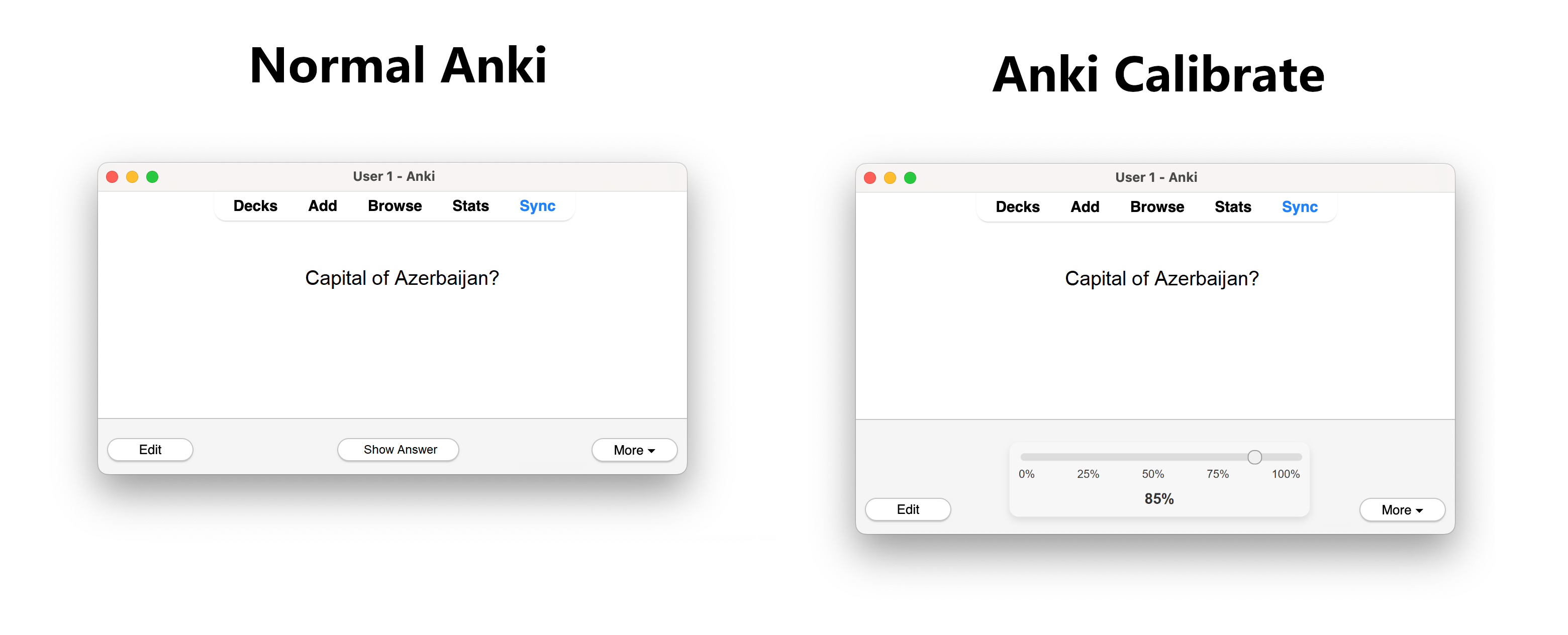
Usually with Anki, you get shown the front of your flashcard, click “Show Answer”, see the backside and then score yourself on whether your answer was correct. This add-on replaces the “Show Answer” button with a slider from 0% to 100% for you to predict how sure you are to have the right answer:
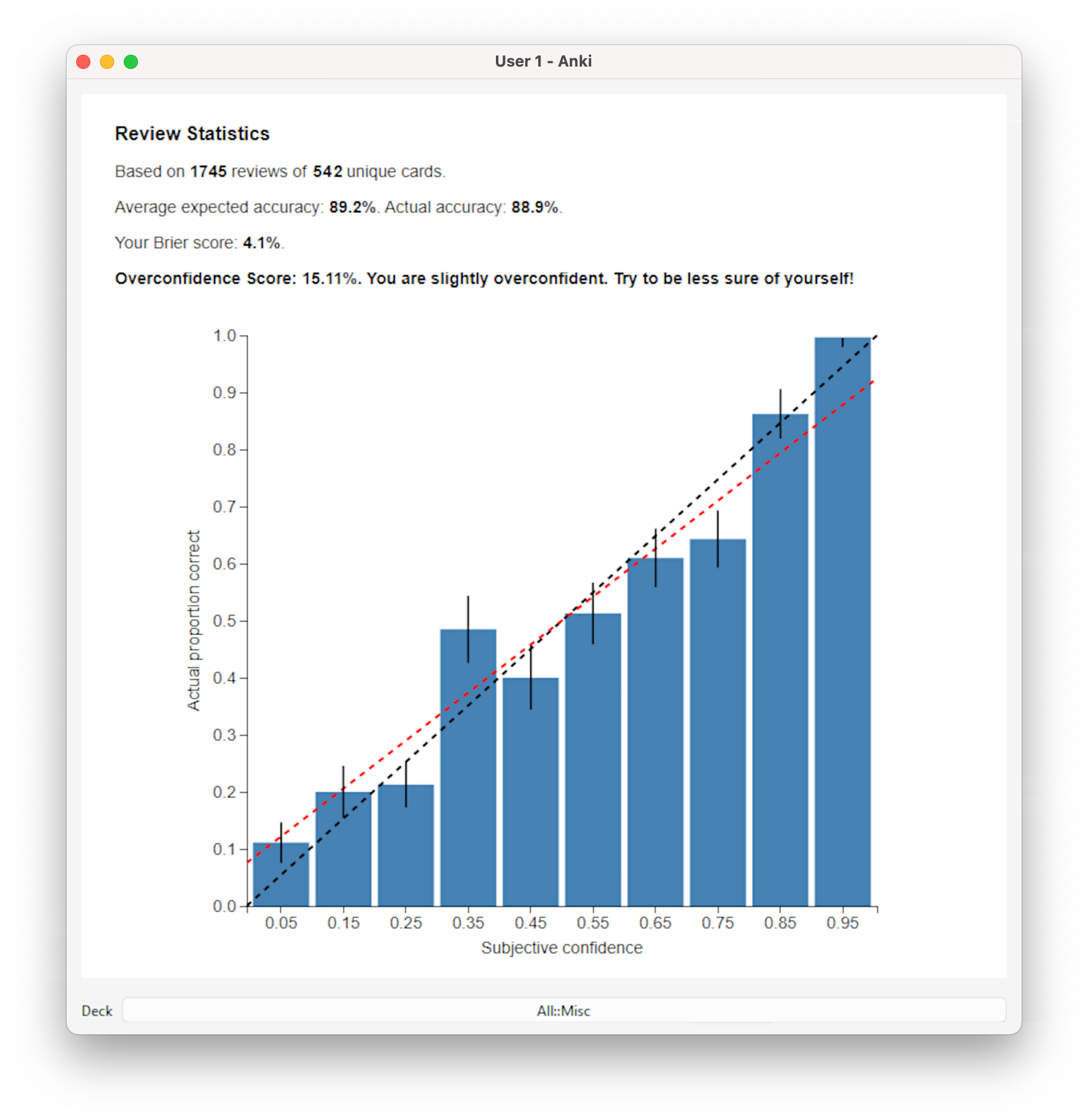
Then you score yourself as usual. After doing this a few hundred times, you can check if your sense of your own knowledge is accurate. Go to the tools menu and click “Calibration”:
The chart displays how often you were actually correct, based on the confidence interval you selected: [0-9%], [10-19%], and so on, up to [90-100%]. It also includes a 50% confidence interval for each range. If you are calibrated, this should roughly follow the ideal diagonal marked in black. In red is an actual linear best fit. The difference in the two slopes is your overconfidence score. If you are perfectly calibrated this should be roughly 0. If it is larger, then you are overconfident. If it is lower, you are underconfident. The Brier score is another measure of how good you are at estimating your accuracy. Less is better with 0% being the best.
Usage Tips
You can use this add-on to get a calibrated sense of accuracy on your personal flashcards. But you might also want to try downloading one of Anki’s many shared decks made by other users to challenge yourself to make accurate forecasts of other topics. Even if you have never studied different countries’ capitals you will probably know many of them, and kinda know even more. So no matter how much you know, try downloading a deck with capitals and see if your sense of your own geography knowledge is accurate.
Also, this is the kind of add-on you might only want to try out for a change rather than permanently. To get a decently looking calibration chart you really only need a few hundred probability estimates. Depending on your Anki usage this might only take a couple of days.
Limitations
This add-on only works for the desktop version of Anki, not for the web or smartphone app. The calibration data is only stored locally on your computer and not synced across devices. However, the Calibrate add-on does not interfere with Anki’s normal functioning, so you can still study on your phone normally while using the add-on on your PC. This add-on was developed and tested with Anki version 24.06.3 and might not work with other versions.
Thank yous
This add-on is heavily inspired by the Anki with Uncertainty add-on by Quantified Intuitions which prompts users to give confidence intervals on numerical questions. The calculation for the overconfidence score and the calibration plot is based on the awesome crowd prediction site Metaculus. You might also be interested in other tools to help calibrate yourself on different tasks.
The source code is available on GitHub: https://github.com/JulHeg/AnkiCalibrateAddon. Any experiences, feedback or suggestions would of course be very welcome!
Screenshots
Liên kết hỗ trợ
Reviews (4)
👍 2024-09-27
Came here from Manifold Markets. This tool is what got me interested in Anki.
👍 2024-08-25
Very interesting add-on.
👍 2024-08-17
Super gemacht, Julius!
👍 2024-08-16
Muito bom!
