Anki Image Search v2 Addon Basically scraps Yandex Images Search and places them on your card. This only works for Anki 2.1.54+
Forked from https://ankiweb.net/shared/info/885589449, https://github.com/haoxuany/anki_image_search
Installation
You can now install this addon by simply copying the add-on code 432495333 into Anki (under Tools → Add-ons → Get Add-ons). You no longer need to download anything manually!
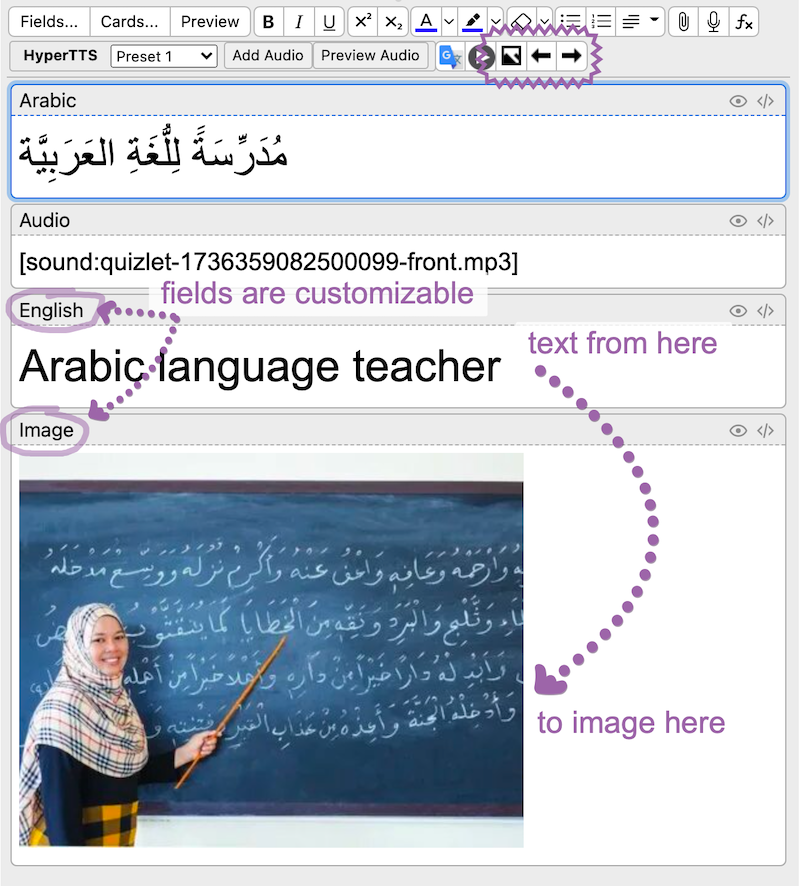
How On the card editor (from either the “Add” or “Browse” dialog), there are three buttons added on the upper right portion of the editor: Search Image, Previous Image and Next Image.
Basically just type in your search query in the field with name “English” in the card, and use those buttons. The image will be inserted/updated in the field “Image”.
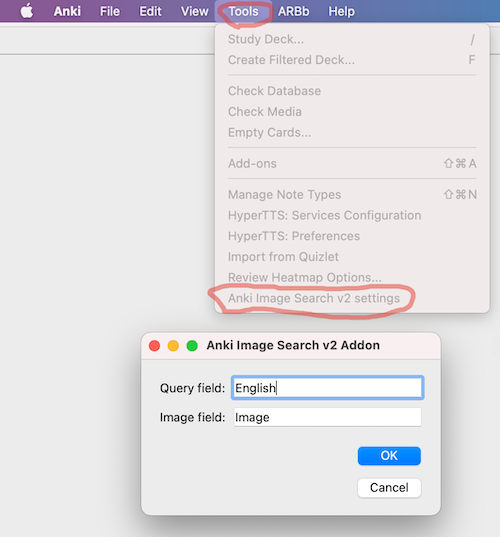
Also you can change field names in settings:
Yandex Image Search provide good results for English or Russian queries, other languages have not been tested.
You can track the project on github https://github.com/nerevar/anki_image_search_v2
Why The main reason I did that, is to make learning other languages more comfortable for me (and others) because original Image Search addon, which uses Google Images Search, looked abandoned and didn’t work. And, of course, because of 2 free evennings :)
Also, I agree with original author of addon: he writes, that he knows just how important it is to be able to point at pictures and recall words without going through a translation phase. He got annoyed doing it by hand at around 20 cards.
License
None of this would be possible without Yandex Images. Even though technically I’m scrapping Yandex Images unofficial API which I found on this github repo
The icons are provided by Open Iconic. Open Iconic is licensed under MIT.
This project is under GPLv2
Screenshots
Liên kết hỗ trợ
- Contact Author
- https://github.com/haoxuany/anki_image_search
- https://github.com/nerevar/anki_image_search_v2
- this github repo
- GPLv2
Reviews (15)
👍 2025-10-31
Fixed the addon https://ankiweb.net/shared/info/178037783
👍 2025-05-10
Check the comments below to see how to fix guys, it will work.
👍 2025-05-04
didnt work on newest version of anki on linux
👍 2025-01-02
Add-on doesn’t work. After installing and restarting, Anki shows a message that says it can’t access the settings. Forget also about the buttons in the card creation/edition window
Project seems dead too. Do not install.
👍 2024-10-20
Works fine, but better to make config.json configurable from the GUI, either way it will crush if the user has different fields names
👍 2024-08-04
dont work at all and crushing anki
👍 2024-07-23
Thanks!
👍 2024-07-22
It is a nice plugin! Thanks! The result of searching English vocabulary is better than Baidu in my test. Look forward to adding “Batch” function!
👍 2023-12-21
Nicely done.
👍 2023-12-19
How to Fix: “Error - An error occurred. Please start Anki while holding down the shift key…)”
Go to Tools>Add-ons>Anki Image Search v2 Addon (Double-Click)
You will see the configure “Anki Image Search v2 Addon”: { “image_field”: “Image”, “query_field”: “English” }
The Query_field is the field where you type text and an image will be generated in Image_field.
Now, custom the name of query_field and Image_field to suitable your card type. Ex: For my card type, I have 2 fields named
👍 2023-09-19
Hey just for some others who were having issues - me too - but I got it to work.
(When first installed, I was getting the same: “Error - An error occurred. Please start Anki while holding down the shift key…”)
You need to go into the app settings and configure the query field (text the app wil search for) and then the image field where you want the image to go.
Type them as they appear on your card, probably case sensitive — so for me it was - “Front” (query field) and then Image (image f
👍 2023-07-21
Greatttt!!!
👍 2022-10-16
Great!
👍 2022-09-18
Unfortunately, it does not work for users from Ukraine.
Anki Image Search v2 Addon
Request error
OK
👍 2022-08-24
i get this
Error
An error occurred. Please start Anki while holding down the shift key, which will temporarily disable the add-ons you have installed.
If the issue only occurs when add-ons are enabled, please use the Tools > Add-ons menu item to disable some add-ons and restart Anki, repeating until you discover the add-on that is causing the problem.
When you’ve discovered the add-on that is causing the problem, please report the issue to the add-on author.
Debug info:
Anki 2.1.54 (b6a7
