>Anki 2.1 addon to generate OCR text from images inside of Anki notes/cards.
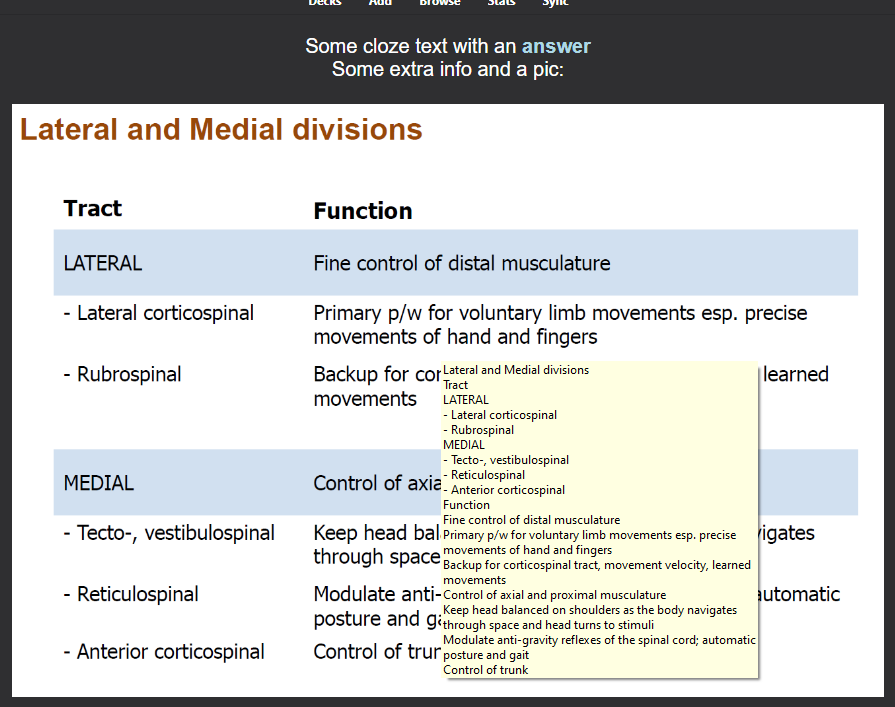
Browser -> select the note(s) -> toolbar ->Cards -> AnkiOCR->Run AnkiOCR
This add-on is a fixed version (fork) of “AnkiOCR” for Anki23+. How to use it please refer to the original add-on. (If the original add-on has been updated to Anki 23.10, this fork is not required.)
How to use Original : AnkiOCR / Author : Chris Culhane
(This image is re-uploaded from the original add-on image.)<>br
Related Add-ons :
📸PasteOCR - Paste image as text (Fixed for Anki24 by Shige)
💖Please Support Shige’s Anki add-ons development!
Hi thank you for using this add-on I’m Shigeඞ!
[ 🛠️Fix add-ons ] So far I fixed and customized 80+ broken add-ons for free and developed over 30 add-ons as a hobby (all add-ons). If you have requests to fix broken add-ons feel free to contact me. Fix broken addons (Free) [ 💖Donation ] I’m looking for supporters for my add-ons development because I like Anki!👍️ If you support my volunteer development you will get 14 add-ons for patrons only and 15 game themes included in AnkiArcade ($5/month).
Get Patrons only addons | Patrons Q and A | Contact
[ Special Thanks ] So far I received donations from 561 patrons and without their support I never could develop this, thank you very much!🙏
Patrons: Arthur Bookstein Haruka Luis Alberto, Letona Quispe 07951350313540 Lily Daniel Kohl-Fink Tim NamelessGO Kyle Mondlak ElAnki Abhi S Matthew Hartford Jonathan Contreras findus161 K Peasant of Anki Juan Salgado Ernest Chan Yaeerrrrrr Elisabeth Barber Jesse Asiedu GP O’Byrne David C KM Christopher Lam Kolorophyll Jake Stucki Kaitlyn Bowler Isabel Guan Steven Banner Heidi Leonora Lomoki Akporyoe ellie Tobias Klös Xiuxuan Wang Ujwal Chadha gus forester iuventius Patrick ellis tarek Iggi qiting zeng Carly Burdorf Austin Regal Muneeb Khan Aydin Herik Mia Hoang Hung Sameer Al Matheus Chagas Bryn Price Orlando Frey pie_is_good Svel1989 Take Root Vivian Cao Keeler Kime Kurt Grabow Zarina Balde Pansanity Gabriel Farrugia Lis Y. Fahim Shaik Augusto Stein Ashok Rajpurohit mootcourt NoirHassassin alpha male, shredded af Morgan Torres Dennis Obis Anh-Tai Nguyen Tae Lee Joseph Howell Gabriel Vinicio Guedes sab hoque Terence Bartenbach R Rebecca only Ythalo Vlogs Ketan Pal Aurora Dzurko Tyler Schulte Kmyungc Mac Will S. Meeyah Davis Eric Allen Devon Williams alex han Douglas Beeman Andrew Yick Robert Remedios Marley Easterbrook Temi Jide Ansel Ng Simeon Azfar Hussain Haley Schwarz Woody kenken Jeanna …full list
[ 📥 How do I install this add-on? ] Copy and paste the add-on code ( 546383173 ) into Anki and you can install it. ( Menu -> Tools -> Add-ons -> Get Add-ons -> Code [ add-on code ] ) When I develop bug fixes, create new features, or compatibility for New Anki, I will notify you and you can install it. Add-ons will be broken when the official Anki gets a major update, so if you like this add-on please support my volunteer development by rating, sharing, and donating. Thank you!
Click here and please Rate this add-on, Thank you! :-)
Screenshots




Liên kết hỗ trợ
Reviews (20)
👍 2025-10-30
thanks for updating the addon, it works but is slow Comment from author Hi thanks for the feedback! Optimizing the code and processing may speed up the process, I’ll look into it.
👍 2025-10-10
I use it for typed image occlusion cards only and it works flawlessly! Scans thousands of cards in a couple minutes and makes my life much easier. Comment from author thanks for the feedback!👍️
👍 2025-04-18
hi, thanks for your beautiful add on, does it support Persian language? as far as checked unfortunately it doesn’t Comment from author AnkiOCR allows you to add new languages in the settings, if you download fas.traineddata from https://github.com/tesseract-ocr/tessdata it will probably work. How to use this add-on please read the original add-on instructions: https://github.com/cfculhane/AnkiOCR?tab=readme-ov-file#ankiocr
👍 2025-03-10
Great add on no doubt about that. Mac support is much needed soon! Thanks a lot! Comment from author Thanks for the feedback! I’ll look into it.
👍 2025-02-26
amazing shige, thank you so much Comment from author thank you! :D
👍 2025-02-18
Amazing add on, makes studying 100x more efficient being able to search up IOs.
HOWEVER, there is a bug where after I enter “browse” and use arrow keys to move between cards, the notes update.
Then, if I try to undo changes or answers to my cards, then every single arrow key input I put in (eg. up arrow 10x), will count as an edit and I will need to press undo 10x until I can undo.
Not sure if this is an OCR problem or if this is an anki problem, as I have tried removing the add-on and the
👍 2025-02-18
Great add on, however, when I go into browse and use the arrow keys to navigate between cards this registers as me updating the cards. Thus when I try to undo after exiting browse I have to press it multiple times to actually undo the card I was on… Comment from author Hi thanks for reporting the problem, I’ll look into it.
👍 2024-12-24
works great on PC! not on my mac though. Comment from author Thanks for the feedback! The Mac is still in the process of being repaired, please wait.
👍 2024-11-24
top Comment from author thanks! :-)
👍 2024-10-14
sorry im getting the error below every time I try to run it on the whole deck
Error encountered during processing. Debug info: Anki Version: 2.1.66 , AnkiOCR Version: 0.7.1 Platform: Windows , Python Version: 3.9.15 (main, Nov 6 2022, 02:45:15) [MSC v.1929 64 bit (AMD64)]Traceback (most recent call last): File “C:\Users\emeka\AppData\Roaming\Anki2\addons21\546383173\gui.py”, line 59, in on_run_ocr ocr.run_ocr_on_notes(note_ids=selected_nids) File “C:\Users\emeka\AppData\Roaming\Anki2\
👍 2024-09-13
Error encountered during processing. Debug info: Anki Version: 24.04.1 , AnkiOCR Version: 0.7.1 Platform: Windows , Python Version: 3.9.18 (main, Jan 8 2024, 06:22:44) [MSC v.1929 64 bit (AMD64)]Traceback (most recent call last): File “C:\Users\wyx\AppData\Roaming\Anki2\addons21\546383173\gui.py”, line 59, in on_run_ocr ocr.run_ocr_on_notes(note_ids=selected_nids) File “C:\Users\wyx\AppData\Roaming\Anki2\addons21\546383173\ocr.py”, line 310, in run_ocr_on_notes notes_query = self.r
👍 2024-08-27
Thank you! your fixed addons are GOLD keep the great work man! Don’t stop please Comment from author Thank you very much! :-)
👍 2024-07-23
works as expected; personally a game changer for me
Comment from author I think so too! :-) this add-on is useful so I would like to enhance it later.
👍 2024-06-10
I can’t believe this exists! I’m having an issue with it though… When I tried to use it I got an error and the (abbreviated) debugging info said: For note id 1713122487243, ignoring unsupported image: _CIR_EM_case1_img1.webp For note id 1713122487243, ignoring unsupported image: _CIR_EM_case1_img2.webp For note id 1713122487243, ignoring unsupported image: _CIR_EM_case1_img3.webp For note id 1713122487243, ignoring unsupported image: _CIR_EM_case1_img4.webp MarkupResemblesLocatorWarning: The
👍 2024-06-05
The text_output_location config option to new_field is not working. Anki closes by itself.
Comment from author
Thanks for the error report, I’ll look into it.
👍 2024-04-16
Works amazing!!!
👍 2024-04-01
its good but i can’t take the output as a text Comment from author Hi, thanks for the feedback. There is another add-on that generates text from images with OCR, but that is also broken (This OCR-Addon is still in the process of being repaired, so I did not repair the other OCR-Addon). I will try to fix it later. 🔵Edit: I fixed it, check it out👍️ 📸PasteOCR - Paste image as text (Fixed for Anki24 by Shige) https://ankiweb.net/shared/info/1808435406
👍 2024-03-09
It only adds to the tool tip and the OCR capability is not that great. Comment from author Thank you for the feedback. I think to use this Add-on in a specific language, you need to install the language file. (Language files are intentionally excluded because the file sizes are quite large.) Please refer to the original Add-on for detailed instructions. 🔵Edit : Perhaps the cause of this problem is the background color of the text. On a white background I could OCR it fine, but if the background
👍 2024-02-22
So helpful if you create flashcards with screenshots.
👍 2024-02-04
God bless you. Makes the AnkiOCR work on the current version.
