GOAL: Help you customize your Anki Remote in seconds within Anki.
IMPORTANT:
With Anki Remote 2.0, you do NOT need this add-on to use the Anki Remote. You can just connect to Bluetooth and get started. This add-on is compatible only with Anki Remote 2.0 (and future generations). To get Anki Remote 2.0, go to http://ankiremote.com/.
INSTRUCTIONS:
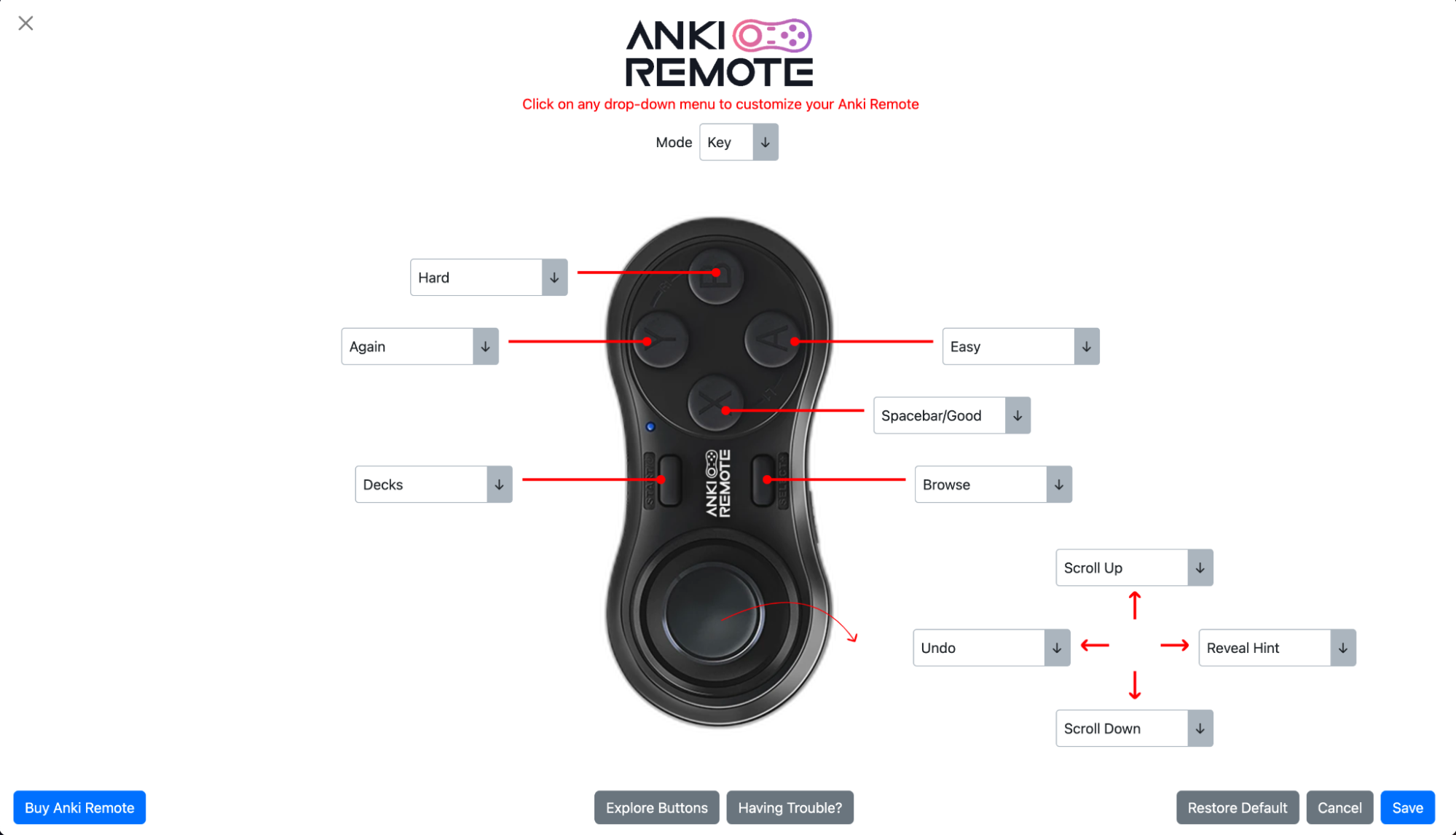
Get the add-on for your computer (follow the Download instructions below) Click Anki Remote in the header menu Check the side of your Anki Remote to see if you are in Key or Game mode Choose your mode at the top of the page Click on any drop-down menu and pick your desired function Hit the blue “Save” button and get started (no need to restart Anki!)
CUSTOMIZATIONS AVAILABLE
To learn about the different button options and our recommendations, click here to explore the add-on.
REQUEST NEW FUNCTION OR BUTTON
Email us at info@ankiremote.com or fill out the Contact Us form and we will try to get your suggestion integrated.
HELP AND SUPPORT
We want you to have the best Anki experience ever. Email us at info@ankiremote.com or fill out the Contact Us form. We love hearing your constructive feedback, and a compliment would make our day.
CREDITS AND LICENSE
Copyright © Anki Remote 2023
Special thank you to Abdo for leading this project.
MORE RESOURCES
Check out ankiremote.com to check out all of our guides, resources, and information.
SMALL REQUEST
If you like the Customize Anki Remote add-on, please give it a thumbs up and share it with your friends, so that more people can enjoy it!
Screenshots

Reviews (22)
👍 2025-11-11
a problem
👍 2025-11-05
please be specific how to do the whole process
👍 2025-10-17
It works. I had a glitch about commands not working as expected but emailed the team and it was resolved.
👍 2025-09-08
Crashes anki everytime I try to go to the add on page
👍 2025-08-30
the buttons do not do what i map them to do using the addon. i have just been using the remote without the addon but it’s unfortunate because i miss the undo that the addon gives.
👍 2025-08-01
Love that it’s so customizable! Only suggestion is that I wish that you could add a “flag” button. I “mark” cards to create a filtered deck of cards I’m confused by or want to take more notes on. It allows me to go through cards faster and not spend time pausing on the confusing cards. I’ll come back to them later by going to the marked cards deck. But I like to flag cards with useful mnemonics or images so that I can look at them later. (I know i can use tags, but flags are easier for me becaus
👍 2025-02-09
so glitchy and i have to restart anki every time i open the add-on
👍 2025-02-07
I cant figure out where to paste the code, there is no “tools” button.
👍 2024-09-25
phenomenal.
Cloze → one-by-one key binding option is very smart.
this app has a picture of the ANKI remote /w drop down menus to simply choose your desired key-bindings.
extremely easy to use and effective.
👍 2024-08-28
easy to use, love how you can customize it!
👍 2024-03-14
Solid. Tip for those confused about where to input the code: Tools -> Add-Ons -> Get Add-Ons… -> enter the code -> close Anki and open it again. Enjoy!
👍 2024-03-09
As you get used to anki, you might want to change your button layout, even if you want to experiment using different card types. This add-on saves you a bunch of time tweaking and making some adjustments. And it’s not complicated to try and adjust what button you want to do what, on the fly, and change it back if it does not work. That is the benefit of this controller with this add-on. If you are not very computer savvy, or do not have time to mess with softwares like Karabeaner that make you w
👍 2024-02-24
Add-on software works as shown and you can customize it much more easily than with karabiner.
👍 2023-11-03
I can’t figure out where I’m supposed to paste it
👍 2023-08-29
works well
👍 2023-08-27
Work’s great! I recommend
👍 2023-08-26
is good
👍 2023-08-26
I suck at tech, but this addon made it easy for me to change up my anki remote
👍 2023-08-26
Wow this is very nice! Great customization tool!
👍 2023-08-26
Easy to use and no hassle set up
👍 2023-08-26
Works great - thanks.
👍 2023-08-26
Got selected to try this out before the launch. In the past, I have tried Karabiner and other random stuff I found on the internet. This was infinitely easier. A couple of things stand out to me:
- Karabiner seemed to mess with my computer settings. So I like not having that problem.
- I feel safer just using an add-on. I hate downloading random software because I am afraid of viruses and the amount of permissions they need from the computer.
- I am super visual so it helped to know exactly
