==================================================================================================
==================================================================================================
Please visit our website to see the most up-to-date information:
www.ankiwithfriends.com (previously Battle Anki)
GAMEPLAY
Anki with Friends is a network-based TCP client-server multiplayer gamification of Anki.
The goal of the game is to complete your deck as efficiently as possible, and whether or not you finish first, to learn the most information.
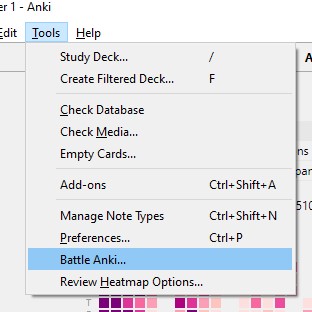
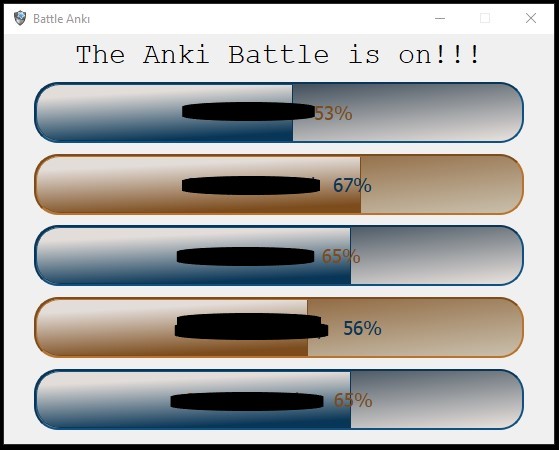
Players log in by opening the Anki application with Battle Anki enabled. The Battle Anki window is launched by navigating to Tools —> Battle Anki…
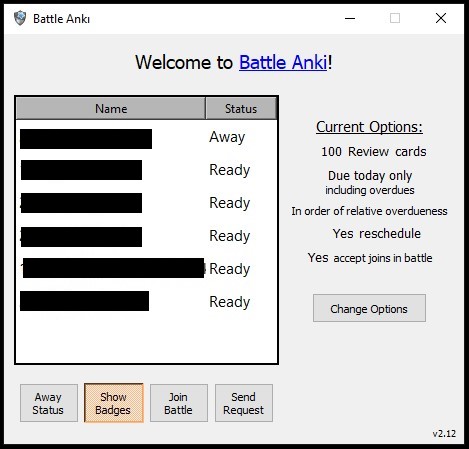
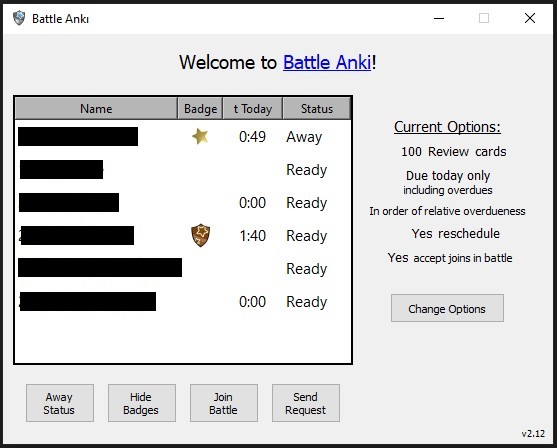
Your name displayed in the Battle Anki window is the profile name you use for your Anki collection (to change it, see SETUP below). All other users connected to your server are displayed.
Clicking the Show Badges (or Hide Badges) pushbutton toggles the view of the 2nd and 3rd columns (badge and time today) as well as submission of this data to the server (i.e. when the badges and time are not visible to you, your badge and time is not visible to other players).
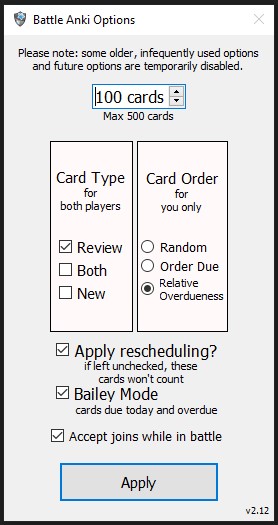
Clicking the Change Options pushbutton opens the options dialog window, where you can select several options:
Players can send real-time requests to “battle” other players who are connected to the server, which, if accepted creates a custom filtered deck “Battle Deck n” (where n is 1 or any incremental integer) for each player using their individual card and deck collections. Battle Anki then tracks each player’s progress throughout the session, providing a sense of urgency for your 20,000 cards due today as you see your opponent’s progress increase.
There is also the ability to join another battle in progress, which simply places you into a multiplayer mode. You can also send requests to multiple players at once - if one of them accepts, the battle begins.
SETUP
The Battle Anki server is now public! After installing the add-on, you do not need to configure the server, this is done automatically. You will, however, need to configure the deck that you would like Battle Anki to use. Go to
Tools —> Addons —> (select Battle Anki) —> click Config
Then enter the name of the deck that you would like Battle Anki to use in the “use_deck” parameter. Then restart Anki.
In order to change your profile name, navigate to
File —> Switch Profile —> (select name) —> click Rename —> click OK —> (change the name) —> (ensure new name is selected) —> click Open
RESCHEDULING
The Anki 2.1 Scheduler is recommended but not required when using this add-on, as the add-on utilizes the Filtered Deck function. There are concerns when using the old scheduler with Filtered Decks, described in the Anki documentation:
Filtered Decks —> Home Decks
Studying —> Due Counts
The 2.1 Scheduler
To upgrade to the v2.1 scheduler: This will reset any cards in learning, clear any filtered decks, and change the scheduler version. It will also require a full upload to the database on next sync… if you have reviews or other changes waiting on another device that haven’t been synced yet, they will be lost.
Go to Tools —> Preferences -> Scheduling Then check the “Anki 2.1 scheduler (beta)” checkbox, then click close
CHANGELOG
Full change log available here
11/26/20 v1.28 - Fixed problem with opponent’s progress bar resetting to 0% after reaching 100%.
12/21/20 v1.32 - Holiday Edition and Anki Marathon Mode (badges and timing).
12/26/20 v1.33 - Marathon Mode now toggleable. Multiplayer up to 6 players in one battle.
12/29/20 v1.35 - Added ability to join a battle in progress. Updated some aesthetics.
12/31/20 v2.08 - New Year’s edition.
1/5/21 v2.10 - Compatible with Anki version 2.1.38. Changes to the UI.
1/6/21 v2.11 - Fixed error at end of battle.
1/10/21 v2.22 - Fixed error with deck names consisting of two words. Spinbox for number of cards of Battle Deck now in Battle Window as well as Options Dialog. Minor backend improvements.
2/1/21 v2.25 - Fixed startup error. Fixed error when joining. Fixed Error with Options Dialog. “Window close” button now accessible (and keeps changes).
4/11/21 v2.26 - Server now public. Server info embedded within add-on. Just download and play!
…
1/6/22 v2.80 - Fixed errors / freezing when opening and closing. Added “Solo Battle” feature.
PLEASE NOTE This add-on is free open-source software. The source code for both the server and client are available here: Server source code Client (Anki add-on) source code
Screenshots

Liên kết hỗ trợ
- Contact Author
- Full change log available here
- Server source code
- Client (Anki add-on) source code
- Contact Author
Reviews (8)
👍 2025-12-21
not working
👍 2024-07-29
Unfortunately does only work with versions using PyQt5
👍 2024-01-28
Does not work anymore
👍 2022-02-07
Thank you very much for the updates. It is very interesting. I will recommend the addon to my contacts, keep it up!
👍 2021-09-28
Improved my efficiency and focus
👍 2021-01-29
Genius! This app has tremendously helped me study flashcards and improve my retention through a positive, fun, and social manner. Thank you!
👍 2021-01-07
This is truly a revolutionary way to do Anki, and I have seen a 233% increase in efficiency. It helps focus, while fostering friendly competition. Nothing like it - the first of its kind, and truly a joy for those who use Anki but are on a time-sensitive schedule.
👍 2020-11-26
This is awesome! Mind blowing!! Thank you
