backfill-anki-yomitan
Anki add-on to backfill fields including media and audio using Yomitan’s API
Installation Install the Yomitan API like specified in the README. Install the add-on from AnkiWeb Restart Anki Usage
Create a Backup of your profile/deck before doing any of these steps
Make sure your Browser is running and the API is working.
Run on deck
Go to Tools -> Backfill from Yomitan in the top bar. Select your deck in the Deck dropdown
Run on select cards
Select Cards you want to backfill in Browse Go to Edit -> Backfill from Yomitan in the top bar of the card browser.
General Steps
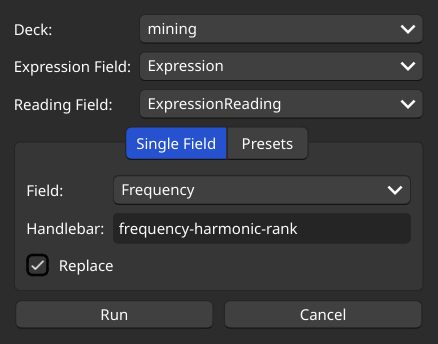
For Expression Field choose the expression field (e.g. Expression in Lapis) of your note type, this is the field that will be queried into Yomitan. Optionally choose a Reading Field (e.g. ExpressionReading in Lapis) to differentiate expressions using their reading. If left blank, the add-on uses the first result Yomitan returns. For Field choose the field to backfilled. In Handlebar type in the Yomitan handlebar, from which you wish to pull data from (e.g. frequency-harmonic-rank). You can concatenate multiple handlebars using a , (e.g. single-glossary-jmdict-2025-08-08,single-glossary-デジタル大辞泉) Optionally tick Replace if you wish to replace the current content of the field in every card. Press Run.
You can cancel backfilling by pressing on the close button of the processing popup. Changes can be undone with Edit -> Undo or with CTRL + Z.
Presets
You can backfill multiple fields using a .json preset. Presets are stored in the user_files folder in the addon directory. An example for Lapis is included and can be found here.
Format:
{ “targets”: { “FieldName”: { “handlebar”: “{handlebar}”, “replace”: true }, “FieldName2”: { “handlebar”: “{handlebar2},{handlebar3}”, “replace”: false }, … } }
handlebar and replace behave identically to above.
Make sure every handlebar in the preset is a valid handlebar in Yomitan. Otherwise backfilling will fail, because all handlebars are requested in a single API call. For the included Lapis preset, this means adjusting the MainDefinition handlebar to the one matching your preferred dictionary.
Config
Tools -> Add-ons -> backfill-anki-yomitan -> Config
max_entries
Default: 4
Amount of entries to request when Reading Field is specified.
reading_handlebar
Default: reading
Handlebar used to compare against Reading Field.
yomitan_api_ip
Default: 127.0.0.1
yomitan_api_port
Default: 19633
yomitan_api_timeout
Default: 10
Issues
If you’re backfilling audio, please be aware that retrieving audio, depending on the audio sources configured in Yomitan, can be quite slow. You can reduce the time by decreasing max_entries in the config.
If you encounter any issues, please report them on GitHub or in the add-on’s TMW #resources-sharing thread. Please attach the backfill-log.log file, which can be found in the add-on’s user_files directory.
Screenshot
Screenshots
Liên kết hỗ trợ
Reviews (14)
👍 2026-01-13
It works well. Thanks for creating this.
👍 2026-01-05
super helpful for updating cards made from other sources, or when you want to make your older cards have info you later realize is important. dev is also responsive and helpful!!
👍 2025-12-31
tysm for making this add-on. Works very great. When I started anki, my japanese card only have kanji and glossary as a field. Gradually I add more fields like audio and pitch accent. There are so many card that I add before, and this add-on helps to update my old cards
👍 2025-12-20
I get error when I try to use this in preset “glossary”: { “handlebar”: “{single-glossary-kty-ja-hi-gloss-brief},{single-glossary-new斎藤和英大辞典-brief},{single-glossary-jmdict-2025-10-18-brief},{single-glossary-jmnedict-2025-10-18-brief},{single-glossary-jlpt文法解説まとめ-brief},{single-glossary-デジタル大辞泉-brief},{single-glossary-pixiv-light-2025-10-18-brief},{single-glossary-現代国語例解辞典-第五版-brief},{single-glossary-日本語文法辞典全集-brief},{single-glossary-tmw-club-v2-brief},{single-glossary-明鏡国語辞典-
👍 2025-12-18
Amazing! Thank you.
👍 2025-12-15
Amazing add on. Used it to switch all of my old JP -> EN cards to JP -> JP and it worked like a charm!
👍 2025-11-25
Please take the upvote. Thanks for creating this add-on.
👍 2025-11-23
Omg you made my life so much greater, you dont understand how many hours i lost in my life trying to do exactly this… THANK YOU!!!
👍 2025-11-19
I am lost for words. This is the best plugin ever. Thank you so much for taking the time to code this and for sharing it with the community. Goated.
👍 2025-10-01
VERY useful addon, update with it 1k notes (MainDifinition, glossary, reading and more). Wasted some time because i forgot to add “single-glossary-” before glossary name
👍 2025-08-02
It’s really good and allowed me to batch replace a lot of fields in my cards. It’s just bit of a pitty it only supports reading instead of furigana-plain to choose the correct word as I never used reading in my cards, so I think this would be a great addition. Furthermore, it would be cool if one could backfill multiple fields at once, this would save me some time as I could set it all up and just run it once for all cards.
👍 2025-07-29
We’ve entered a new era.
👍 2025-07-27
Thanks for implementing this, it’s a real game changer.
👍 2025-07-18
Unironically best plugin
