Supported Anki versions: 2.1.36 - 2.1.50+
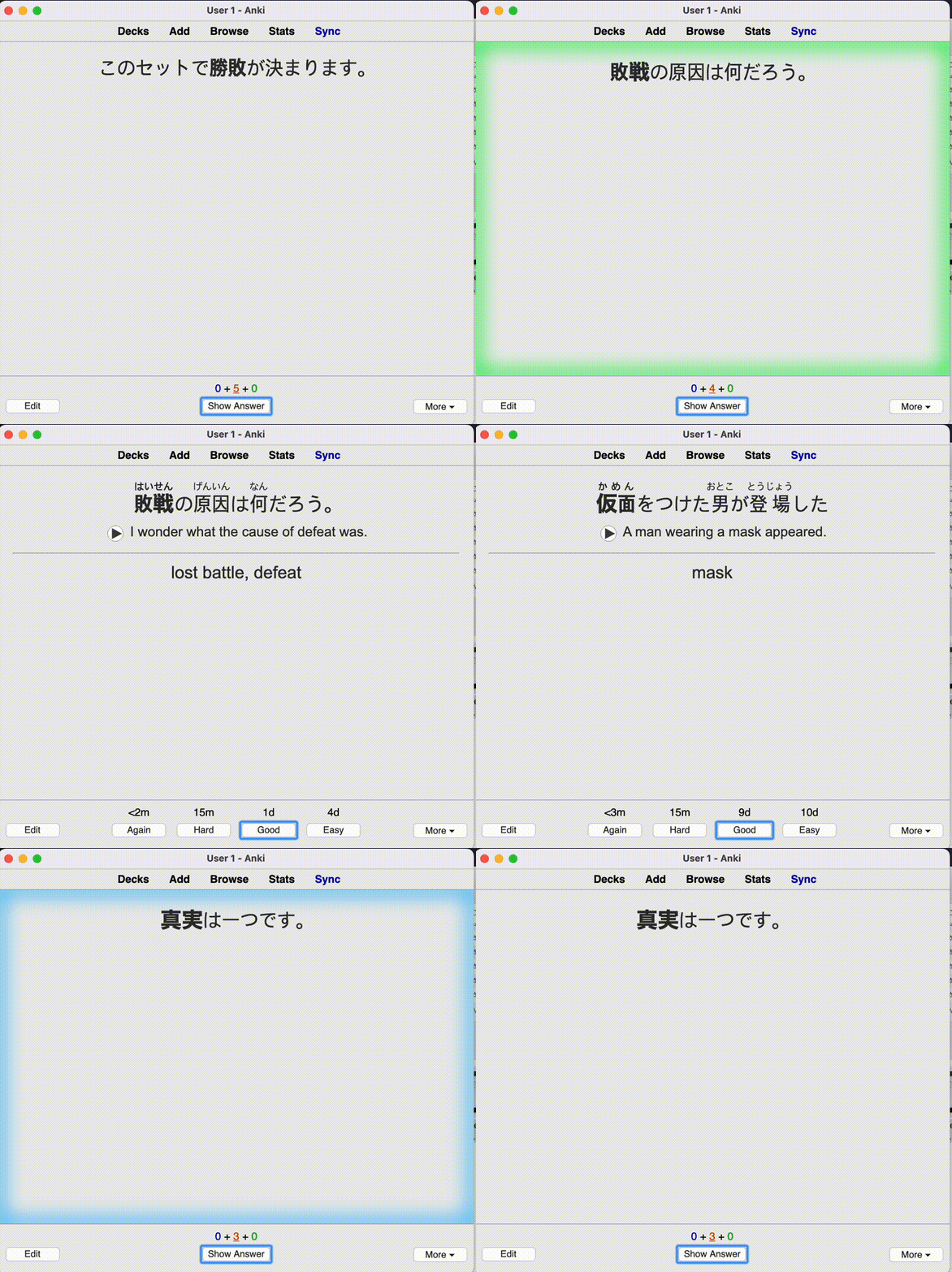
This add-on will give you visual and auditory feedback after reviewing and/or finishing a deck.
How to customize themes You can modify existing themes, or create a new theme. Open the add-on config and click ‘Open Theme Folder’ to find the theme files.
Audiovisual feedback is triggered in 4 situations: (1) when the review starts, (2) when you click an answer and do a review, (3) when you go on the congrats screen (When the review is completed), (4) When you repeatedly fails cards.
The add-on chooses a file to play/display from folder “start” for (1), and “congrats” for (3). For (2), a file is chosen from “again|hard|good|easy” based on which answer button you pressed.
You can change which images/sounds are played by adding, modifying, or deleting the files in the theme directory.
If you messed up the theme somehow, you can find the original theme files in addon_folder/default/themes/.
Visual Feedback Images in images/ isn’t actually displayed by default. The visual feedback is controlled by the 4 files web/(reviewer|congrats).(js|css), and many themes just choose to display images in images/ directory.
On (1), window.avfReviewStart() is called. On (2), window.avfAnswer(ease) is called where ease is the string “again”|“hard”|“good”|“easy”. On (4), window.avfIntermission() is called. You can control the visual effect by declaring those functions in the web/reviewer.js.
Creating a new theme You can create a new theme by copy-pasting an existing theme directory in addon_folder/user_files/themes/ directory. (Not in the addon_folder/default/themes/ directory)
Please consider checking out our:
YouTube Channel- How to use Anki for beginners and advanced users.
Instagram/Facebook: @Ankingmed
www.TheAnKing.com- Recommended add-ons, tutorials and more including how to download 40+ add-ons in < 5min
Patreon/VIP- Support our work and get individualized Anki help!
Screenshots





Liên kết hỗ trợ
Reviews (27)
👍 2025-11-28
I like this alot
👍 2025-07-29
Great add-on. Keeps me focused.
👍 2025-03-18
I can’t imagine doing my cards without this. Thank you!
👍 2025-03-06
This gives me a little bit of dopamine while doing boring review sessions, which is exactly what I want.
👍 2025-02-19
Cool, unfortunately the audio feedback delays the sound of my language cards with audio on the front. It would be great if it’s somehow possible to set different audiovisual feedback settings for different decks.
👍 2025-02-08
one of my new favorites. i made a custom theme mixing and matching elements from other themes, and it makes using anki a lot less dull
👍 2025-02-02
I like it, i found this fun. :)
👍 2025-01-27
So good but congrats is not working (I’ll update my comment after getting fixed)
Update: I followed the instructions in the upper comment (the main.py file is located at Anki2/addons21/231569866/main.py), and it’s fixed! Thank you! Comment from author before post was edited We don’t get any notifications here so please send details on github so that we can look into it and fix it.
👍 2025-01-23
Perfect, thank you! I modified the audio to use the hitmarker from 1776869150 and it’s great to have visual and audio feedback like this.
👍 2025-01-12
nice but can you add sound controller the sound is little bit high and also the speed of the flash is fast i want it little bit slower thanks
👍 2024-12-25
on 2024-12-22 If the “congrats” sound effect is not working for you, here is how I fixed it:
Navigate to the addon’s main.py file located at Anki2/addons21/231569866/main.py
Change line 237 in main.py as follows: if name == “congrats.html”: -> if name == “congrats”:
👍 2024-11-13
The “Congrats” is not working
👍 2024-10-26
Great addon! Really helps beating the monotony of reviewing for hours if you add some fun sounds, like the Duolingo answer sound effects or whatever
👍 2024-10-07
LOVE this addon!! Works perfectly. I even customized it to have modern warfare kill sounds that make studying way more fun. If you’d like to check out my setup, here is the link to download the sound files:
https://files.catbox.moe/rx9bsb.zip
👍 2024-08-23
awesome. thanks.
👍 2024-07-16
this is so cool! I love it
👍 2024-06-19
Very fun add on! Love the feedback of the color :)
👍 2024-05-13
Anki 2.1.66 (70506aeb) Python 3.9.15 Qt 6.5.0 PyQt 6.5.0 Platform: Linux-6.6.30-2-MANJARO-x86_64-with-glibc2.39 Flags: frz=True ao=True sv=3 Add-ons, last update check: 2024-05-13 18:46:50 Add-ons possibly involved: Audiovisual Feedback
Caught exception: Traceback (most recent call last): File “aqt.mpv”, line 373, in _send_request File “aqt.mpv”, line 354, in _get_response aqt.mpv.MPVCommandError: invalid parameter
During handling of the above exception, another exception occurred:
Trac
👍 2024-04-17
Sound works and its great but im not getting a green or red outline visual feedback when i answer…
👍 2024-04-11
I love it!
👍 2024-04-01
Just what I was looking for!
Had an issue with the audios lagging behind the cards when I was answering rapidly, but I changed the play_without_interrupt method in the audio.py file to fix it. You just have to add AVPlayer.stop_and_clear_queue(self) before the audio effect is played and it’ll clear any audio lagging behind when you’re playing that new answer sound effect.
(New method with edit: def play_without_interrupt(self, file: Path) -> None: """Audio played with this functi
👍 2024-03-09
Good addon, no issues and does exactly what it says it does
👍 2024-01-17
great gamification Add on for extra motivation
👍 2023-12-31
Thank you very much AnKing team !
👍 2023-12-21
Pretty awesome! That’s what I was looking for! Thank you so much for this addon!
👍 2023-12-14
Very cool!! I’m using it with Zelda sounds. For example, when I finish a deck I use “OOT_Fanfare_SmallItem” (https://noproblo.dayjo.org/ZeldaSounds). Thank you for your great contribution!! Comment from author such a cool idea!
👍 2023-09-23
Why does my Anki not show these lights during the review?
