An Anki add-on to batch download pictures from Google Images.
If you’re in China and the add-on doesn’t work for you with the error message, “Connection to www.google.com timed out”, try Baidu Images - https://ankiweb.net/shared/info/1024335436
👷♂️ My Freelance Services – Anki Decks & Bilingual Audiobooks
For more information, please see my personal page at https://kelciour.notion.site/Home-14b745ea2520800cbd92ed43718202b6
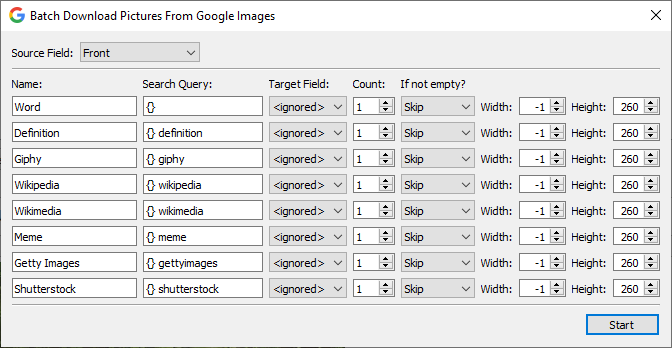
Open the card browser - select a few cards - menu Edit - Add Google Images. Select “Source Field”. Select “Target Field” instead of “<ignored>”. Select how many pictures to download. (optional) Set the maximum width or height. (optional) Click “Start”.
If the source field contains cloze deletions, only clozes will be used to search for pictures.
By default, multiple pictures will be separated by a space character (” ”). It can be changed, for example, to a newline character (“<br>”) by editing the “Delimiter” option in the config window (Tools - Add-ons - … - Config).
For Anki 2.1.15
The add-on depends on mpv video player to be able to resize pictures. By default, the pictures will be downsized by height to 260 px if mpv video player can be found. On macOS it can be installed via brew.sh and on Linux it should be already installed with Anki 2.1. On Windows download mpv video player from http://mpv.io and update the PATH environment variable.
For Anki 2.1.20+
The latest version contains a built-in image resizer, i.e. there’s no need to additionally install mpv video player to be able to resize pictures, but mpv is still required to be able to resize gifs.
— N. <kelciour@gmail.com>
Screenshots
Liên kết hỗ trợ
Reviews (29)
👍 2026-03-01
Worked like a charm. Thank you so much for this thoughtful addon!
👍 2026-01-09
Great tool, thank you!
👍 2025-11-16
Perfect add-on- It will save a lot of time when you want to learn children a foreign language by adding the picture to the word (dual coding)in their flashcard
👍 2025-10-04
It is working well and saves me a lot of time. Thank you!
👍 2025-09-16
very good
👍 2025-07-28
Amazing, saves so much time.
👍 2025-07-28
Added no image to any cards
👍 2025-06-05
It works, thank you very much.
👍 2025-05-29
good, works well. easy to use
👍 2025-04-21
Still working 2025-04-21. Super helpful!
👍 2025-04-09
thanks for this
👍 2025-04-01
Thank you for this amazing addon. It’s incredibly helpful. But I got this error this morning and needed your help:
429 Client Error: Too Many Requests for url: https://www.google.com/sorry/index?continue=https://www.google.com/search%3Fq%3Dsynesthesia%2Bart%26ie%3Dutf8%26oe%3Dutf8%26ucbcb%3D1%26safe%3Dactive%26tbs%3Ditp:photo,ic:color,iar:w%26udm%3D2&q=EhAkAggAYRZH781Xvkamh5KCGMmbrb8GIjBMpcfJ6tpgZ-8WGZtfwBt3sDIT9WR0qqjEoSMzsKa0NnBrrikDewxkwWfdTan2sT8yAnJSWgFD Comment from author I’m afraid, I
👍 2025-02-27
Incredibly Helpful!
👍 2025-02-11
In addition to Anki Connect, this should be the most useful for me
👍 2025-02-08
Version 24.11 (87ccd24e) Python 3.9.18 Qt 5.15.2 PyQt 5.15.5
Works like a charm, 1000 luv it
👍 2024-12-16
409 google error: too many request!! please give us your solutions
👍 2024-12-06
this is really nice tool.
👍 2024-11-20
maaaaan, it so awesome!
👍 2024-10-31
Absolutely fantastic!
👍 2024-10-21
Good addon But when I overwrite an image I want to overwrite with an another iamge, but not the same, as it’s working now
👍 2024-09-30
Huge time saver. Have been using it for 2 years now. The Addon occasionally changes from working to not working etc.; huge thank you for the developers to constantly update the App!
👍 2024-08-29
Worst add on I have ever used… Complete trashhhh
👍 2024-07-25
I’d live to use this but I’m getting the following error - appreciate a fix if possible :)
Error An error occurred. Please start Anki while holding down the shift key, which will temporarily disable the add-ons you have installed. If the issue only occurs when add-ons are enabled, please use the Tools > Add-ons menu item to disable some add-ons and restart Anki, repeating until you discover the add-on that is causing the problem. When you’ve discovered the add-on that is causing the problem, p
👍 2024-07-22
Does not generate images for me. I tried it on a simple card (Front: “cat” pasting to “Image” field). It says it processes image but it does not paste anything. I also tried setting it to “Overwrite” and used the code in the debug console that the author suggested to someone else.
Luckily, the Baidu add-on seems to work! But this one doesn’t for me. Comment from author The add-on works for me, but maybe Google is rolling out some changes to the web page and I’m yet to see them.
Anyway, the bes
👍 2024-07-20
Working on 24.06.03 tks a lot.
👍 2024-07-11
Thanks a lot!
👍 2024-07-10
Very Good addon! Is there a possibility to make the process automatic? I mean, when i add a card that has the picture field empty, the addon to automatically do a query and insert a picture?
👍 2024-06-13
Work with “overwrite” but now i can’t remove the image :))))) p.s i removed it using code
👍 2024-06-04
Now it works perfectly! Thank you for the upgrade!
