Better Markdown Anki
Github Repository
A powerful React-based Anki add-on that transforms your flashcards with advanced markdown rendering, interactive features, and modern web technologies for an enhanced study experience.
Announcement
Generate Free Cards From PDF w/o Account
Preview
Features 🎨 Enhanced Visual Experience Theme-aware design that automatically adapts to Anki’s light/dark mode Color-coded card sections with distinct styling for front, back, and extra content Modern UI components built with React and Mantine UI library 📝 Advanced Markdown Support Full markdown rendering with proper formatting for headers, lists, tables, and more LaTeX math support using KaTeX for both inline ($…$) and block ($$…$$) equations Syntax highlighting for code blocks with language-specific coloring HTML entity decoding for proper character display 🔄 Interactive Cloze Deletions Toggle switches for each cloze deletion to show/hide content dynamically Smart cloze processing that preserves formatting within code blocks and math expressions Visual indicators for active/inactive cloze states 🏷️ Smart Card Organization Tag display with styled badges for easy categorization Difficulty indicators to show card complexity at a glance Installation Download the add-on from the Anki add-on repository or by downloading the .apkg. In Anki, go to Tools → Add-ons → Install from file… Select the downloaded file and restart Anki The add-on will automatically create the necessary note types on first launch
Alternatively, install the add-on using the Anki identification number.
Note Types
The add-on creates two specialized note types:
Better Markdown : Basic Fields: Front, Back, Extra, Difficulty Use case: Traditional question-answer flashcards with markdown formatting Better Markdown : Cloze Fields: Text, Back Extra, Difficulty Use case: Interactive cloze deletion cards with enhanced markdown support Usage
After having installed the add-on.
Create a new note using one of the “Better Markdown” note types Write your content using standard markdown syntax The add-on will automatically render your markdown with enhanced styling Math expressions can be written using LaTeX syntax Use toggle switches to interact with cloze deletions dynamically Technical Architecture Core Technologies React 19 with modern hooks and functional components Mantine UI for consistent, accessible component design Vite for fast development and optimized builds TypeScript support for type safety Markdown Processing Pipeline ReactMarkdown for base markdown parsing remark-math + rehype-katex for mathematical expressions react-syntax-highlighter for code block formatting Key Features DOM mutation observation for real-time card updates Automatic theme detection from Anki’s CSS classes Python backend integration with Anki’s API Automatic template and field management with version control Development
Install dependencies
npm install
Start development server
npm run dev
Build for production
npm run build
Configuration
The add-on includes automatic configuration management:
Templates are updated automatically when the add-on loads Missing fields are added to existing note types Theme mode detection from Anki’s CSS classes Content changes monitored through DOM mutation observation
Screenshots
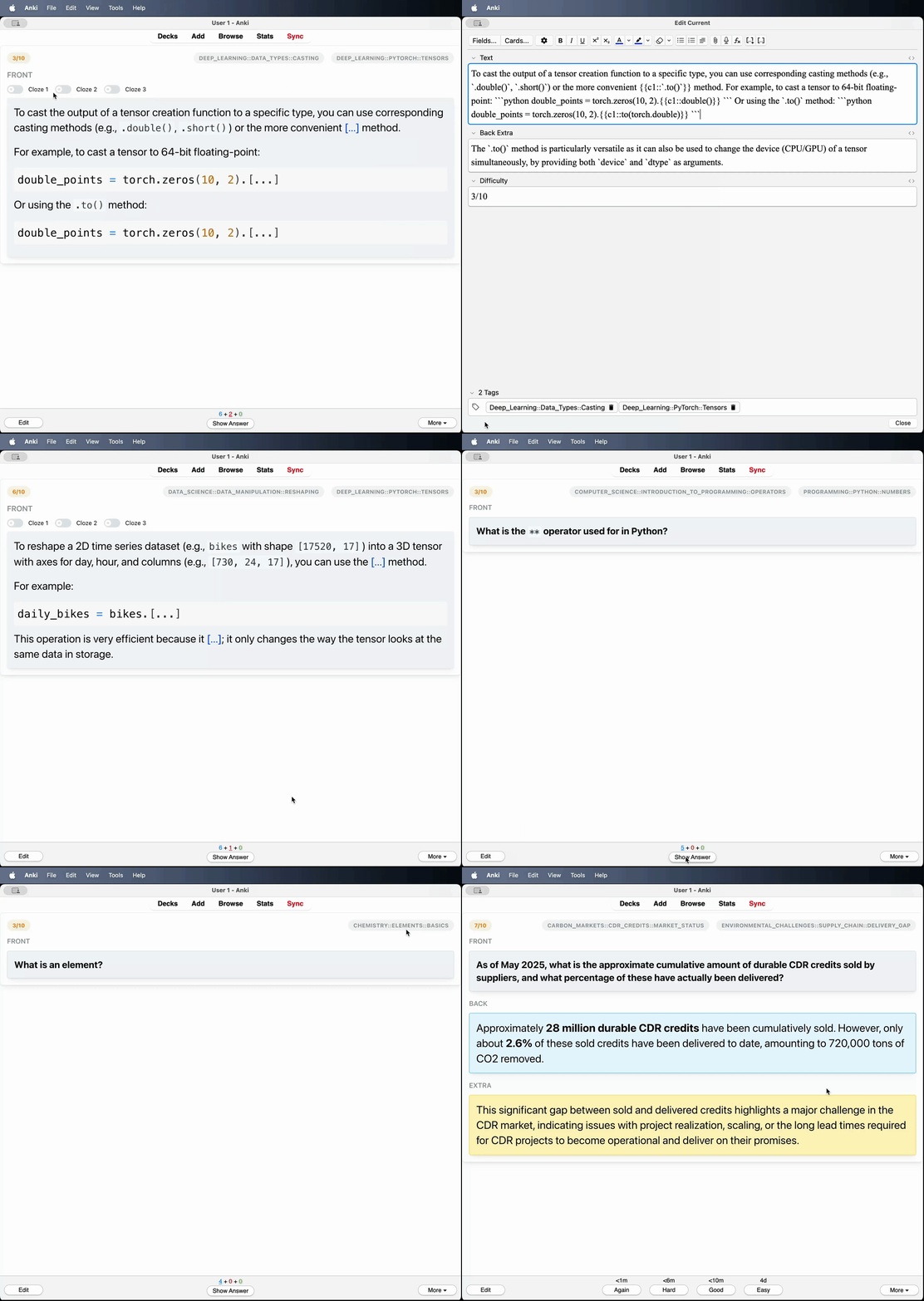
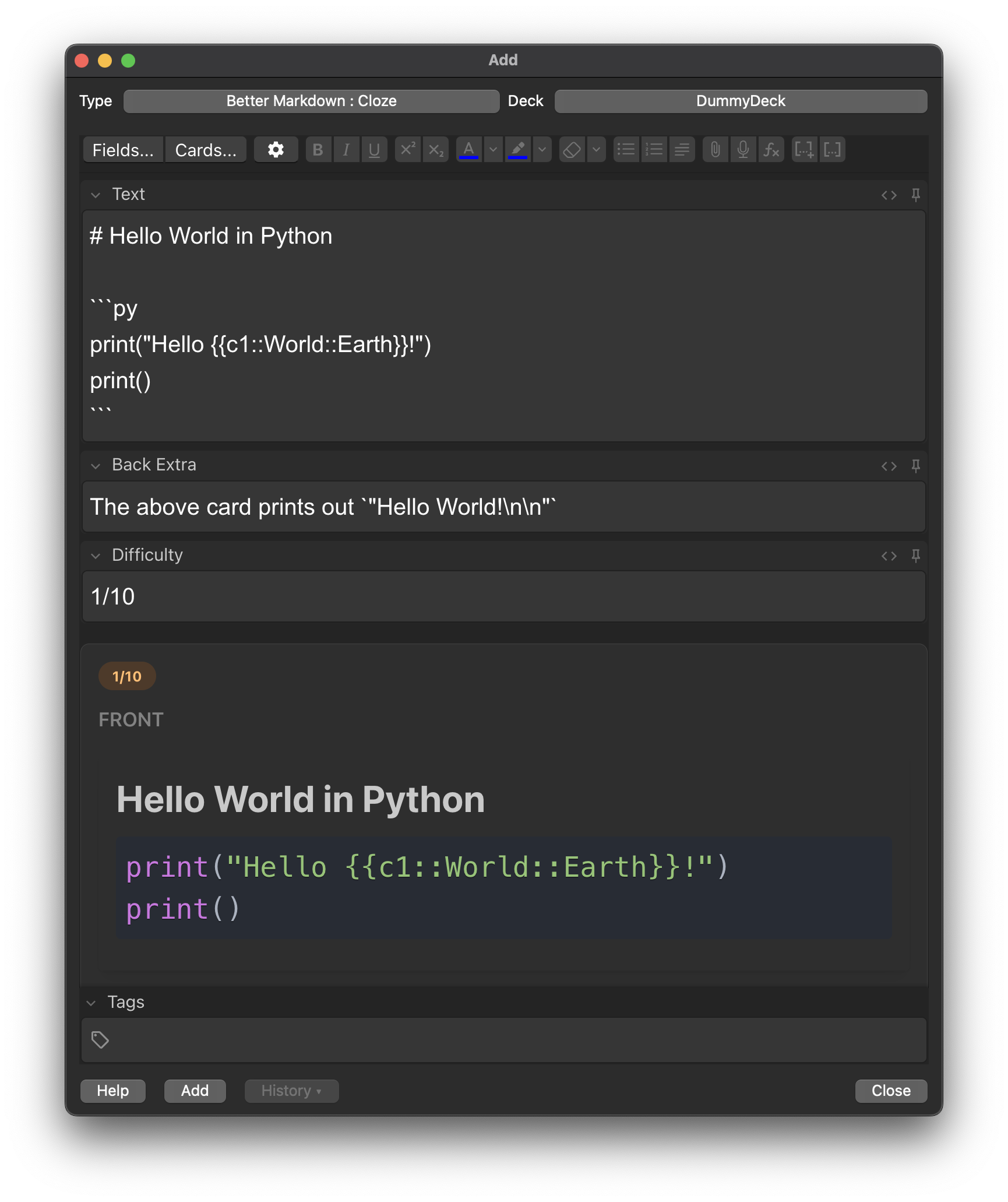
Liên kết hỗ trợ
Reviews (18)
👍 2026-02-20
I use it to review my LeetCode. The only inconvenience is that the "" type of hyperlink doesn’t work. But I can use “<a href=""></a>” instead.
👍 2026-02-02
Works great, thanks!
👍 2026-01-07
Not working reliably. Anki always break cards by appending it’s html along with my md and this results in broken cards
👍 2025-12-27
Good addon, but it doesn’t support quote text >
👍 2025-12-20
Great addon, thanks for the work! How can I decrease the overall font size, across the board?
Edit: Not sure if this is the best approach, but in my Anki profile directory I created _better_markdown_anki_user_style.css as:
:root {
/* Set this to (your desired px) ÷ 24. Examples:
18px -> 0.75 | 20px -> 0.8333 | 16px -> 0.6667 */
--mantine-scale: 0.83333;
}

.markdown-content {
/* Replaces the add-on’s inline “font-size: 24px” with Mantine’s scalable default */
font-size: var(--mantine-f

### 👍 2025-11-29

How could I create a cloze? And why is there no preview on my card creation interface?
Comment from author
1) Install Add-On
2) Add
3) Type : "Better Markdown : Cloze"

Note that you can share decks without having the add on installed on the other device, but then there will be no preview.

### 👍 2025-11-27

When using Better Markdown Anki on desktop Anki, the card template renders perfectly. However, when reviewing the same cards on AnkiWeb (browser version), a large blank space appears before the Front field content. There is a massive empty space at the top of the card, pushing the actual content way down.
Comment from author
Will look into it. :)
Update: Should work now, maybe you have to clear cache and login again.

### 👍 2025-10-27

Looks very interesting and I am updating my decks at this moment to better test the add-on.

### 👍 2025-09-23

a decent plugin

### 👍 2025-08-30

good addons

### 👍 2025-08-04

I appreciate your effort. It looks like you did a great job. But it didn't work for me. It doesn't render the markdown correctly.

### 👍 2025-07-19

Very good md format, some loading speed is slow on mobile phone

### 👍 2025-07-19

The addons works well, but 'buy me a coffee' popup is too obnoxious.

### 👍 2025-07-19

I really appreciate the work, but putting "buy me a coffee" inside the note template is a bit annoying.
Comment from author
It should show every 500th card change now. If it is still too annoying, you can add
#buy-me-a-coffee { display: none; }
to `path/to/collection.media/_better_markdown_anki_user_style.css` (You need to create this file),
see https://docs.ankiweb.net/files.html#user-data to locate the folder on your device

### 👍 2025-07-16

Exactly what I wanted. Is there any way to get indented bullet points?
Comment from author
Have you tried something like this:

- bullet point
  - bullet point indented using two spaces

### 👍 2025-07-10

great plugin!! thanks :)

### 👍 2025-07-10

It works and looks pretty good. Thanks for the plugin

### 👍 2025-07-04

This add-on is beautiful, but could you change the color of the clozes in night mode. The blue contrast make it difficult to read.
Comment from author
Thanks! I’ve switched the color to teal for both dark and light mode. If you have any suggestions for further improvement, feel free to open an issue at https://github.com/alexthillen/better-markdown-anki/issues so we can discuss better options together.
