This add-on was paid for using money that is earned on our AnKing Membership. We create add-ons using this income, release them for Members only first, and eventually release them to the public. Creating and maintaining add-ons is very time-intensive and expensive, so we have to fund this somehow. We employ some fantastic software engineers in the community to help us create tools that are useful to everyone. If you have ideas for new add-ons that would be useful or fun, please feel free to let us know!
Add-on information
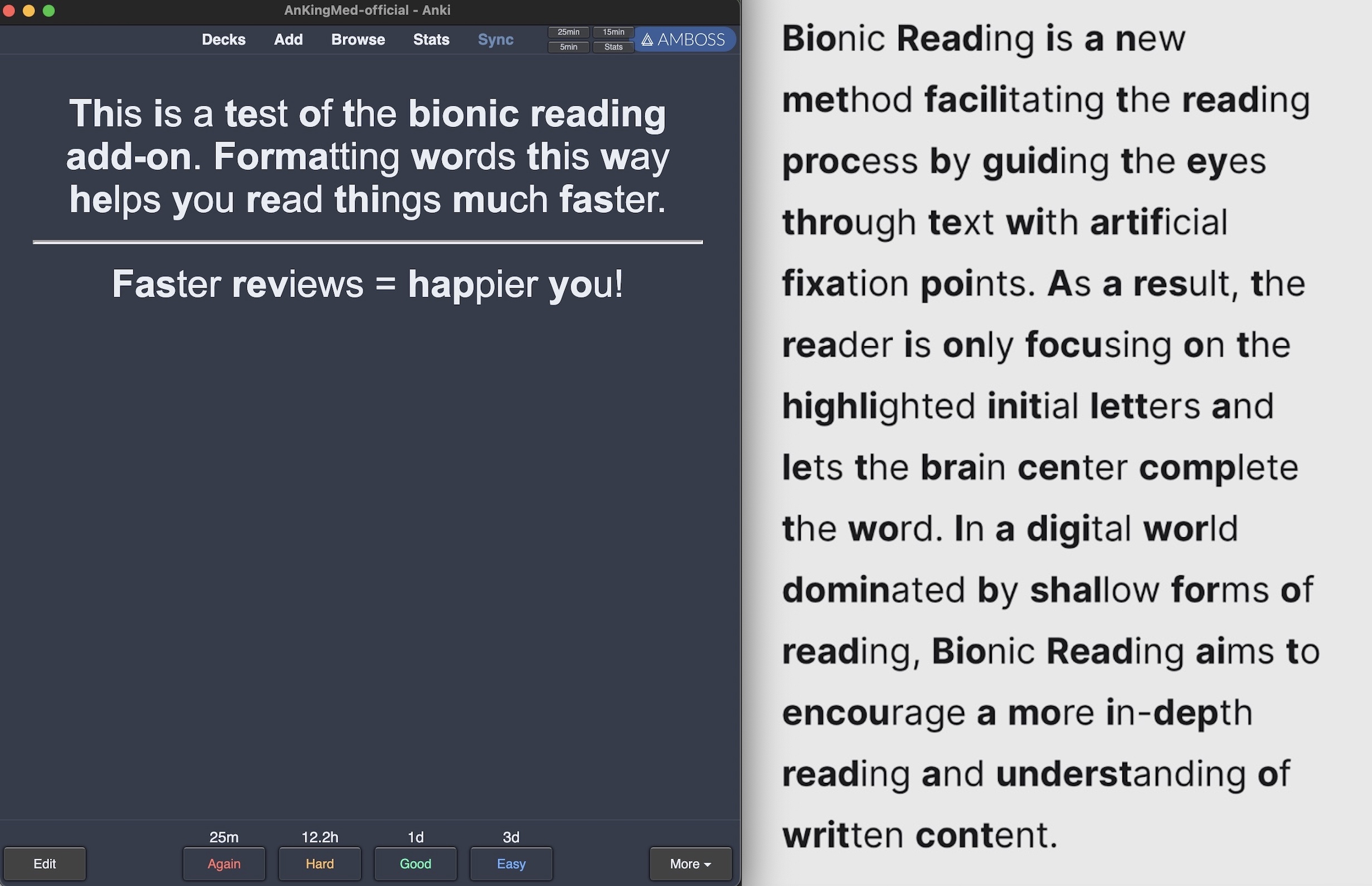
This add-on adds Bionic Reading formatting to your Anki cards! Bionic reading bolds the beginning half of each word which makes reading faster. It works on your mobile Anki version, as well! See the image posted below and check out https://bionic-reading.com/ for details!
How to Use You can select which note type you want to use bionic reading in add-on config under the AnKing menu.
When you add a new note type, you will need to go to the add-on config and select the note type to apply bionic reading.
*To disable this add-on’s function, you need to disable it on each note type in the add-on config. Toggling the add-on off alone will not turn off the bionic reading formatting!
Submit issues here: GitHub Issues Page (Bionic Reading).
What other add-ons and perks are available to AnKing VIPs?
We have made a running list of all current beta add-ons on this website. Other perks of being a member include individualized help with Anki, early release YouTube videos, live Q&As, etc. These are listed under the tiers on the VIP Sign-up page.
What other add-ons have we funded?
Other add-ons we’ve released and/or are currently maintaining using income from this project include: Advanced Card Styles, AnKing Note Types (Easy Customization), Browser Resizer, Clickable Tags, Custom Background Image and Gear Icon, Export Single Tag for Sharing, Fastbar, Field Autocomplete, ReColor, Special Fields, and more!
Please consider checking out our:
YouTube Channel- How to use Anki for beginners and advanced users.
Instagram/Facebook: @Ankingmed
www.TheAnKing.com- Recommended add-ons, tutorials and more including how to download 40+ add-ons in < 5min
Patreon/VIP- Support our work and get individualized Anki help!
Screenshots





Liên kết hỗ trợ
Reviews (18)
👍 2025-03-19
super helpful, especially for the close flashcards. It works on the new update of Anki- thank you very much. it allows me to be able to read the full flashcard with good focus.
👍 2025-01-27
It is the worst addon ever; even the config is broken and I have to remove it manually from every note type! It’s just a waste of time and will make you to spend a lot of time just removing bionic-reading.js from every card type! Just DON’T INSTALL IT!
👍 2025-01-20
I don’t think it’s working for me for some reason. Cannot figure out why even tho I’m on the latest Anki update. Is this the most updated version of this add-on?
👍 2024-11-15
Lovely; just minus the fact it breaks cards w/ MathJax. :)
👍 2024-09-21
struggle to disable it
Comment from author You need to have the add-on enabled, then go to the settings and uncheck all the note types and save. It cannot disable itself just when you disable the addon because it’s adding (or taking away) code that is in your note styling.
👍 2024-07-25
Not working on my Mac running Sonoma macOS 14.5, Anki Version 23.12.1. Says Anki encountered a problem. Every time I configure and save, the next time I re-enter the configuration, the checkboxes next to the desired note types go away.
Edit: fixed with help on Github + copy-pasting <script src=“_bionic-reading.js”></script> into each note type Comment from author before post was edited We don’t receive any updates here and can’t troubleshoot back and forth with you. Please let us know more det
👍 2024-05-15
Works fine. However, if you’ve used another add-on or style template to change the Bold font’s color, you’ll see words in two different colors, which can be disorienting.
👍 2024-05-02
Awesome! Always looking for ways to increase speed and comprehension while doing Anki
👍 2024-04-26
Great !! but not working on ankidroid, i’ve tried the https://github.com/Born2Root/Fast-Font suggested by the user under my comment and it worked !! Thank you man
👍 2024-02-27
Some people want this for Anki Android. Just download the ttf or whatever from Fast Font, which is the same as Bionic Reading: https://github.com/Born2Root/Fast-Font The easiest way is to install it onto your phone using a 3rd party font installation software, then force it to be the default font for your phone and make it override whatever Anki Droid is using. You should also be able to do this on normal Anki Desktop if this add-on ever fails, just treat it like any other font. Fast Font basic
👍 2023-11-15
I know it works for existing cards but how can I can’t get it to work on both Anki Desktop and Ankidroid.
Any help? Comment from author before post was edited Yes!
👍 2023-11-14
love it, thanks for keeping it post
👍 2023-11-13
OMG - this has taken my Anki note review to Epic levels. Ty for making this.
👍 2023-11-13
Super. Been Waiting for something like this for a while.
👍 2023-10-27
good add on
👍 2022-12-21
Good Comment from author before post was edited It works! This add-on is currently only available as a beta test on our memberships. We’ve explained why in the text above. https://www.ankipalace.com/memberships
We’d appreciate if you’d remove this rating or change it so that it does not confuse others
👍 2022-12-21
Cool feature
👍 2022-09-04
Not work!! Comment from author UPDATE: This should be working now and we would really appreciate if you change this to a 👍🏼! :) If you find issues or have suggestions for improvement, please share on our GitHub and we can discuss!
