An Anki addon to change the pie chart colors in the stats overview window.
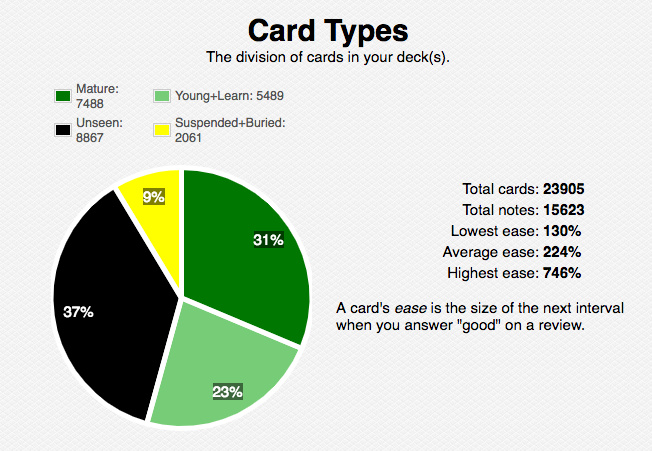
The stock version of Anki includes a pie chart at the end of the statistics overview screen, with the deck/collection divided into ‘New’, ‘Suspended+Buried’, ‘Young+Learning’, and ‘Mature’ sections.
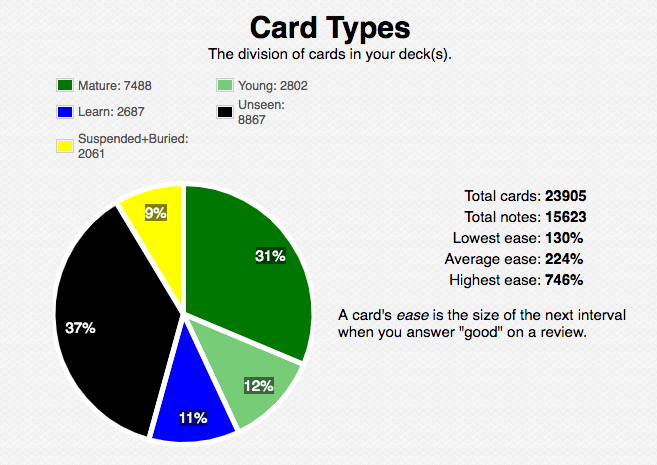
Since I use longer intervals while ‘learning’ compared to the default options, I’ve felt it may be better to separate ‘Young’ and ‘Learning’ cards. However, vanilla Anki doesn’t include this option, so I figured I’d make one!
Notably, as of v1.1, this addon is compatible with both v1 and v2 review scheduler versions!
Development
For issues/bugs, questions, and suggestions (or curiosity), the GitHub Repo of this project is here
Version history
v1.1: Adapted piegraphs.py functions (and created config.md and config.json) to allow user configuration via the addons manager. Compatible with both v1 and v2 scheduler versions.
v1.0.1: minor formatting updates
v1.0: initial release
Native divisions/colors:
Graph with ‘learning’ cards option enabled (alone):
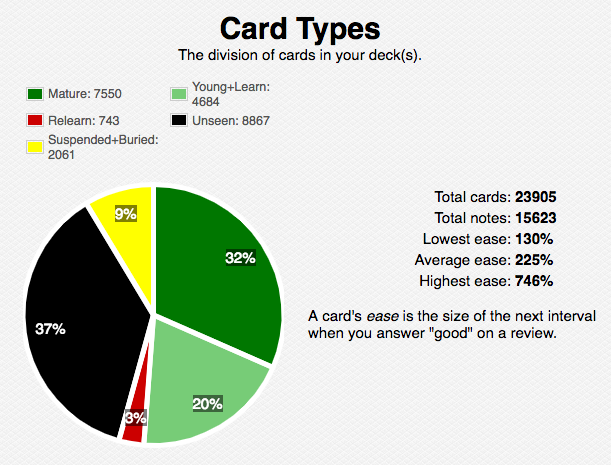
Graph with ‘relearning’ cards option enabled (alone):
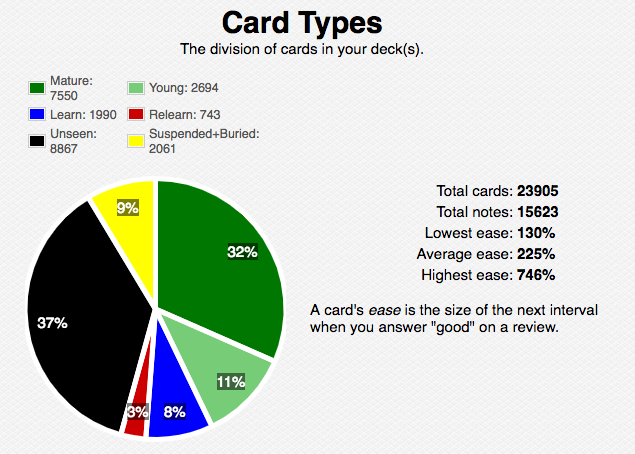
Graph with both ‘learning’ and ‘relearning’ card options enabled:
Installation
Manual Installation
Create a folder in your respective addons folder (or clone this one), so that it contains init.py, piegraphs.py, and the two config.ext files.
Do not put these in a subfolder; i.e., it should be …/addons_folder/newFolder/files. The meta.json file should be created automatically by Anki after loading for the first time after install.
Conflicts with other addons: The only ones I imagine are those that also modify the native cardGraph or _cards function of anki/stats.py, declared as anki.stats.Collection.cardGraph or anki.stats.Collection._cards. There was a previous conflict with Progress Graphs and Stats for Learned and Matured Cards, but this resolved with some debugging of the function wraps used here.
Screenshots
Liên kết hỗ trợ
Reviews (5)
👍 2020-04-27
Amazing
👍 2020-04-05
Great stuff, thanks!
👍 2020-02-27
Great add-on. Works like a charm!
👍 2019-08-25
useless Comment from author Can you provide some more constructive feedback? The GitHub repo for this extension is a good place to start: (https://github.com/colinb647/pie_chart_addon)
👍 2019-03-30
Wow! Awesome addon, thank you!
