Bold Color Shortcut https://github.com/BigFatDuck1/boldcolorshortcut-anki
Change color of text and bold it quickly.
Simple anki addon for adding keyboard shortcuts to quickly change the color of selected text, similar to the default Ctrl + B for bold or Ctrl + I for italic in the editor.
You can toggle whether you want the text to be bolded as well by changing the config.json file: “bold”: “on” to “bold”: “off”.
Current default is:
Red
Orange (+ alt)
Yellow
Green
Light Green
Blue
Purple
Brown (N)
White
Cyan (D)
Shortcut is Ctrl + Shift + (First letter)
(exceptions placed in brackets, e.g. Ctrl + Shift + Alt + O for orange
or Ctrl + Shift + D for cyan)
Make sure the keyboard shortcut you have chosen does not overlap with other anki keyboard shortcuts, as those take precedent!
Credits: Based on Quick Colour Changing (“https://ankiweb.net/shared/info/2491935955”)
Screenshots
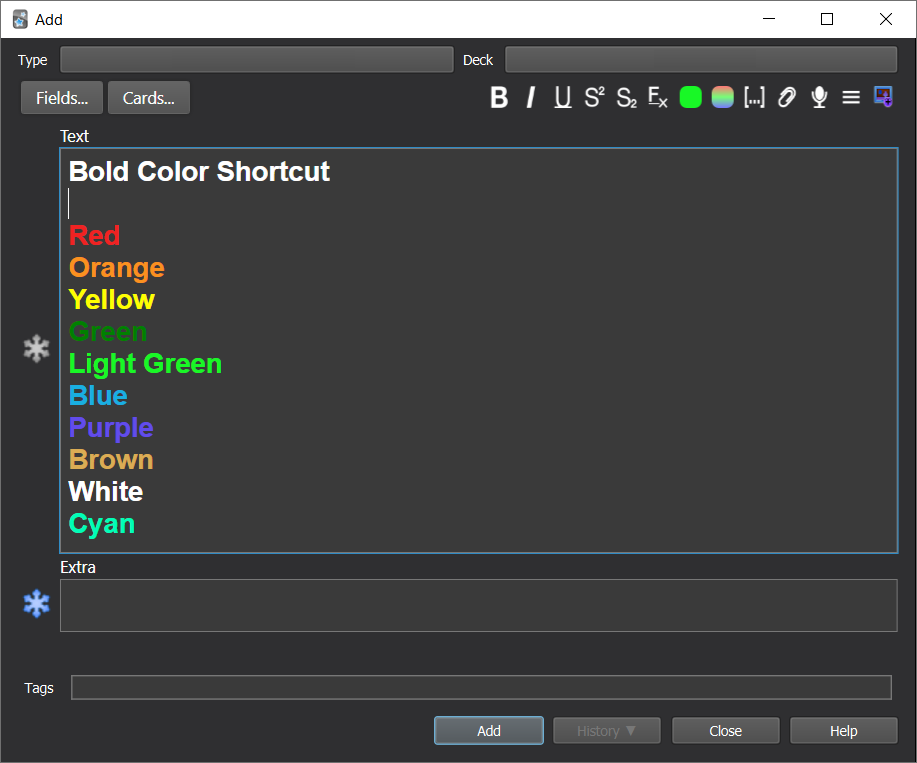
Liên kết hỗ trợ
Reviews (10)
👍 2025-05-19
si usáis este complemento y “Highlight Color Shortcut” a la vez, al cambiar el color tanto de la letra como del fondo, se quita el negrita atomáticamente. para solucionar este error hay que cambiar el código en la configuración. donde pone BOLD “on” modificarlo a “off”.
seguramente nadie lea esto. Pero por si le es de ayuda a alguien, por aquí lo dejo
👍 2025-04-19
don’t work on version 24.11
👍 2024-05-30
Does exactly what I wanted
👍 2023-05-24
Works perfectly ! Thank you !
👍 2023-03-17
exactly what I needed
👍 2022-09-18
I had to change short cut keys. so It works! so useful for me (ver. 2.1.54)
👍 2022-03-24
doesn’t work on Anki 2.1.49
👍 2021-08-28
I LOVE this addon! I colour code texts in my flashcards all the time.
👍 2021-08-28
Hey, thanks. This is super helpful. Much appreciated.
👍 2021-05-24
It’s usefull!
