The goal of this addon is to let you define different intervals for a group of cards in a deck.
Suppose you have a deck and you want to increase the interval when you mark a revision as good (for example). Currently you can do so, using Anki through Deck Options. Now, let’s say you want to customize the interval of only some cards. Through that Deck Options this is not possible tough, because it applies the options to the entire deck.
Customizing the intervals given by Anki
Having this feature could be interesting because in many times you want to use a customized interval. Even if you marked a given card as “good”, sometimes you would like to review it again, before the provided time.
It’s possible to do it somehow with a few addons. For instance:
- Define any custom time you want, with a shortcut that asks you what interval you want;
- Lots of extra buttons with customized times, for each one
These options do work. They need you to manually choose the interval that you desire in each revision. As you have so many options (especially with those buttons), sometimes you are not sure about which one to use in that time.
Schedule Priority comes up
This addon modifies intervals based on the card (note) record. So when you are studying it, the time is assigned automatically. No need to think about this detail during the review.
How to use it
In the edit view, while either creating or editing the card, use the context menu (right click on mouse) and select one of the given options.
Edit card -> Right click -> Card Priorization -> Click the choosen option
Scheduler V3
Check out instructions at: https://github.com/ssricardo/anki-plugins/wiki/Card-Priority---Scheduler-V3
Bugs / Suggestions / more…
Please, feel free to make suggestions and open issues about possible bugs found.
Check out the documentation at GitHub.
Updates
12/15/2023: version 4.0:
Adapt Scheduler reference to recent versions of Anki
Added support (as possible) for Anki Scheduler v.3
Small adjust in calculated date
Try preventing some errors
26/07/2021: version 3.0:
Added support to Anki Scheduler v.2
About
Addon developed by ssricardo. Check out more of my addons on https://github.com/ssricardo/anki-plugins.
Screenshots
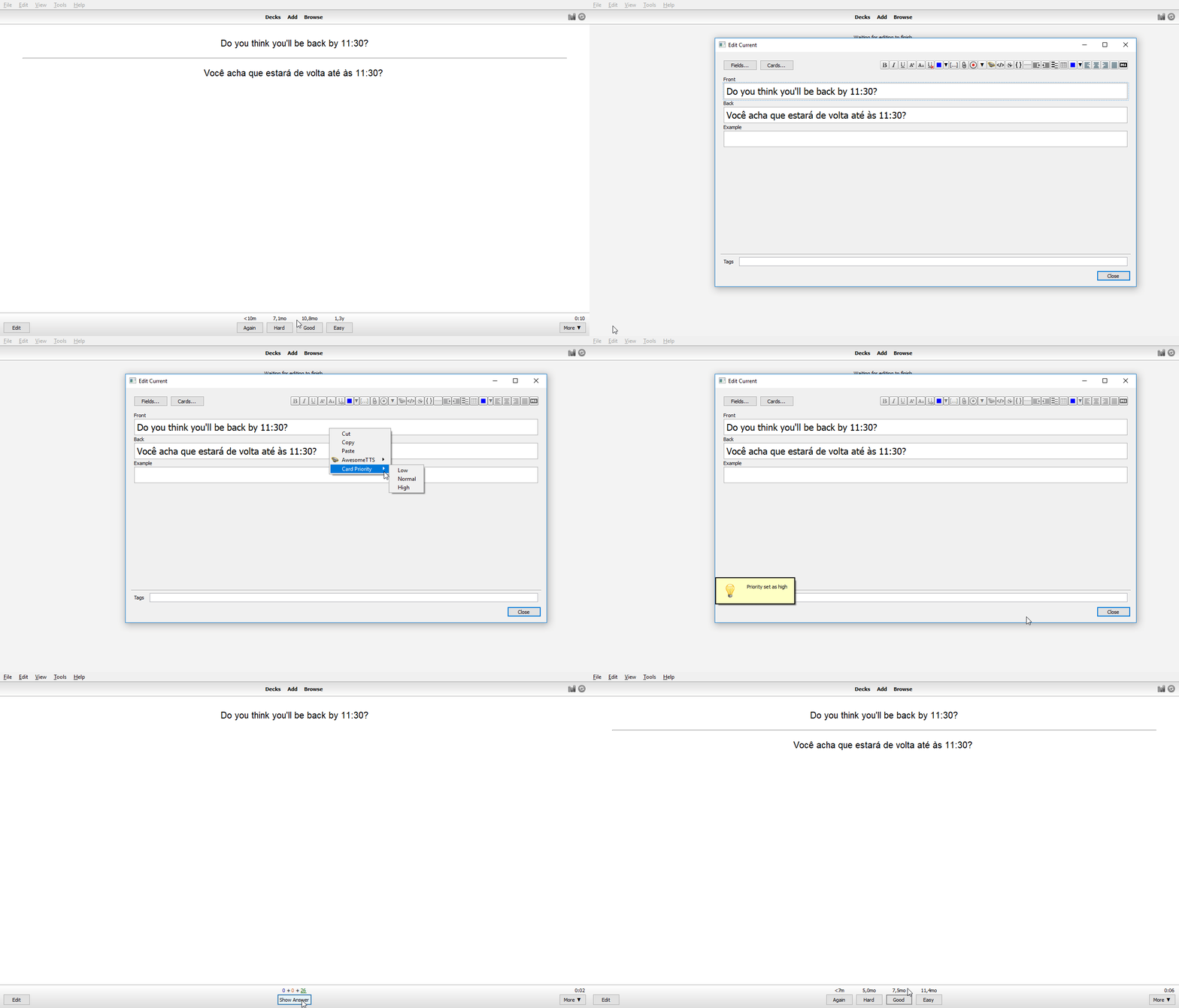
Liên kết hỗ trợ
- Contact Author
- https://github.com/ssricardo/anki-plugins/wiki/Car
- documentation at GitHub.
- https://github.com/ssricardo/anki-plugins
- Contact Author
Reviews (8)
👍 2025-08-18
I wanted to tried, but right now it doesnt work because of the update, please this is a function that all of users need for studying
👍 2024-06-14
Work with FSRS ? Comment from author I’m not sure. It just connects to Anki Scheduler component. If Anki didn’t change such interface, it should work.
👍 2024-04-23
能改变一张卡的复习间隔,通过原间隔*n%,这里优先级影响n值.
👍 2023-10-07
please add a batch feature to do for multiple cards then will rate good
👍 2023-05-13
230513T165807, looks OK after the update.
but seems need some period of time to say it’s working, thanks
230430T005845, pls see github’s issues.
any modification is unrelated to the choice of priority!
thx
👍 2022-05-15
awesome. but u should be able to do it with more cards at once. It’s tiring to do it to all cards separately
👍 2020-01-03
Useful app thanks alot
👍 2018-10-23
Easy & effective!
