ColorCoding - Anki Add-on
Improve your learning strategy with the ColorCoding add-on. This tool allows you to set specific font colors for different terms and automatically colors these preset words when editing cards. Consistently color-coding your Anki cards can effectively enhance memory retention.
How to use ColorCoding
- Settings
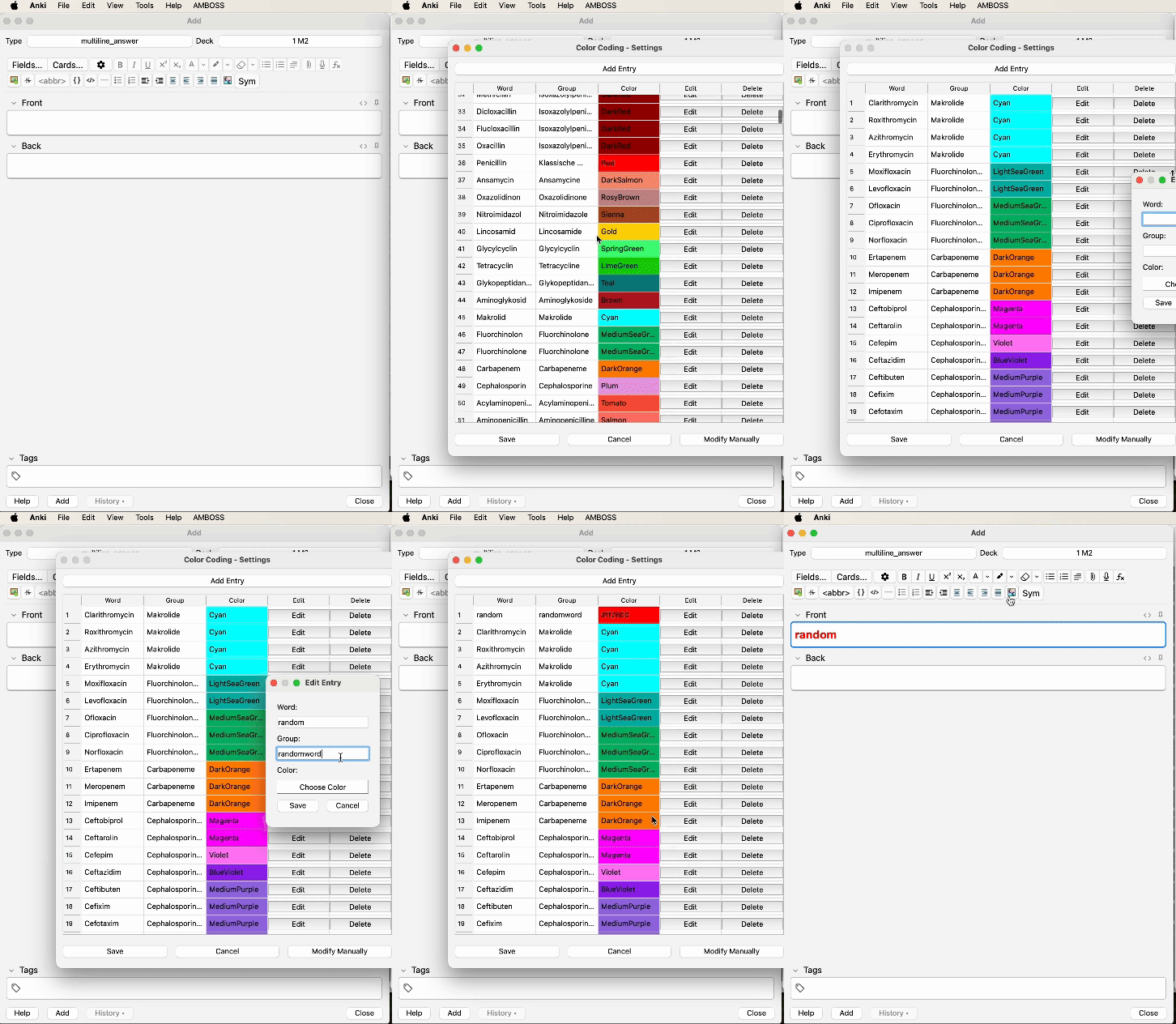
Within Anki, open “Tools” -> “Color Coding…” to set up word-color pairs.
Make sure there are no empty spaces in your word definitions.
Alternatively, you can manually provide data in JSON format, e.g.,
[{“word”: “penicillin”, “group”: "", “color”: “red”}, {“word”: “doxycycline”, “group”: "", “color”: “green”}, … ].
via “Tools” -> “Color Coding…” -> “Modify Manually”.
- Coloring
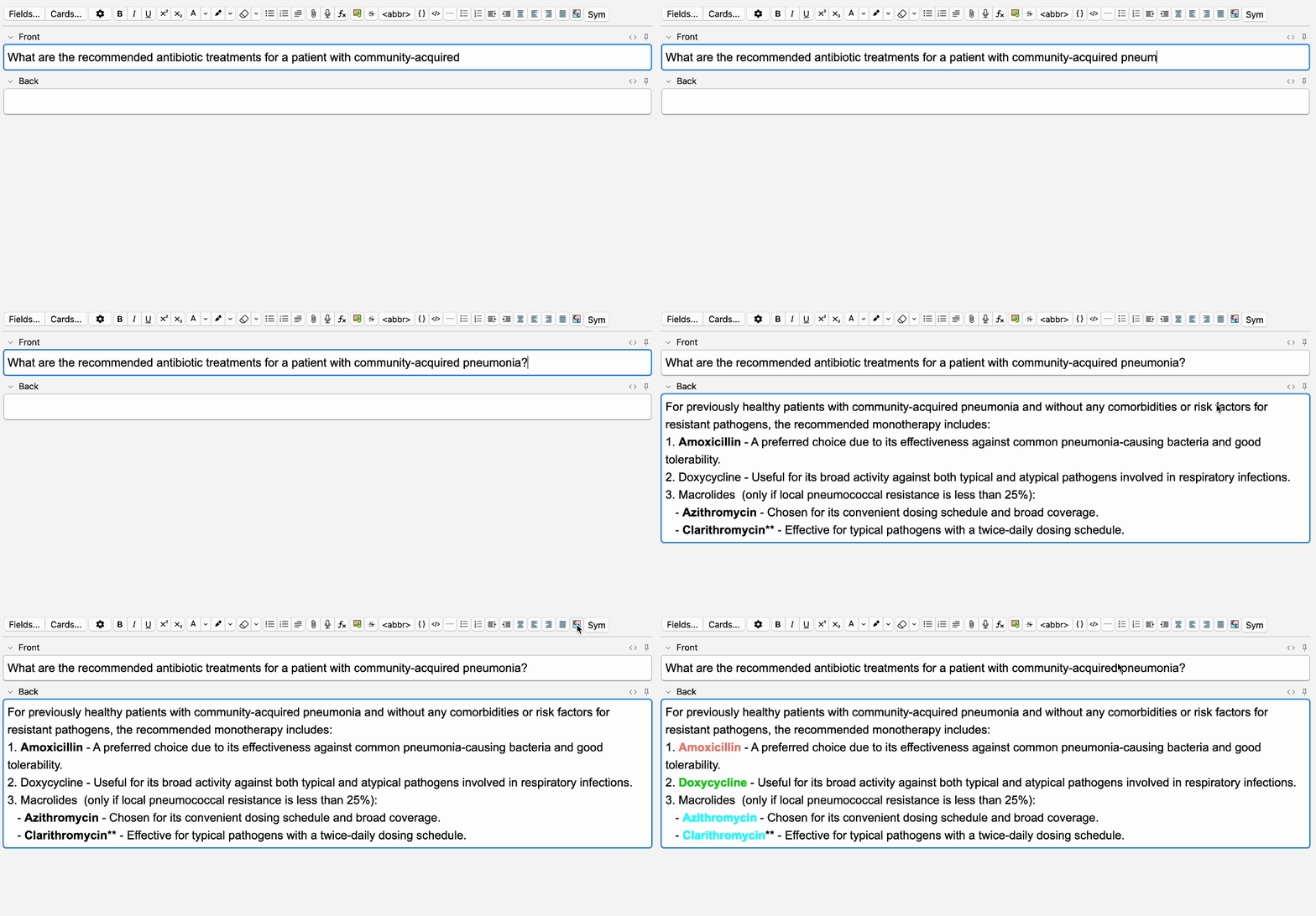
Once you want to color your words, press the ColorCoding button. This automatically colors all defined words in the field that is currently being edited.
All available HTML color names and HEX color codes can be used. One color can be set for as many words as you want, allowing specific font colors to be used for either a single term or an entire group of words.
Preset words will automatically be colored while typing within the Add window.
Accessing Preset Datasets English Medication List: here German Medication List: here English Medication List (Christina Ton Version): here
Have you created a ColorCoding and you think it might benefit others as well? We encourage you to share your dataset! Feel free to reach out via GitHub.
Updates 2024-09-11 Added option to toggle bold formatting on or off (see Font Settings). 2024-09-10 Improved functionality, including new export options to share custom datasets. 2024-08-24 Improved functionality, with great support from FelixKohlhas. 2022-02-02 Initial Release Color Coding Help and Support
This add-on is still under development. Please report any bug reports or feature requests.
Contact
schubertmc
2022 - 2024
Screenshots
Liên kết hỗ trợ
Reviews (19)
👍 2026-01-08
Wanted to like it, but it can’t even color basic symbols like parentheses. I’ve tried Unicode, HTML, escape characters, etc., but nothing.
👍 2025-09-14
excellent addon! thanks!! using this extensively
Would it be possible to request for a feature? Would it be possible to bulk apply this in the Browse window to multiple cards at once? Thanks
👍 2025-08-09
Good but How can I delete your words all of them at one time completly? Comment from author Go to Tools → ColorCoding → Modify Manually. Insert the following: [] Then press Save. Now the list is completely empty.
👍 2025-02-10
Awesome addon, had to tweak the code a little to make it work on anki 24.11. I would love it if it would add the changes automatically to all existing cards and if there was better batch editing of the existing words. If I get to procrastinating again, I might try adding it myself!
👍 2025-01-16
Great job! Do you know if it is simple adjust the code to detect words with accents? Like ”~” in “não”. Other example (técnica): https://prnt.sc/SVKwz_UsvQzd I tried with claude IA (bcz i do an adjust in another code to show time spend by card at the day and worked) but in this code i cant understand the modifications maded by IA.
👍 2025-01-05
So convenient, thank you !
👍 2024-10-27
nice tool
👍 2024-10-21
vvvvvvv
👍 2024-10-20
A ideia é bem interessante, mas poderia funcionar com palavras que possuem acento: ~ ` ´ ^ e o “ç”. Quando tento utilizar em palavras do gênero, não funciona. Até testei colocar as palavras sem acento dentro da configuração do addon, mas não reconhece.
👍 2024-09-28
Thanks!
👍 2024-09-13
Great, however, I think there can be big improvement.
Currently it doesn’t work with multiple characters all at once.
For example: In Vietnamese, Korean, Chinese, a word can have multiple components, the word “배우다” will become “\ubc30\uc6b0\ub2c8” in JSON format. The twist is that, current code doesn’t interpret this as three separate characters, but instead as only one character “\ubc30\uc6b0\ub2c8”. And of course, this character doesn’t exist in UTF-8.
So conclusion, there are two improveme
👍 2024-09-11
This does what it is supposed to do I’m not sure how to keep things from turning bolded when I color code though Comment from author Thanks for your suggestion. I just added an option (‘font settings’) that allows users to choose between bold and standard text formatting. Hope this helps!
👍 2024-09-09
It’s already pretty good, but It would be better if it recognized the differences between words like ‘lactating’ and ‘non-lactating’ while ignoring case sensitivity. In this case, I managed to configure ‘Lactating’ and ‘lactating’ to have the same color (each as a separate entry), but I couldn’t figure out how to apply color to a word within another word, like ‘non-lactating.’ Any suggestions? Comment from author Thank you for your message. A solution would be to use an underscore to connect wo
👍 2024-09-09
Nice feature
👍 2024-08-24
Thanks
👍 2024-01-14
I spent a lot of time looking for something like this, but unfortunately it doesn’t work on newer versions of Anki Comment from author The addon has been updated and fixed. It should now work on newer versions of Anki.
👍 2023-09-17
The color-coding icon fills the whole screen and messing up the UI. Can;‘t make flashcards using this add-on; colod-coding also doesn’t work. Comment from author The issue has been fixed and should work on newer versions of anki.
👍 2023-01-08
I tried several Windows versions and it only worked on 2.1.48 for me.
Link to 2.1.48: https://github.com/ankitects/anki/releases/download/2.1.48/anki-2.1.48-windows.exe
👍 2022-02-03
Great add on!!
