Features • Full RegEx support (including backreferencing) • Live preview • Search history
Installation You can install the add-on via Ankiweb or build it from Github.
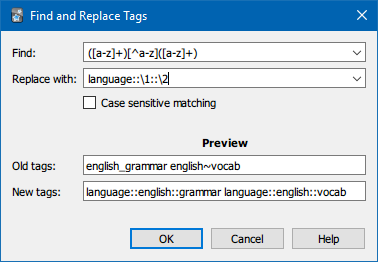
Usage In the browser, select the notes whose tags you want to edit. Then, choose “Find and Replace Tags (RegEx)” in the “Notes“ menu or use the shortcut Ctrl+Alt+Shift+R to open the Find and Replace dialog. Here you can type in the search and replacement patterns, toggle case sensitivity and enter arbitrary tags to preview how they would be changed. You will be able to confirm the Dialog only while both RegEx fields contain compilable patterns. When editing has completed, a brief summary is shown and you have the option to clear unused tags to reflect the changes in the browser’s tag list.
Support I appreciate bug reports and feedback on GitHub or the Anki forum. Feel free to ask for help and find further information there as well.
Anki 2.1.45+ Starting with version 2.1.45, vanilla Anki supports RegEx replacing for tags. Therefore this add-on will not be updated to work on versions newer than 2.1.44.
License Copyright © 2020 RumovZ This program is free software: you can redistribute it and/or modify it under the terms of the GNU Affero General Public License as published by the Free Software Foundation, either version 3 of the License, or (at your option) any later version. This program is distributed in the hope that it will be useful, but WITHOUT ANY WARRANTY; without even the implied warranty of MERCHANTABILITY or FITNESS FOR A PARTICULAR PURPOSE. See the GNU Affero General Public License for more details.
Screenshots
Liên kết hỗ trợ
Reviews (5)
👍 2021-08-03
Works perfectly and I like that the author gave clear instructions as not everyone really knows what they’re doing with Anki, haha
👍 2021-05-15
It solved my problem to rename all my tags and saved me hours of work.
👍 2021-04-21
Thanks for this powerful add-on, Rumo! Saved me a ton of time.
👍 2021-01-18
So thanx TT
👍 2021-01-07
Great, thanks.
