Create Subdeck (Gear Menu) — Anki Add-on
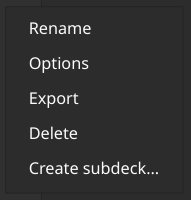
Adds a Create subdeck… item to the cogwheel (gear) menu on Anki’s Decks screen, so a subdeck can be created quickly from the deck selector.
What it does Adds a new menu item: Create subdeck… When clicked on a deck, opens Anki’s built-in “create deck” dialog Prefills the deck name as ParentDeck:: so only the child name needs to be typed Install From source (development) Download (or clone) this add-on. Place the add-on folder into Anki’s add-ons directory: Open Anki → Tools → Add-ons → View Files Copy the folder containing init.py into that location Restart Anki. How to use Open Anki and go to the Decks screen. Find the deck that should be the parent deck. Click the deck’s gear (cogwheel) button. Click Create subdeck… In the dialog, type the subdeck name after the prefilled Parent:: prefix, then confirm.
Example:
Prefilled: Physics:: Type: Quantum Mechanics Resulting deck: Physics::Quantum Mechanics Notes This add-on does not bypass Anki’s normal deck creation workflow; it uses the standard deck creation dialog. The add-on only adds a convenience shortcut to create hierarchical subdecks. License
MIT
Screenshots
Liên kết hỗ trợ
Reviews (1)
👍 2026-02-06
Thanks! Surprising that this isn’t built in. Comment from author Exactly, It is available on ankidroid though
