This add-on was collaborative effort between The AnKing and Glutanimate. Please consider supporting our work using the links below so we can continue to fund add-on projects like this.
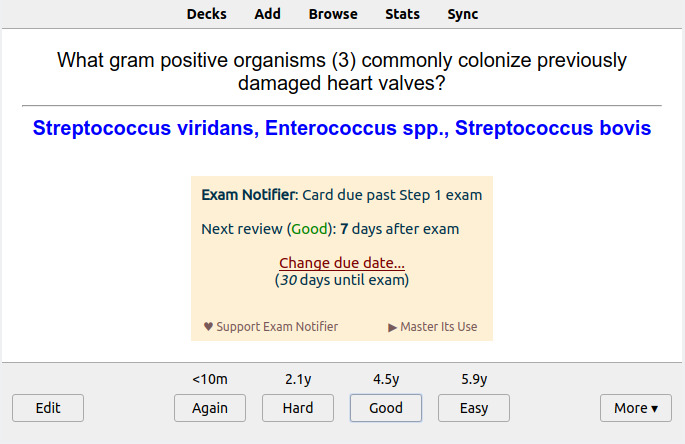
Exam Notifier provides users with notifications that a card will appear after an upcoming exam date. This feature allows the user to determine how to answer the card (i.e. Again, Hard, Good, Easy) or determine if rescheduling the card is deemed necessary. For example, a user may struggle with a particular subject and despite their ability to answer the card correctly, that they would like to revist these cards on the days leading up to their exam.
Many of us use Anki to prepare for exams. Some of us use Anki to learn a language in preparation for a trip to another country. Exam Notifier will tell you which cards are set to reappear after your test date. For example, if my big exam is coming up in 27 days and the current card is set to reappear in 28 days, this addon will notify you of this fact and give you the option to reschedule that card to reappear sooner for further review(s).
Screenshots
How to use
Go to the options for your deck. There you can check “enable exam notifier for this deck” and set an Exam Name and date. Exam notifier will then notify you if a card will be scheduled past that due date when hitting the “Good” button
Watch this AnKing YouTube tutorial for a more detailed explanation!
This add-on works on Anki 2.1.41+ and will work on qt5 or qt6 versions of Anki.
Problems, Bugs, Errors, Improvements If you find a serious bug, please submit it on Github.
Changelog
01-19-2023: Initial Release
02-01-2025: Updated for Anki 24.11
SUPPORT OUR WORK
If you like Exam Notifier, please give it a thumbs up and share it with your friends so that more people can enjoy it!
Exam Notifier was developed as a collaborative effort between Glutanimate and AnKing. If you enjoy the add-on, please consider supporting our work through one of the means listed below:
Supporting Glutanimate:
Make sure to check out my socials for the latest add-on updates and news
@Glutanimate | / Glutanimate | / @Glutanimate
Lots of exclusive add-ons and other goodies also await on my Patreon page. Make sure to take a look!
Please consider checking out our:
YouTube Channel- How to use Anki for beginners and advanced users.
Instagram/Facebook: @Ankingmed
www.TheAnKing.com- Recommended add-ons, tutorials and more including how to download 40+ add-ons in < 5min
Patreon/VIP- Support our work and get individualized Anki help!
Screenshots






Liên kết hỗ trợ
Reviews (29)
👍 2026-02-14
There’s a bug every time a new card with the exam notifier pops up. Debug info: Anki 25.07.5 (7172b2d2) (ao) Python 3.13.5 Qt 6.9.1 PyQt 6.9.1 Platform: macOS-15.6.1-x86_64-i386-64bit-Mach-O
Traceback (most recent call last): File “/Users/eytanhaddad/Library/Application Support/Anki2/addons21/236593452/libaddon/gui/notifications.py”, line 281, in resizeEvent self.update_position()
File "/Users/eytanhaddad/Library/Application Support/Anki2/addons21/236593452/l

### 👍 2026-02-09

Not working

### 👍 2026-01-16

the date is not accurate, I will put the exam as 5 days from today and the pop-up will say the exam is in 3 days. Useless if it doesn't work, and I don't know what is wrong, is it the anki version, is it my macbook???? I have anki 24.11

### 👍 2025-12-12

Anki 25.09.2 (3890e12c) (ao)
Python 3.13.5 Qt 6.9.1 PyQt 6.9.1
Platform: macOS-26.1-arm64-arm-64bit-Mach-O

Traceback (most recent call last):
File "/Users/jesusperezalba/Library/Application Support/Anki2/addons21/236593452/libaddon/gui/notifications.py", line 281, in resizeEvent
self.update_position()
~~~~~~~~~~~~~~~~~~~~^^
File "/Users/jesusperezalba/Library/Application Support/Anki2/addons21/236593452/libaddon/gui/notifications.py", line 307, in update_position
self.parent().m

### 👍 2025-12-02

doesnt work; date auto-resets today's date and there is no pop-up

### 👍 2025-11-03

Doesn't work with the new update and I can't figure out how to make it work with any work arounds for Mac.

### 👍 2025-10-10

Helpful for scheduling your studying

### 👍 2025-09-22

very helpful

### 👍 2025-08-25

Easy solution from ChatGPT if you're getting error on new anki version:
Open this file:
/Users/***yourusername***/Library/Application Support/Anki2/addons21/236593452/libaddon/gui/notifications.py

Go to around line 307 and make sure this line:
self.parent().mapToGlobal(QPoint(x, y))  # type:ignore
is changed to:
self.parent().mapToGlobal(QPoint(int(x), int(y)))  # type:ignore

### 👍 2025-01-01

The add-on still works if instead of clicking on deck options, you shift + click on options (pulls up alternate menu), then go to exams tab.

### 👍 2024-12-13

very helpfull addon, unfortunately it doesn't work with the newest update so far.

### 👍 2024-11-26

This is not working for the new versions

### 👍 2024-11-11

Nice addon - thanks !

### 👍 2024-11-01

It would be nice to have the option to dismiss the popup either by clicking a hotkey or clicking anywhere on the screen (or both). It would also be nice to be able to choose where the popup spawns or the size. I ask this because sometimes the popup blocks stuff and it would be much more efficient to be able to have those alternative options rather than specifically clicking on that x button. I understand this is a small complaint, but it has been a personal pain point that I feel would enhance t

### 👍 2024-10-11

Great!

### 👍 2024-10-09

Please update!!!

### 👍 2024-09-24

Add-on setting don't show up, is there a way to manually change or set the date from the addon files?

### 👍 2024-08-23

please update

### 👍 2024-08-20

It looks very nice but problem on the last version of anki : the feature doesn't appear in the option of a deck...

### 👍 2024-07-03

very good and useful.

### 👍 2024-03-21

dankeschön

### 👍 2024-03-13

Great add-on. I also had issues with Anki crashing after selecting my exam date on the calendar. Have to just manually type my exam date instead and it worked.

### 👍 2024-01-29

Update: 1/24, add-on no longer works and causes Anki to crash whenever attempts to adjust exam date/name are made. Reported issue on GitHub but no response or acknowledgment of problem.

Super helpful! As others have stated, potentially relocating the pop-up to a region that does not obstruct card content and upcoming review intervals would be highly beneficial. Potentially one of the upper corners.
Comment from author
We're working on it! We'll get it fixed. Thank you for reporting on Github

### 👍 2023-12-29

Amazing add on! But is there a way for us to have exam notifier based on tags?

### 👍 2023-11-27

Does not show up as it had before in the settings menu.

Edit: I can't upgrade to 23.10.1 because some addons I use don't support that yet. However I did switch to 2.1.64 but still, no reviewed cards are being recognized as being reviewed once I use the exam notifier add, Anki just shows zero cards reviewed even though they (cards) have been scheduled.

Comment from author before post was edited
Please report this on the github link and we will happily look into this. I believe this is an issue

### 👍 2023-11-14

Great addon! 10/10
I have multiple subdecks just to have different exam notifications going on at one time based on the cards. Is there anyway a new feature could be added to customize the color of the popup? So each exam notification could have a different color and easier/faster to know which exam notification I'm looking at.
Comment from author
That's something we've considered! If you can submit an issue on Github that would be helpful!

### 👍 2023-10-25

To those who can't access the exam notifier option: Press/Hold Shift and then press the option menue of your deck. Another menue will open than just hitting the options of your deck... And there you can see "Exam" and there are the options for the Exam Notifier. I'm out of practice, my englisch ist not the best but I hope it helped.

Works fine. Only disturbing thing is, that it i didn't find a way to put the notification in the right lower corner yet... So the Exam notifier pups up in the middl

### 👍 2023-10-16

wokrs only on normal decks. could you please add the feature for filtered decks too??

### 👍 2023-10-06

Cannot get to option menu to use the add-on.
Comment from author
UPDATE: This should be working and we would really appreciate if you change this to a 👍🏼! :) If you find issues or have suggestions for improvement, please share on our GitHub and we can discuss!
