🔍 Instant Context Search
Stop copying and pasting text into your browser!
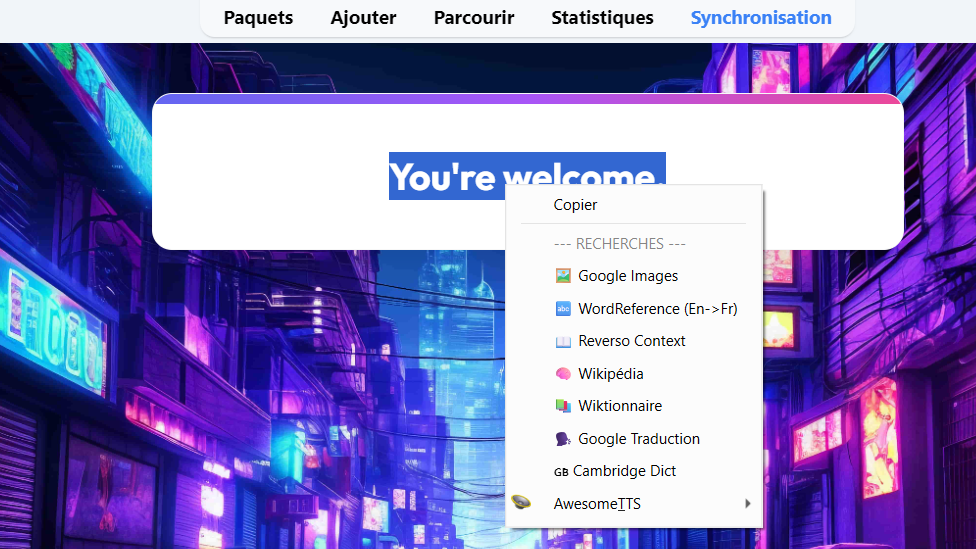
This add-on allows you to search for selected text on popular websites directly from the Anki Reviewer context menu (Right-Click). It is a game-changer for language learners who need to quickly look up images or translations.
✨ Features ⚡ Fastest Workflow: Just select a word, Right-Click, and Search. 🖼️ Google Images: Perfect for visualizing concrete nouns (e.g., “apple”, “car”). 📖 Reverso Context: Great for seeing how a word is used in real sentences (perfect for language immersion). 🚀 Lightweight: Less than 50 lines of code, no impact on Anki’s startup speed. 🛠 How to use Open any deck and start reviewing. Select a word or phrase on the card with your mouse. Right-Click on the selection. Choose 🖼️ Google Images: Perfect for visualizing concrete nouns (e.g., “apple”, “landscape”) to boost memory. 🔤 WordReference: The gold standard for accurate translations. 📖 Reverso Context: See how words are used in real sentences (essential for immersion). 🗣️ Google Translate: Quick translation for full phrases. 🧠 Wikipedia: For encyclopedic knowledge. 📚 Wiktionary: For precise definitions and etymology. 🇬🇧 Cambridge Dictionary: For high-quality English definitions. Your browser will open automatically with the search results.
🤓 For Advanced Users
Want to add YouTube or Wikipedia? You can easily edit the init.py file to add your own search providers. It’s designed to be easily extensible!
Created with ❤️ to save you time. By Ouattara Habib Lamine
Screenshots