—————<[ P U R P O S E ]>—————
Automatically adds pitch accent information to cards.
—————<[ B A S I C U S A G E ]>—————
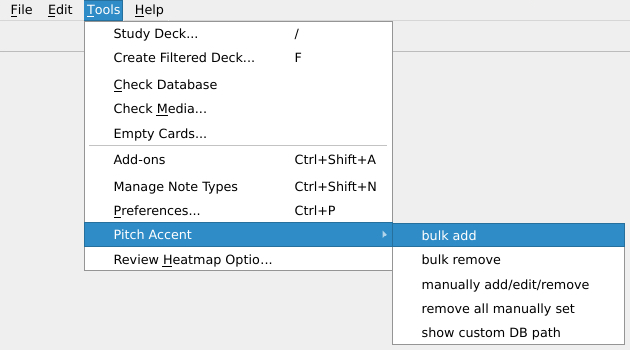
① Tools → Pitch Accent → bulk add
② Choose a deck ③ Select a note type (is skipped if whole deck is one note type) ④ Select the field containing the Japanese expression
⑤ Select the field containing the reading ⑥ Select the field to which the pitch accent info will be added ⑦ Done
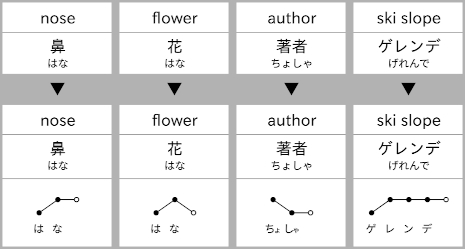
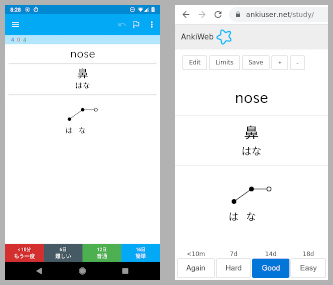
Result
—————<[ A D D I T I O N A L F E A T U R E S ]>—————
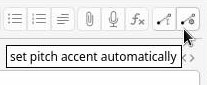
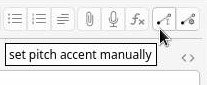
Add, edit, or remove pitch annotations of single cards with the card editor’s pitch accent buttons.
Annotations sync to mobile (e.g. AnkiDroid) as well as AnkiWeb
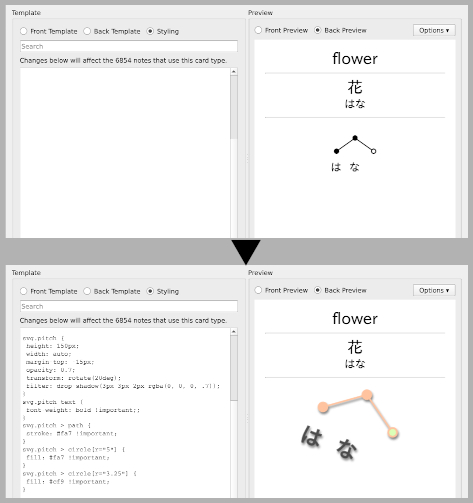
Annotations are customizable via CSS
Example usage:
svg.pitch { height: 150px; width: auto; } svg.pitch text { font-weight: bold !important; } svg.pitch > path { stroke: #fa7 !important; } svg.pitch > circle[r=“5”] { fill: #fa7 !important; } svg.pitch > circle[r=“3.25”] { fill: #cf9 !important; }
If you’re using night mode, use the following style to invert the pitch accent color.
.nightMode svg.pitch { filter: invert(1); }
—————<[ L I M I T A T I O N S ]>————— ① Does only support words (and some expressions), but not whole sentences. ② If the field in a card with the Japanese expression contains additional text, pitch accent lookup might fail (e.g. “<数字>頭” in a card for the counter of large animals). ③ When an expression has several possible readings (e.g. 汚れ) the script tries to determine which one is used by inspecting the reading field of the card. This does not always work.
—————<[ M I S C ]>————— Code Issues & Suggestions
—————<[ C H A N G E L O G ]>————— 2023/05/07 — Added function to automatically set single pitch. Made add-on Qt6 compatible. Various stability, performance and UI improvements. 2022/03/26 — Fixed bugs concerning functionality to manually add/edit/remove annotations. (Thanks kclisp) 2022/01/23 — Updated pitch accent DB (from roughly 100k to 200k entries). 2021/08/22 — Added cancel buttons to selection dialogs. 2021/01/26 — Added support for successive bulk adding of annotations to different fields of notes. 2020/10/05 — Added functionality to manually add/edit/remove annotations. 2020/08/02 — Made code compatible with new Anki 2.1.29 DB schema. 2019/09/22 — Added support for multiple note types within a single deck.
Screenshots


Liên kết hỗ trợ
Reviews (28)
👍 2026-02-06
Very helpful, does what it says on the tin.
👍 2026-02-02
Really nice addon, but personally as a Mandarin speaker, I put in my vocab as original hiragana form instead of kanji form(so I know what the pronunciation means instead of just automatically reading it in Mandarin), wish it could work with hiragana vocab too. It’s just a problem specific to me though.
👍 2026-01-21
Works well, useful.
👍 2025-10-27
The setup is very intuitive
👍 2025-10-15
Very useful!!! Awesome add-on
👍 2025-09-28
Good add-on, would be great if you could somehow remove that dividing line
👍 2025-09-01
Super helpful, mostly works as expected. Can be annoying to add pitch accents to multiple decks at once.
👍 2025-08-19
Simple to use, effective — thanks so much!
👍 2025-06-21
Very good plug-in👍, I have a problem, mac and iPhone can display normally, but iPad mini7 has problems, the tone and the pseudonym under the tone are stacked together and cannot be used. How to solve this problem (it has been a long time and has not been solved), thank you very much🙏
👍 2025-05-19
Awsome. But how to batch remove the black line and the space below it ? If would be awsome if you add it :33
👍 2025-05-16
Been using it for a long time, works great still!
👍 2025-05-09
Works as expected and only took me a few minutes. Huge thanks!
👍 2025-05-03
Thanks
👍 2025-04-05
it’s good, still works
👍 2025-03-22
works nicely. pitch accents in this visual format are a very welcome addition to my flashcards.
👍 2025-03-03
Very useful, Thank you!!!
👍 2025-01-05
Works perfectly, thank you
👍 2024-12-31
Thanks!
👍 2024-12-20
Helpful!
👍 2024-09-09
Great tool, but there are some things I would like to see added:
- Select hiragana reading position (above or below the pitch accent annotation). And っ should be positioned before the next kana, in the same “column”.
👍 2024-09-07
Doesn’t use Html Ruby very well but I made an addon to fix this for this and other add-ons https://ankiweb.net/shared/info/1090067124
This add-on could also be improved by alphabetical sort of the decks as well as ad support for subdecks
Over all, very good and saves lots of time
👍 2024-08-15
Check if your readings and accents are correct. Makes some mistakes sometimes. But great tool.
👍 2024-07-18
Great add-on! Super easy and quick to use!
Feature question; is it possible to change the location where the add-on gets it’s pitch accent data? I’d like to point it towards a Kansai database. Thanks in advance! Comment from author Glad you like it! :) If you go to Tools → Pitch Accent → Show custom DB path, it points you to a file that is treated as a preferred source for pitch accent patterns. If you place a dictionary of Kansai dialect pronunciation in the required format there you can achie
👍 2024-07-07
The automatic pitch accent inserter is not accurate in some words. For example: 滝(たき) that is LH, according to the addon is HL; 過言(かごん) that is LHH, according to the addon is HLL. Comment from author Thanks for the feedback. In the case of 滝, the data source used for the accents (Wadoku) appears to list 滝 (HL) as a family name before 滝 (LH) as a noun. In the case of 過言 it appears to be just wrong. I wonder if there’s a good way to check the Wadoku data against e.g. the NHK日本語発音アクセント新辞典, spot di
👍 2024-07-06
Works great, wish I found this earlier
👍 2024-06-22
Works well, easy to use!
👍 2024-04-08
Seems good. However, what database do you use for that, is it 100% accurate ? Also, does it work for things like family name, name of city etc ? Comment from author Glad you like it. The data used is from Wadoku, a Japanese to German online dictionary (similar to Jim Breen’s EDICT / JMdict). As far as permissively licensed, machine readable data on pitch accent goes, Wadoku is the most extensive and seemingly reliable source I am currently aware of. See: https://www.wadoku.de/wiki/display/WAD/Do
👍 2024-02-15
Great! But is there any way to delete the line that divides the text and the pitch accent (or basically, to make it not appear every time i add a pitch accent)?
