The download will appear to freeze. Just wait, it will eventually download.
The Kanji Colorizer addon automatically adds colored stroke order diagrams to your kanji cards. They are stored as media, so they continue to work even when you’re reviewing on a platform such as ankiweb where you don’t have the addon installed.
Usage: Add a “Diagram” field to a model with “Japanese” in the name and a field named “Kanji” - or other model and fields of your choice; this is customizable the config found in “Tools > add-ons”. When you finish editing the kanji field, a colored stroke order diagram will be added to the Diagram field in the same way that the Japanese support plugin adds readings. If the Kanji field contains multiple characters, the add-on will only generate diagrams for the kanji; if it does not contain kanji it will generate diagrams for all characters
“Tools > Kanji Colorizer > generate all new” will add diagrams to all such fields that don’t already have diagrams. Or the “(re)generate all” option can be used to generate them all with new settings.
The development site for this addon is at https://github.com/cayennes/kanji-colorize . If you have any bug reports or feature requests, use the issue tracker there or email me at cayenne@hey.com. I do not get a notification when you post a comment on this page.
UPDATES:
7/3/24:
Add option to draw grid under character, thanks to teozec Add option to write characters to multiple destination fields, thanks to byohay
1/8/24: Update to use latest KanjiVG diagrams.
11/3/20: Option to not overwrite destination field if it already has something in it (thanks Andrew Reitz!). Helpful message instead of unhelpful error pane when you try to generate all new and there are no models matching your config.
8/2/20: Fixed a bug that broke generating cards with empty destination field on anki 2.1.28+ (thanks eternal-flame-AD!)
7/26/20: Fixed a bug on anki 2.1.28 and added setting to control whether to generate diagrams for non-kanji characters
7/20/20: Will now properly generate kana combination cards
5/31/20: Option to generate diagrams only for cards with an empty destination field (thanks ThundX!)
11/2/19: Hopefully fixed an error prevented it from loading it properly.
11/1/19: Configurable fields (thanks AyanamiSan!)
10/28/18: Support anki 2.1 (thanks j-kramer!) and use new config system
12/23/17: Update KanjiVG data
12/22/17: Fix bug that would lock up anki when editing kanji cards in some conditions. Thanks to Quinnlet for reporting and alexpizarroj for finding the problematic code.
10/11/14: Kana support added
10/11/14: Newer kanjivg version, fix from LucasEasedUp for an exception when closing an empty add card form
4/15/14: Latest kanjivg version
12/7/13: Ignore invalid characters (such as Chinese characters that don’t exist in Japanese) instead of throwing error.
10/27/13: Fix for issue where diagrams were no longer generated after upgrading anki
5/9/13: Contribution from shufps: option to create colored groups instead of colored/numbered strokes (that was a while ago but I broke it before uploading it; now I’ve fixed it)
4/9/13: updated stroke order information from kanjivg
3/31/13: Fix for the “No module named colorsys” errors that some people were seeing; also ospalh’s fix for number coloring (no longer inappropriately bolded)
Screenshots
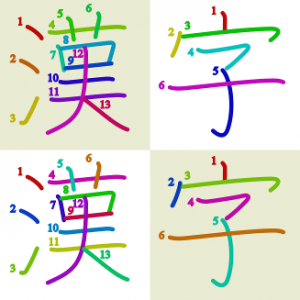
Liên kết hỗ trợ
Reviews (28)
👍 2026-01-25
A bit complicated to set up, but works perfectly once you’ve set it up
👍 2025-11-21
I love this add on, been using it since 2023, and been recommending it since then to people who have interest in learning how to write, or to people who look for a way to change approach in their kanji learning journey.
Imo, writing is one of the best ways to learn how to read, especially such huge collection of the chinese characters.
So if you look for the ways to enchant your learning, you may find this add on pretty useful (I do recommend to look up some youtube video where people explain
👍 2025-09-24
Works great.
IMPORTANT NOTE: This won’t work if you have SPACES in your field names. For the easiest fix, temporarily rename those fields, then you can rename them back to what it was before.
👍 2025-08-31
Exactly what I needed, thanks!!
👍 2025-07-29
This really is magic, I was hesitant on downloading Anki because most decks did not show the stroke order but ughh I love this so much. It did take me a while to set up how I wanted it exactly, but it definitely paid off and saved me hundreds of hours of having to look up stroke order ahh!!
👍 2025-05-08
Easy enough to customise to my own needs, works fine :)
👍 2025-04-06
Great addon, but please, for the love of God, rename “model” setting to “note_type”. This addon still saved me many, many hours but I lost a few trying to figure out what was wrong. Also if you’re reading it, good luck learning those kanji!
👍 2025-03-19
The add-on works greatly!
The only con that I see is that I wasn’t able to find a bulk add function for my existing cards ),:
👍 2025-03-02
Could you add a 2x2 grid in the background of all the images? It just makes it easier to proportion the different elements of the kanji when trying to learn and write them.
👍 2025-01-12
Works great! Once I understood the process, it was easy to generate and apply the stroke diagrams to my entire deck. It even works with my custom font! Some points that could be improved are making the directions more idiot-proof and ensuring the stroke numbers aren’t covered by the strokes themselves (add outlines?)
👍 2024-10-25
Hi, your add-on is great, thank you! Could you add a setting in the config section of the add-on with which we can exclude some symbols (like comma) on the generation of the stroke order diagrams? I have listed in some kanji more than 1 character separated by a comma, therefore every time I have inadvertently selected that field it generates commas. I can’t deactivate the add-on or set “overwrite-dest” to false since I haven’t finished on modifying cards. Fortunately the add-on doesn’t read pare
👍 2024-09-11
Awesome tool! Thank you so much.
It took me a while to figure it out but by a simple web search I found a video, idk if ankiweb allow links so just search “Japanese Tutorial: The Kanji Colorizer Add-on for Anki” on YouTube and an old video will pop up
Some clarification that might be useful; “Model”= Note type
👍 2024-08-23
please make the instructions more clear and not comparing to other plugins idk what that is. i cant get it to work at all. i just wanted a simple add-on but the setup is impossible to use
👍 2024-06-25
Worked really well, saved me hours of manually adding these images to all of my existing cards. Thank you for putting this together!
👍 2024-03-31
Excellent plugin, best of its kind
👍 2024-03-21
Very usefull add on. Makes creating cards very easy. Not very clear on how to setup proparly however.
👍 2024-02-13
Work quite well!! Go to Tools->Add-ons’ config->Change:
- “model” to the notetype you use, i.e I have a “Kanji” notetype so I change “model”:“Kanji”
- “dst-field” where Diagram will be generate
- “src-field” where your Kanji
Then Tools->Kanji Colorizer->Generate
👍 2023-10-17
I’m changing my rate because I made it work, it works great! Model japanese means that you need to have a note type named “japanese etc.”, so it has to have “japanese” in it. If you have more than one note type with “japanese” in it, it won’t work so watch out (or at least I couldn’t work it out). Then change of course the source field and destination field on the add-on configuration based on your name fields
P.S.: the “regenerate all” feature is awesome
👍 2023-05-24
Fairly janky to set up, but I got it working. I always forget how to make it work when I need it again though, it feels like it sometimes doesn’t work even when my Note Type has “Japanese” in it and I changed the settings in the kanji_colorizer.py file. The add-on settings from the menu don’t seem to actually save or change anything, so you probably have to edit the python file directly.
👍 2023-02-18
Doesn’t work
👍 2022-10-28
This is very helpful and is a lot easier to use than I thought (at least on ankiweb and anki desktop). But I have one issue and since I am new to anki I don’t know how to resolve this. The Diagrams on ankidroid are displayed, but are really tiny, almost impossible to read.
👍 2022-09-29
Never seen it work once, been trying to set source and destination for fields to see if it ever sets the diagram automatically, but nothing seems to work, and the add on config doesn’t even display the code anymore, just the options, so I have no idea if it’s the version that’s messing it up or something else
👍 2022-04-12
Works and is very helpful. Anki version 2.1.44
👍 2022-01-15
Worked like a charm!
👍 2021-12-16
Awesome. Just what I needed. Thank you very much for this.
👍 2021-08-09
Great add-on!
Minor issue found: After changing “diagrammed-characters” to “kanji”, after already having ran it, the kana is still visible. I was hoping (re)generate all would overwrite the diagram field back to empty.
edit: forgot I could just erase the field and re-add it :D
👍 2021-07-08
Amazingly helpful, thank you for this!
👍 2021-06-27
This is just what I needed for a stroke order deck I’m making for myself. Thanks!
