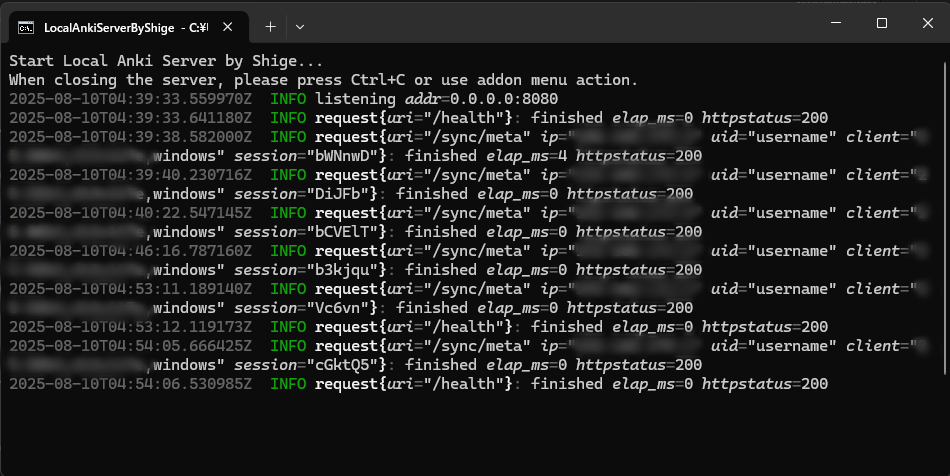
Edit 2025-08-10: I added a new mode to display the console. You can use it by selecting it when you start it up for the first time. (it will not start if the local server is already running.)
What is this Add-on?
This is an add-on to use a local server instead of AnkiWeb server. The latest version of Anki for desktop has a built-in Self-Hosted Sync Server for advanced Anki users, this add-on makes that server easier to use for beginner Anki users, so you can easily use the local server by just logging in with very little setup.
Introduction How the add-on basically works
When you start Anki the local server is auto started. The default username and password is username, password1234 (You can optionally change them.) On the desktop it auto sets the self-hosted server to Preferences when you log in from the add-on settings. In AnkiMobile and AnkiDroid you can connect from the same wifi after entering the self-hosted server in the mobile app option. When you close Anki the local server is auto closed.
Why use a local server instead of AnkiWeb?
Synchronization is fast because it is local wifi, so even if you have a lot of audio and images, synchronization will be completed almost instantly. (Syncing all decks for the first time takes a little longer.) You can optionally remove the deck size limit. Forced synchronization is also relatively fast, so changing fields is easy.
Laptop and mobile syncing is easy when AnkiWeb is not available for some reason. (e.g. Communication is too slow because the deck is too large. Cannot sync because the limit is exceeded. There is a temporary communication problem. Unable to connect to the Internet.)
Basically it works with local wifi, but with additional settings you can connect to your home wifi from outside and sync.
What are the disadvantages and risks of a local server?
Since the data is stored locally there is no way to recover it if the decks are lost due to some problem (Official AnkiWeb they may be able to recover the data from their server), so if you are worried about it please back up your decks regularly by yourself.
To access the server Anki and your laptop must be running at all times. If Anki closes for some reason or if your laptop closes the server will also close.
You will need storage for the decks. This means that storing sync data on a laptop doubles the file size. (e.g. decks for review + decks for sync)
The server built into Anki is intended for personal use so it is simple. It’s not possible to review only with a browser like AnkiWeb.
Basically the self-hosted server is a feature for advanced Anki users so there is no official Anki support. This add-on is developed by me and is not related to the official Anki, and there is no warranty for any problems or damages that may occur (because this Free add-on is developed by me as a personal hobby volunteer, not for work or business).
Notes
Anki 2.1.57+ is required. Older Anki cannot be used because they do not have a server built in.
When you log in to a new account on the local server, you are automatically logged out of the current AnkiWeb account. If you have forgotten your AnkiWeb email and password you may not be able to log in again, so please be careful. Your current AnkiWeb username can be found in Preferences. (Tools -> Preferences -> Syncing -> AnkiWeb Account)
If you do not log in for about 6 months, your AnkiWeb account will be deleted by the official Anki. So if you want to keep your AnkiWeb account, I recommend you to sync with AnkiWeb from time to time to back up your decks.
The local server depends on the server built into Anki. In other words this add-on does not create a server it only controls the server built into Anki. So a major update to the latest Anki may cause errors and problems just like normal add-ons. (Or if the official Anki no longer supports the server.)
The server communicates via wifi, so if your antivirus software or firewall blocks access to the server and Anki, you may not be able to connect even if you setup this add-on correctly (of, Wifi at school or company prohibits access). If so, the solution is different for each device and software so I cannot support it.
How to terminate the server?
The local sync server will continue to run automatically in the background, and basically the server will automatically terminate when Anki is closed. If for some reason the server does not close automatically, you will need to close it from the Task Manager. (Or restart your laptop.)
Windows: Task Manager Mac: Activity Monitor Linux: System Monitor
Also if the server freezes for some reason, it may prevent Anki from starting. In such a case, exit Anki and the server as described above, and start Anki with Shift key pressed to disable the add-ons.
How to use Addon menu
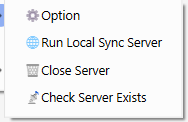
Option Open the Settings window. Change the settings then auto restart server. Run Local Sync Server Run the server. If the server is already running do nothing. Close Server Close the server. If it cannot be closed please close it manually from Task Manager or restart your laptop. Check Server Exists Check whether the server exists or not. Settings
When you press Save, or when you log in a new user, the server will exit and restart.
Local tab
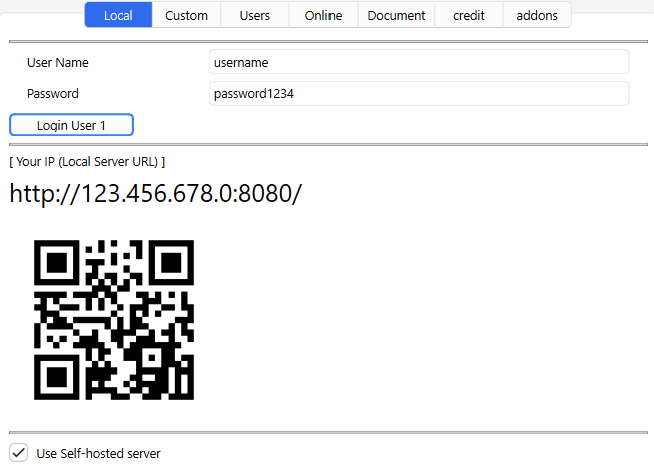
You can open this add-on option from Tools. If you want to use the server only with local Wifi then the options in this tab should work well enough. (Just login and use the server URL.)
User Setting
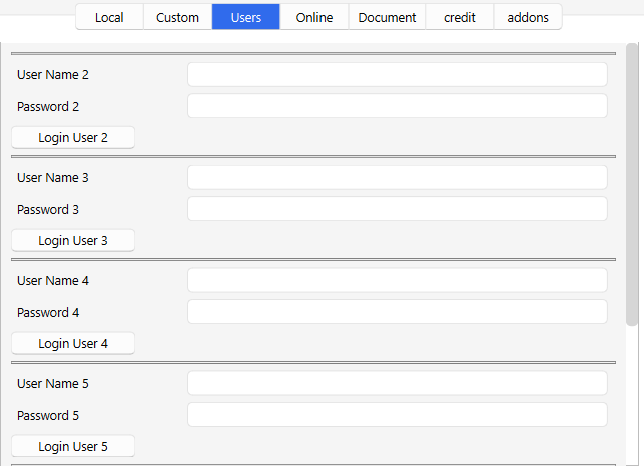
When you press the “Login User 1” button, the username, password, and local server will be set automatically. If you can synchronize by pressing the “Sync” button on Anki it is successful. The default settings are username and password1234.
Local Server URL
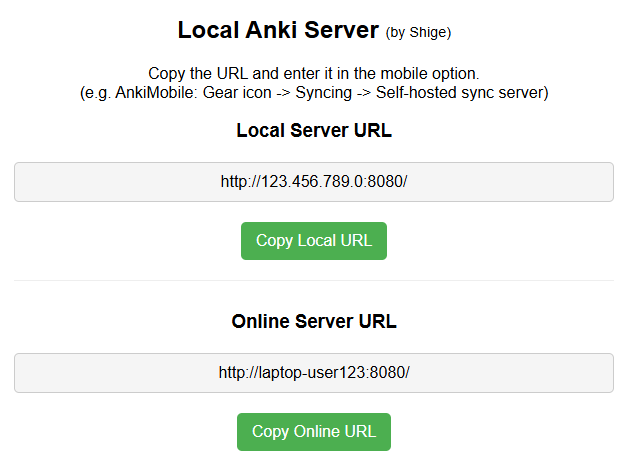
Enter this URL into the AnkiMobile or AnkiDroid options to access the local server from your mobile. Laptop and mobile must be connected to the same Wifi. The server will be restarted to reflect the latest options.
QR code
Instead of manually typing the URL into your mobile device, you can use the QR code to display and copy the URL. Laptop and mobile must be connected to the same Wifi. If you want to use an online server URL additional setup is required (VPN).
User Self-hosted server
Enabling this will automatically set the URL of the new local server to your Anki for desktop. If turned off, it will disable the self-hosted server setup for this Anki for desktop and return it to AnkiWeb. (But the local server will continue to run even if it is turned off.)
Or if you want to enter manually instead of automatically:
Disable this option Tools -> Preferences -> Sync -> Self hosted Sync Server Custom tab
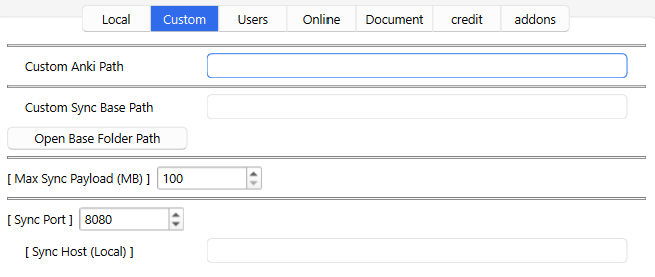
The options on this tab are set automatically, so basically you don’t need to change them unless you want to.
Custom Anki Path
You can specify the path to the Anki executable. If the auto-detected path is wrong, you can set the correct path. e.g. C:\Users\UserName\AppData\Local\Programs\Anki\anki.exe
Or if you have downloaded multiple versions of Anki, you can use the Anki executable to fix the version of Anki to use on the server.
Custom Sync Base Path
This is the path to the folder where the server data is stored. The default path is ~.syncserver. (e.g. C:\Users\UserName.syncserver) You can change the path where decks are stored by setting a new path. This path cannot be the same as the path where Anki’s decks are stored. (In other words, the server data must be stored in a different location from where Anki and your decks are stored.)
If you press the button it will open the location of the path where you have saved the decks on the server. If you want to delete the server data, delete those folders, anb be careful not to delete the account you need by mistake.
How to change username and password?
The username is used to name the folder. So if you want to change your username, you can open this path and change the folder name directly. Changing the name while the server is running may cause some problems, so I recommend that you close Anki and then change the name. (The server will run automatically until you close Anki.)
To change the password, simply change the password in this add-on option. If you change the username in the add-on option a new user folder will be created in this path.
Max Sync Payload
AnkiWeb and the built-in server limit the maximum size of uploads by default, you can change that limit with this option. Please set it in MB, the default setting is 100MB. If your upload limit is not reached you do not need to set this option.
Sync Port
You can change the Port number of the server you use locally. Port is like a local wifi room number, e.g. If other applications use the same 8080 number, you cannot use it because it is duplicated, so you need to change it to another number.
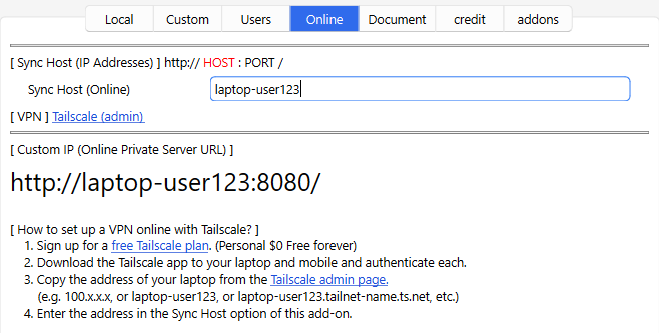
Sync Host (Local)
You can change the number of the server host to be used locally. This is needed to enter the correct IP address if the auto-detected IP address is wrong. If you set the wrong IP address, you will not be able to access the server, so do not enter anything unless you want to. (Do NOT enter the Tailscale host here.)
Console mode
I developed a new console mode for local Anki server.
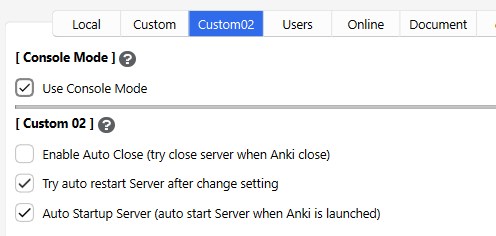
This mode can be used by selecting Console mode in the window that pops up when you launch the add-on. (it will not start if the local server is already running.)
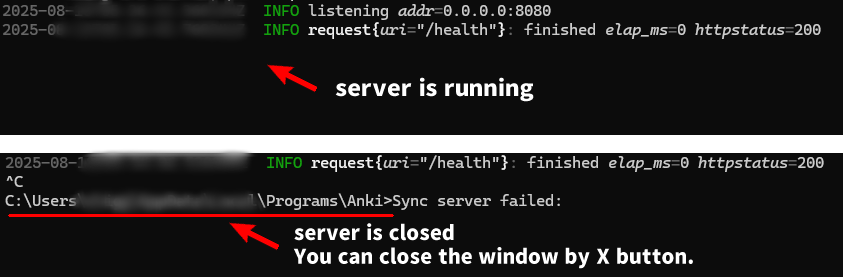
The server is displayed and closed using the console. A black window will be displayed, like the Anki launcher. The server will continue to run until the console window is closed. To close the server please press Ctrl+C or use addon menu action. (closing the window with the X button will force close, not recommended.) If Cancel, start the server without the console (as before). This old mode has a bit of a bug, so server may not be closed from add-on. (if so please close it from Task Manager or restart your laptop.)
Q. Why console mode?
Anki’s built-in server is designed to be launched from the console by developers, so using the c
Screenshots

Liên kết hỗ trợ
- Contact Author
- (For Developers) Building and running Anki sync se
- 🌟AnkiForums
- 🐙Github
- Patrons Q and A
Reviews (10)
👍 2026-01-12
Let’s me do syncs with my phone (when my ISP blocks Ankiweb for some reason) Comment from author glad it helped! :D
👍 2025-12-06
work! thx u💘 Comment from author thanks for the feedback!👍️
👍 2025-10-12
Does not sync files larger than 100mb. Max Sync Payload = 700 Comment from author --- Edit: 2025-10-14 --- Hi thanks for the report, please try these. [1] The local server requires a restart after changing the options, it will restart automatically by default but there is a possibility it may fail for some reason, if so this local server will not close even after Anki is closed. So please try force closing the server from Activity Monitor or restarting your laptop. [2] Basically there is no limi
👍 2025-09-10
thanks for this addon! but i wonder is it still limitation in collection size (300mb)? Comment from author hi thanks for the feedback! the collection database size is limited to 100mb by default (media files are not included in this calculation). maybe this 100mb is the compressed size so the limit for the uncompressed size is probably 300mb as you said. you can change this limit in the add-on options: (Anki Menu -> Tools -> Local Anki server Option -> Custom tab -> Payload -> Max Sync Payload)
👍 2025-08-20
Anki 25.07.5 (7172b2d2) (ao) Python 3.13.5 Qt 6.9.1 PyQt 6.9.1 Platform: Windows-11-10.0.22631-SP0
Traceback (most recent call last): File “C:\Users\user\AppData\Local\AnkiProgramFiles.venv\Lib\site-packages\aqt\sync.py”, line 199, in callback mw.closeAllWindows(lambda: full_upload(mw, server_usn, on_done))
File "C:\Users\user\AppData\Local\AnkiProgramFiles\.venv\Lib\site-packages\aqt\main.py", line 988, in closeAllWi

### 👍 2025-08-15

Awesome
Comment from author
thanks! :-)

### 👍 2025-08-14

good
Comment from author before post was edited
Glad it helped! :)

### 👍 2025-06-22

bro thanks for this i live in a country with REALLY bad limited internet syncing is really slow for me and i can't even do it all month because of internet quotas , this is litearlly a life saver bro i really appreciate it
Comment from author
wow, glad it helped! :D

### 👍 2025-05-25

I think it's an excellent addon that should be the default, partly because if everything is stored locally it's less expensive for Ankiweb in terms of users' multimedia.
Comment from author
Thanks! Perhaps in the future the official Anki plans to develop a paid server, if so the speed problem of AnkiWeb should be solved, so this add-on may be unnecessary in the future.

### 👍 2025-05-22

take the first like for being awesome as always
Comment from author
thank you!👍️
