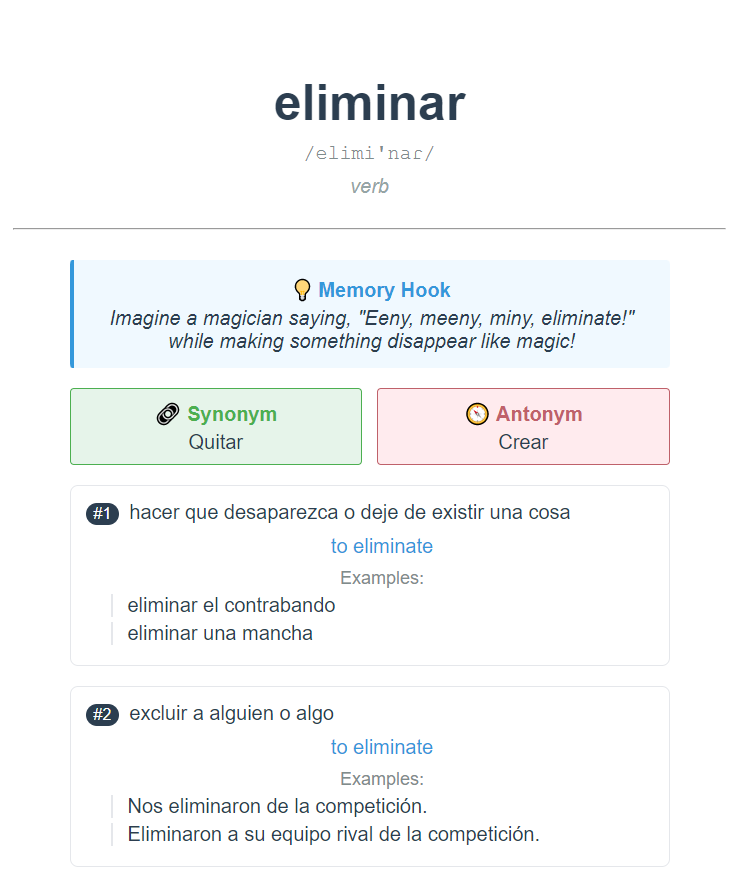
MnemoMaker is an advanced Anki add-on that transforms vocabulary learning by automatically creating comprehensive flashcards. It integrates with Cambridge Dictionary and AI services to generate beautifully formatted cards featuring definitions, examples, translations, and AI-powered mnemonics.
What are Mnemonics?
A mnemonic device is a learning technique that aids information retention by creating meaningful associations. These memory devices help connect new information with existing knowledge in your long-term memory, making learning more efficient and memorable.
Features Multi-Language Support
Supports multiple language pairs including:
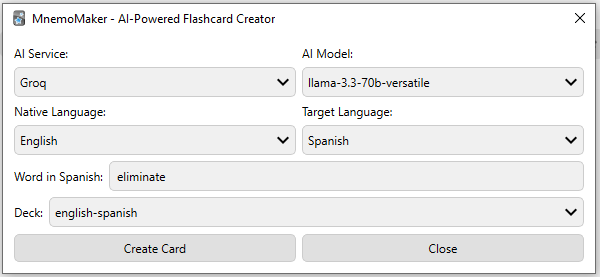
English → French, Spanish, German, Italian, Portuguese Turkish, French, Spanish, German, Italian, Portuguese → English AI-Powered Mnemonics Generate culturally-relevant memory hooks in your native language Smart word associations based on your cultural context Automatic synonym and antonym suggestions Multiple AI provider support (Groq and OpenAI) Rich Content Integration Comprehensive definitions from Cambridge Dictionary Native language translations Contextual usage examples IPA pronunciation guides Detailed word structure and grammar information Prerequisites
Important: Valid API credentials are required for mnemonic generation. You’ll need an API key from either:
Groq: Get your free API key OpenAI: Get your API key (paid) Installation Guide
Add-on Installation
In Anki, go to Tools → Add-ons → Get Add-ons and enter the installation code. Restart Anki.
AI Service Configuration
Go to Tools → MnemoMaker → Config Enter your chosen API credentials How to Use Open MnemoMaker from Tools → MnemoMaker: Language Learning Accelerator Configure your settings: Choose AI service and model Select native and target languages Pick destination deck Enter the word you want to learn Click “Create Card” Support
If you find MnemoMaker helpful, you can support the project
Screenshots


Reviews (6)
👍 2025-12-07
Al querer crear una mnemotecnia dice: Error creating card: Su base de datos parece estar en un estado inconsistente. Utilice la acción Comprobar base de datos. No such notetype>: ‘0’. Ayuda porfavor
👍 2025-11-06
Please add english to english support!
👍 2025-08-14
Anki 25.07.5 (7172b2d2) (ao) Python 3.12.3 Qt 6.9.1 PyQt 6.9.1 Platform: Linux-6.14.0-27-generic-x86_64-with-glibc2.39
When loading MnemoMaker Language Learning Accelerator: Traceback (most recent call last): File “/snap/anki-desktop/51/lib/python3.12/site-packages/aqt/addons.py”, line 250, in loadAddons import(addon.dir_name) File “/home/adel/snap/anki-desktop/common/addons21/756388520/init.py”, line 1, in <module> from . import main File “/home/adel/snap/anki-desktop/com
👍 2025-05-29
This looks great but it’s not compatible with the last version of anki. Here’s the log:
Anki 25.02.5 (29192d15) (ao) Python 3.9.18 Qt 6.6.2 PyQt 6.6.1 Platform: macOS-14.4.1-arm64-arm-64bit
When loading MnemoMaker Language Learning Accelerator: Traceback (most recent call last): File “aqt.addons”, line 250, in loadAddons File “/Users/xxx/Library/Application Support/Anki2/addons21/756388520/init.py”, line 1, in <module> from . import main File “/Users/xxx/Library/Application Sup
👍 2025-04-28
It helped me learn new words. Good job. Comment from author Thanks!
👍 2025-04-11
Doesn’t work. Addon not loaded Comment from author After installing the Add-ons, make sure to restart Anki, if it still doesn’t work, try updating Anki to the latest version.
