Notes2Flash
AI-powered application to organize online notes (Google Docs, Notion, Obsidian) and convert them into Anki flashcards.
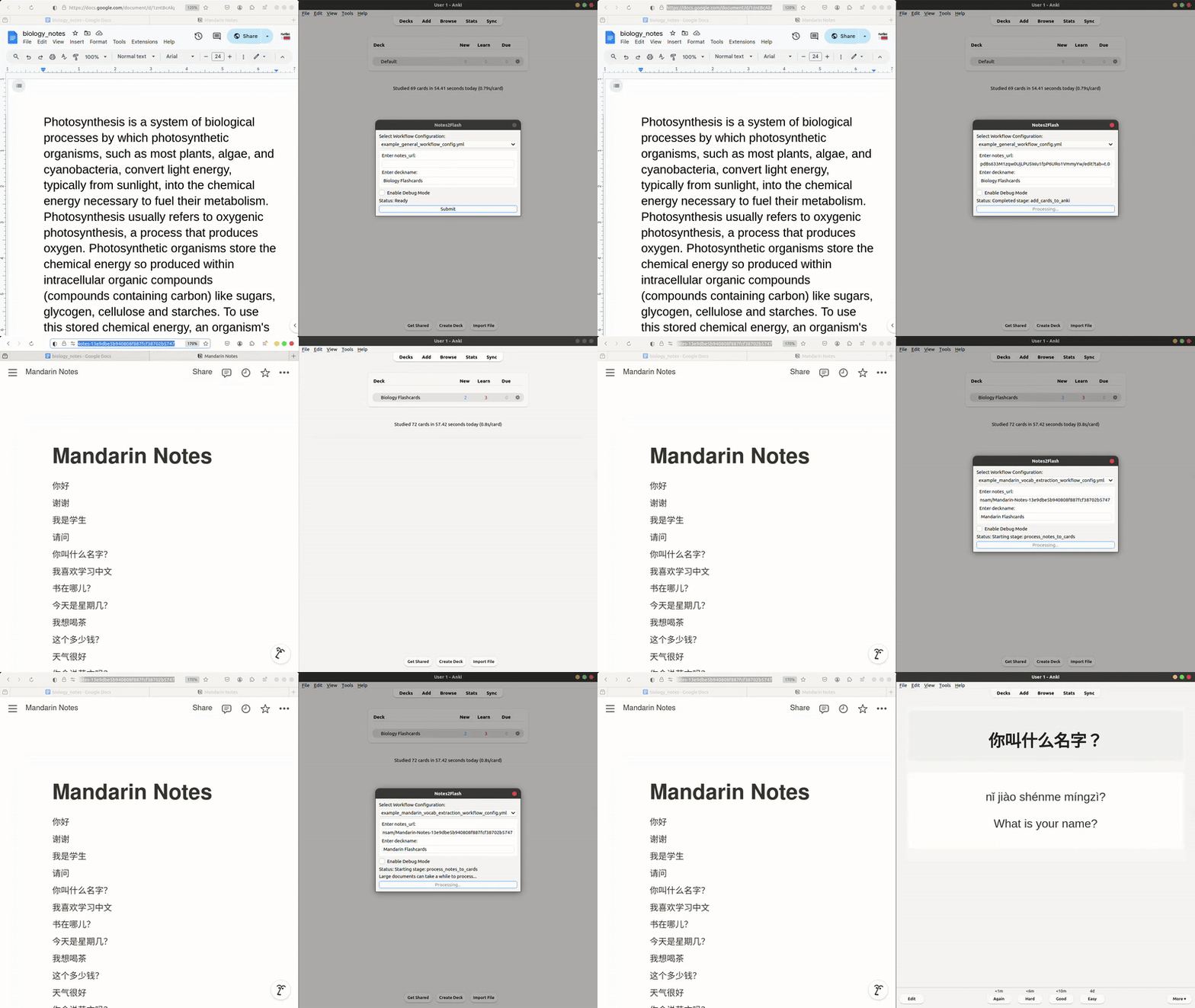
Features Compatibility with Google Docs, Notion, and Obsidian Minimum setup to scrape contents of online documents and convert them into Anki flashcards Highly customizable flashcard creation via YAML workflow configurations Support for multiple LLMs (e.g., GPT-4, Llama, Gemini) through OpenRouter.ai Ability to chain prompts with multiple API calls for complex workflows
Tested Anki Versions:
24.06.03 (qt6) 23.12.1 (qt6) 2.1.49
For detailed information and examples, visit the GitHub page.
Installation
If you haven’t installed Anki yet, you can download it from the official Anki website.
Go to the Notes2Flash AnkiWeb page.
Copy the add-on code:
868678030
Open Anki and go to Tools > Add-ons > Get Add-ons…
Paste the code into the “Code” field and click OK.
Setting Up OpenRouter.ai Account (Required) Create an OpenRouter.ai account quickly using your Gmail or other means: OpenRouter.ai Go to the “Keys” section and press “Create Key” Copy the generated key into the config.json of the notes2flash addon: In Anki, navigate to Tools > Add-ons > Notes2Flash > Config Paste the key into the value within quotes by “openrouter_api_key” Restart Anki for changes to the Config to take effect
Note on Pricing: Free models like meta-llama/llama-3.1-70b-instruct:free require no credit card. For paid models, a $5 USD minimum top-up is needed. A cost-effective option is openai/gpt-4o-mini, processing 1 page (≈ 500 words ≈ 25 flashcards) for ~$0.0024. Visit OpenRouter.ai to explore models.
Notes2Flash is not affiliated with OpenRouter.ai and does not receive any financial benefit from its usage.
Notion Integration (Setup Required if using Notion) Create Integration: Visit the Notion Developer Portal and select “New Integration” Provide a name, assign it to your workspace, and set the necessary permissions After creation, store the Integration Token securely for authentication Share Pages: Navigate to the page you want your integration to access Click “Share” > “Invite” and search for your integration by name to grant it access More documentation
For more workflow examples and detailed documentation, see the GitHub repository.
(2025-01-06) Notes2Flash v1.1.0 Update:
- New: Added retry handling for API errors, a cancel button, and prevention of duplicate Anki cards.
- Improved: More efficient multi-step processing and better logging.
- Fixed: Issues with content chunking and debug logging.
For a more detailed changelog on github please see here
Getting support
If you need help, found a bug, or have a suggestion, the best way to reach out is by creating a GitHub issue here.
Screenshots
Liên kết hỗ trợ
Reviews (4)
👍 2025-02-10
super useful thank you!
👍 2025-01-06
thanks
👍 2024-12-31
Thanks
👍 2024-12-16
Free to use and quick to set up
