This addon does not work on Apple/MacOS unless you modify some Mac security settings, see the section “Apple/Mac” below. AnkiMobile and AnkiDroid don’t support add-ons so this add-on is only useful on Windows and Linux.
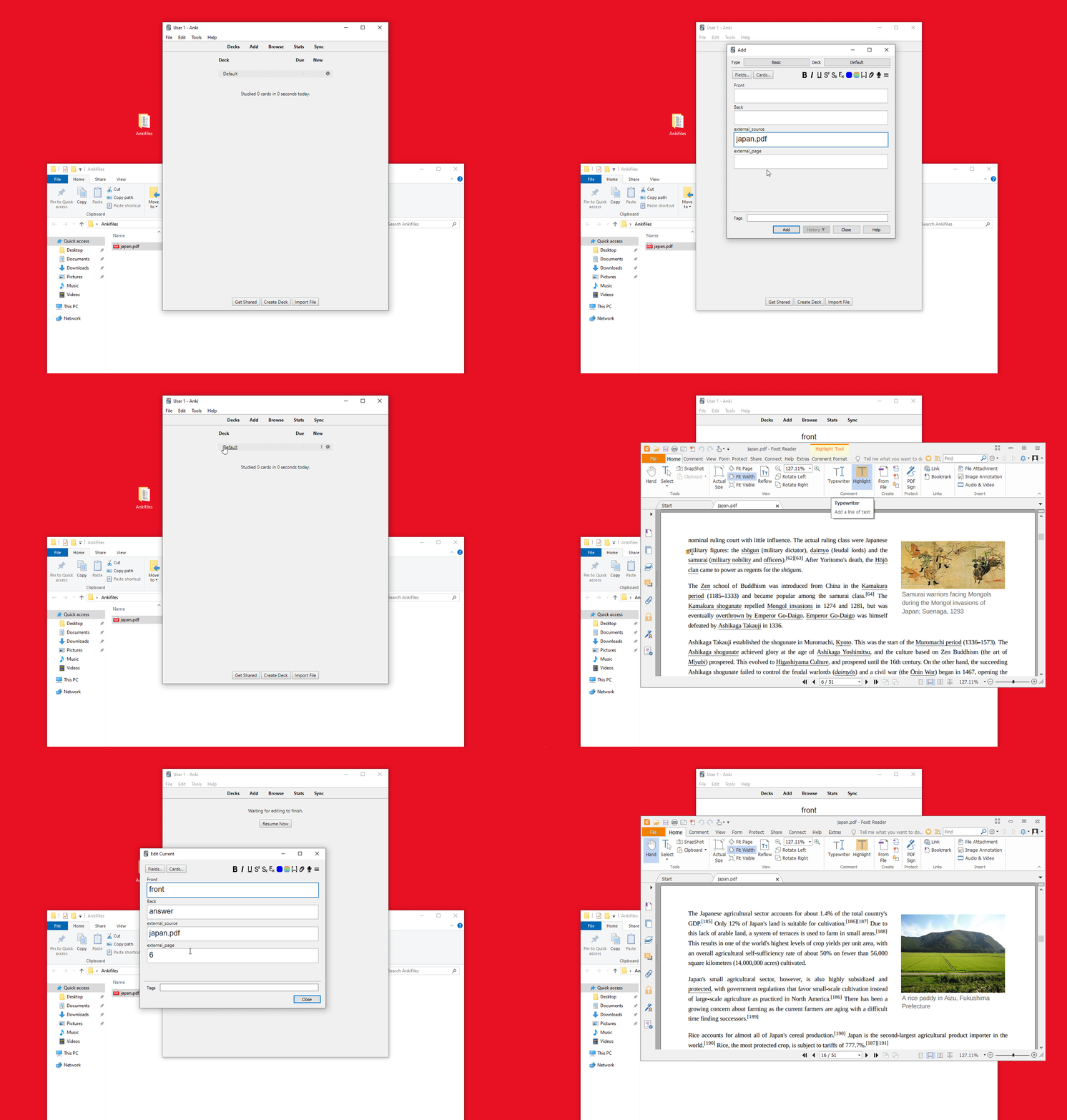
This addon allows you to open a file in an external app at a specific position, e.g. a pdf in your pdf viewer on page 37 or a music file in vlc at 1:23 by clicking a hyperlink in the reviewer/previewer or from the editor. I have used this add-on to open pdf files in Sumatra or okular, office documents in LibreOffice Writer, epub files in the calibre ebook-viewer, audio files in vlc at positions in the middle.
There are two different ways to use this addons:
links are within other fields: Let’s say you have a file named France.pdf in a folder that you have set under Default folders for relative paths for a program/extension. Then you write ___france____7 anywhere into a field in a note. Then during reviews this gets transformed into a clickable hyperlink that will open the file France.pdf on page 7. In the editor you can double-click it to open it in a pdf viewer. filename and page/position in separate fields. for details see the screencasts above/below.
Apple/MacOS
I don’t have a Mac so I can’t adjust and test this add-on for MacOS. By default the addon is broken on MacOS because MacOS restricts which apps can read or modify which files (check System Preferences -> Security & Privacy -> Privacy). If you just want a simple pdf viewer have a look at the add-on pdf viewer. In the MacOS settings you can give Anki more access to your files (which I think is not secure). Then you could use the default app for displaying pdfs in MacOS which is “Preview”. But there is no command line parameter like “—page” when opening “Preview” to go to a specific page. So this add-on uses a workaround with AppleScript which is slow-ish and due to the way it works you’ll briefly see a flickering box before the targeted page is opened. To use Preview use these settings
Extensions: pdf command/program: preview command parameters to open on specific page: PATH#page=PAGE
screencasts about using extra fields
You can download the following screencasts (gifs) by right-clicking them. Then select “save image as” from the context menu (tested in Chrome and Firefox). Then open these gifs with a program that supports to pause gif files. On Windows I use the popular image viewer IrfanView that can also display gifs. IrfanView has “Options->Start/Stop Animation” and you can adjust the speed with [SHIFT][CTRL][+] or [SHIFT][CTRL][-]. On Linux I use mpv.
There are three steps to do:
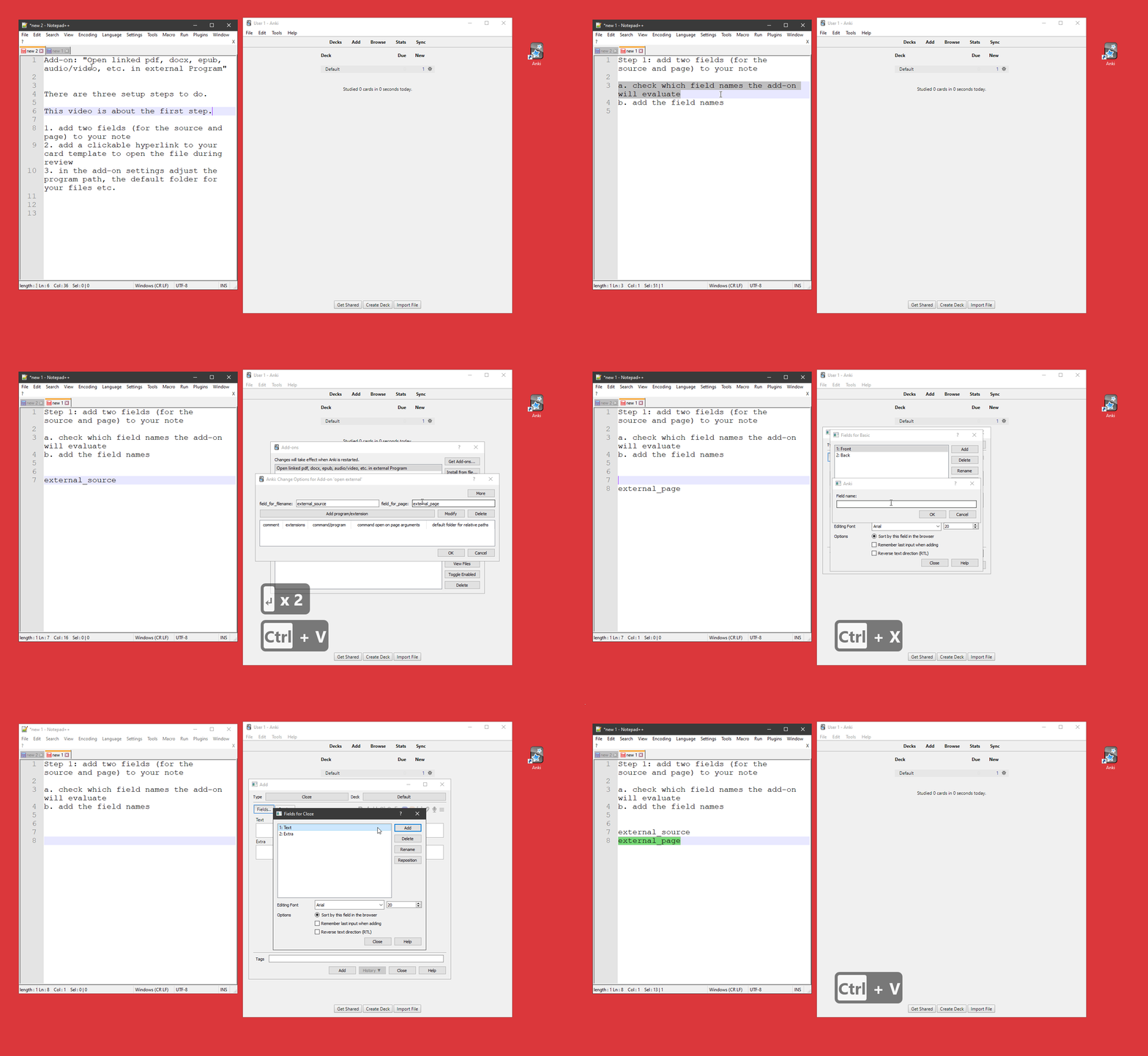
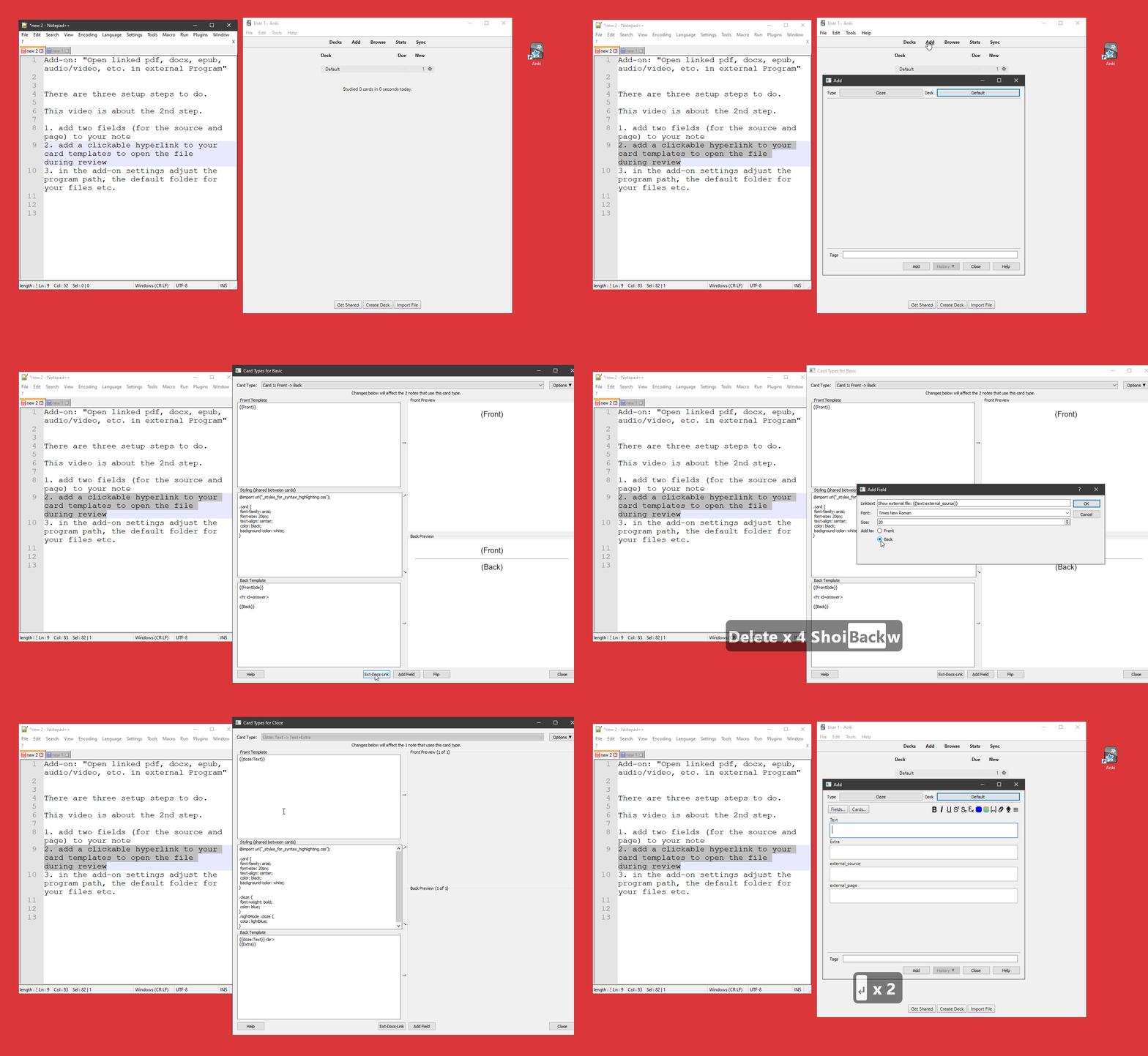
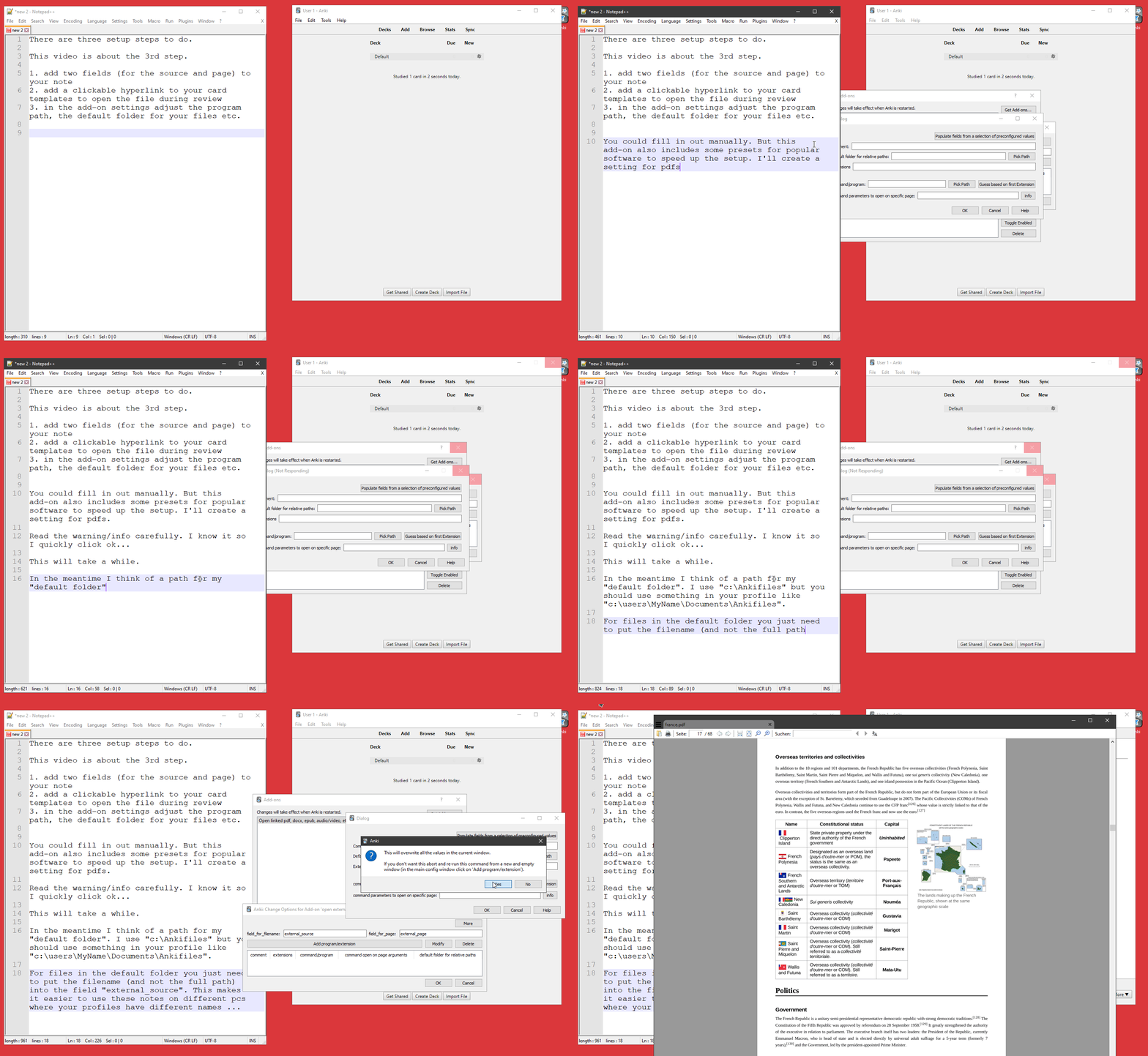
Add two additional fields to all note types. The default names for these fields are “external_source” and “external_page” but you can adjust these field names in the add-on configuration. See Screencast 1 for details You must add a hyperlink to the template in the “Card Types for … ” window. This add-on adds a button for this at the bottom of this window named “external Program”. See Screencast 2 for details You must setup your external programs. In the main window go to Tools->Add-ons, then select this add-on and click the button “config”. See Screencast 3 for details
Screencast 1 - Adding Fields
Screencast 2 - Adjusting the Card Templates
Screencast 3 - setup your external program
Use
I put the files I link to from my notes/cards into a the folder I set under “Default folder for relative paths” in the add-on settings (for each file type). Then it’s enough to put in the file name. I can quickly fill out relative paths with an add-on like Field History. This approach makes sure that my links always work (after adjusting just one setting) and I don’t move and break files by accident.
The backslash is only used as a folder separator. You may not use "" in a filename.
Limitations
There are some limitations about the infield option:
This works only for files that are in a folder set in Default folders for relative paths). Filenames may not contain spaces (whitespace)!!!! All occurrences of ___ are transformed. If you have ___ in other places in your notes you’ll get weird links that lead to errors when you click them.
bugs, problems etc.
When you click a link and nothing happens: Maybe it’s a bug in my add-on or maybe there’s a problem in your config - my config is not the easiest to use so maybe it’s the latter and you can fix it for yourself. To find out run Anki from the command line, for details see this section from the manual. Then Anki will print diagnostic messages in the terminal window. Whenever you click a link my add-on inserted into a card you should see the command my add-on tries to execute. Try to run this command from the Terminal/Command Prompt: If it doesn’t work outside of Anki the problem is not my add-on but the config. If it works let me know.
Feedback, improvements, and error reports are welcome. It’s best to post these in the official anki forum where I can respond multiple times, just click the “contact author” button on the upper right.
alternatives
To incrementally process pdfs have a look at the add-on Searching, PDF reading & note-taking in “Add” dialog. If you just want a simple pdf viewer with som editing options have a look at my add-on pdf viewer. For editing images and sound files from your cards have a look at OpenInExternalEditor,Rename,Duplicate for Image,Audio,Video.
versions
2025-08-31 fix for code related to the editor in anki 25.02+ 2024-04-09 some fixes for windows paths 2023-06-18 fix filename sometimes inserted at beginning of field (2.1.50+), various changes related to filenames in normal field 2022-07-14 fixes for in-field links with _…__; optionally use internal pdf viewer from the add-on “pdf viewer”, at least one bug fix … (.45+ only) … 2019-09-16 initial release
Screenshots
Liên kết hỗ trợ
Reviews (28)
👍 2025-07-07
Fantastic add on, extremely useful!
👍 2025-04-23
Anki 25.02 (038d85b1) (ao) Python 3.9.18 Qt 6.6.2 PyQt 6.6.1 Platform: Windows-10-10.0.26100
Traceback (most recent call last): File “aqt.webview”, line 53, in cmd File “aqt.webview”, line 169, in _onCmd File “aqt.webview”, line 728, in _onBridgeCmd File “decorator”, line 232, in fun File “anki.hooks”, line 92, in decorator_wrapper File “anki.hooks”, line 89, in repl File “C:\Users\Lenovo\AppData\Roaming\Anki2\addons21\879473266\reviewer_previewer.py”, line 16, in myLinkHandler
👍 2024-10-29
Fantástico. Dá algum trabalho para configurar, mas é uma mão na roda para não perder muito tempo elaborando resposta, basta linkar com o documento.
👍 2024-10-29
This is excellent and very well-documented. Using it to open files in VLC. Thanks, sincerely. : )
👍 2024-07-25
This is amazing!!! The only thing is being able to do it on IOS/Android!!!
👍 2024-07-21
It is what I need!But I can’t open pdf on specific page with the Edge browser
👍 2024-03-31
muy buena app para aprender complejos contenidos de todo tipo de temas
👍 2024-01-08
Hello, this add-on looks great, but i get this error when i click the hyperlink : ,,no program set for this extension or file not found”. I use Anki Version 2.1.54 (b6a7760c), Qt 6.3.1 on win 10 and i m quite sure i respected all steps from the videos. Comment from author I just saw your review. That’s unfortunate.
You could start Anki from the commandline (cmd) by running anki-console.bat which is in your anki program folder. this might print additional information though I already plan to e
👍 2024-01-07
Brilliant idea! Brilliant add-on. This is what I needed! This saved my life :)
👍 2023-11-22
This addon is very useful and I seriously would have liked to have known about it years ago, thank you so much for sharing it with us. Please, the only thing I would request is if there would be a keyboard shortcut to directly open the generated link in the reviewer. Very grateful for your work. I hope to support future versions of Anki.
👍 2022-12-03
I’m using calibre to manage my books and I couldn’t delete the whitespaces in calibre.
so, if you’re in the same spot.
you can use this structure:
title%20-%20Author_
instead of:
title - Author_
I hope you find it helpful.
👍 2022-08-11
What an absolute piece of gem. Incredible concept, beautiful execution, and good support from the developer. The setup is a little bit tricky but when you get past that it is really worth it. Thank you for sharing this add-on.
Initially I had a problem with Foxit reader on Windows not going to the pages that it was supposed to, but I found the solution in the forum. Here is the link in case someone else encounters this problem: https://forums.ankiweb.net/t/open-linked-pdf-docx-epub-audio-vide
👍 2022-05-23
Works perfect here. Thank you for this addon.
👍 2022-03-02
great addon. i used this to add my text book and school videos to all of my anki cards with the batch editor. it works great and even can fetch from a flashdrive (which is helpful for file sharing). i was going crazy trying to figure out why it wasnt working because i was trying to open the files in the preview window (it only works during “real” review, not in the preview window) i sometimes use the preview window to study. if there is an easy solution please make it work in the preview window!
👍 2022-02-20
Thank you for your addon, If you using Windows OS, I recommand a pdf reader named ‘BookX Note Pro’ to you, which can copy source link every page you like, then you just paste the link to anki surounding by hyper link tag, it work well.
👍 2022-02-16
hi I am new to anki indeep,
however this is 1 card 1 hyperlink, can it be 1 card, multiple hyperlink? i.e.
e.g.
what is duke’s criteria? (hyperlink to IE.pdf #page 123)
what is the treatment of IE? (hyperlink to IE.pdf #page 124)
it helps.
thanks Comment from author you could try the “inline-links (experimental)” functionality so that you write e.g. __IE.pdf____123
The downside is that I haven’t tested this a lot and don’t have time for this.
But you could
👍 2021-12-11
Thanks for your amazing addon. But I keep getting this after the latest update (I’m on 2.1.47 anki version, debian buster):
An add-on you installed failed to load. If problems persist, please go to the Tools>Add-ons menu, and disable or delete the add-on.
When loading ‘Open linked pdf docx epub audiovideo etc in external Program’:
Traceback (most recent call last):
File “aqt/addons.py”, line 230, in loadAddons
File “/home/m830/.local/share/Anki2/addons21/879473266/init.py”, l
👍 2021-10-14
please
attach a video
how i can use it
???????????????
please Comment from author Thanks for the hint. I re-added the missing screencasts.
👍 2021-08-15
Such a brilliant Idea, Great work, really make study much easier.
BTW,
I downloaded the gif, then using an online converter to make mp4 files.
Thank you very much!
👍 2021-03-09
Very well made and helpful
👍 2021-03-01
Amazing plugin, I had a problem with the vlc but now its ok.
11/10 would kiss the dev.
👍 2021-02-20
It works perfectly.
👍 2021-01-15
good bug fix
👍 2021-01-05
The addon doesn’t support the Foxit pdf? Comment from author The last time I checked about 18 months ago it did. But a lot can change in the meantime. Maybe you can setup the path manually in the add-on config. To find out the path of your foxit installation I would search google for something like “find out path of program in windows”. If you installed an app from the store it’s much more complicated. At the moment I don’t have a windows computer so I can’t help.
👍 2021-01-02
Thanks a lot such an add-on. Thumbs up. One thing that could perhaps be considered in the future is the possibility to open links (especially for PDFs) to specific paragraphs instead of just the page number. In other words, there could be an additional field which lets you input the zoom level (eg. TopLeftZoom,318,18,1.7687) in addition to the page number. That way, the link sends you to the specified page and the the exact paragraph or section of that page. Comment from author Thanks.
I agre
👍 2020-12-12
Very helpful, thanks!
Would be great if one could add several PDF links to the same Anki note, by seperating them with a new line, maybe. Comment from author check https://github.com/ijgnd/anki__Open_linked_pdf-_docs-_epub-_audio-_video-_etc_in_external_Program/issues/12
The update from 2020-12-13 has some options for this.
“several PDF links to the same Anki note, by seperating them with a new line” would be useful. I didn’t implement this yet because this would have been more complicat
👍 2020-09-04
An awesome addon…So useful. Thanks a lot for developing this cool addon!
👍 2020-08-18
Useful addon.
Author was nice and helpful in his Github page.
5/5
