PDF TO NOTES Using the poppler library (https://poppler.freedesktop.org/) the add-on converts a PDF file into notes. - Question/prompt extracted from each page (the first line of text) - Convert PDF pages to separate “normal” (front/back) notes or separate clozes in a single cloze type note. - PDF pages inserted as images or HTML (using poppler pdftoppm and pdftohtml).
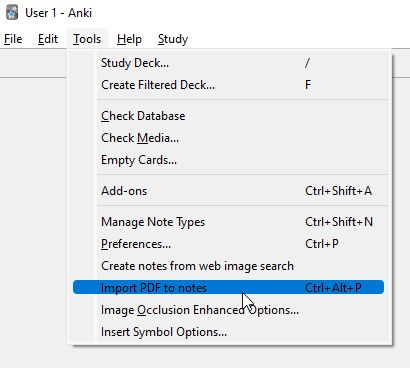
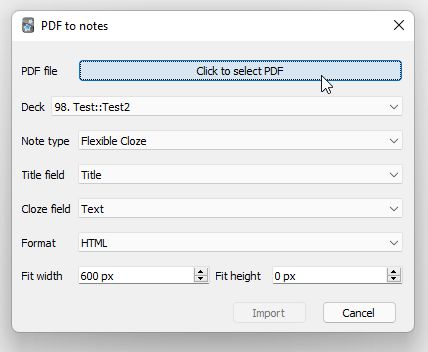
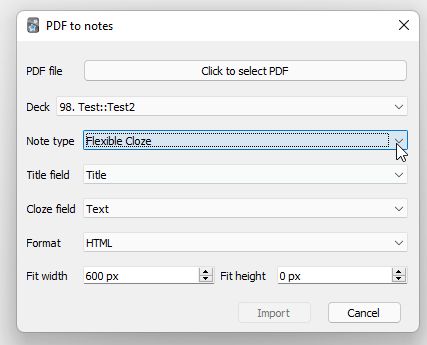
PDF file (can be multiple): select file(s) to convert. Deck: Which deck the added note(s) will be inserted into. Note type: Which note type to use for insertion, supports “normal” (front/back) note types as well as cloze note types. Subdeck: If checked a subdeck (with the PDF file name as title) will be created for each file. Note that if note type is a cloze style note there will be one subdeck for each note. Front (“normal” (front/back) note type): Which field to insert the “question” (first line of text in the page) in. Back (“normal” (front/back) note type): Which field to insert the “answer” in. Title field (cloze note type): Which field to insert PDF file name as title (for note types, such as the built-in cloze, that do not have a suitable field for this, select <none>). Cloze field (cloze note type): Which field to insert clozes into. Clozes are inserted as prompt: {{c1:: answer}} where prompt is the first line of text extracted from the page and answer is either an image of the page or a with the page HTML. Format: Format to insert the pages in, either as images (will preserve exact layout and work well on all screen sizes but no editable/selectable text) or HTML (does not give perfect results on any screen, especially not small screens but text can be copied/edited). Configurable keyboard shortcut (default Ctrl+Alt+P) to open dialog from main window Fit width/height: output will be scaled proportionally to fit inside the specified box (0 means not constraint in that direction, i.e. 0 x 0 means no scaling and 600 x 0 means output will be 600 px wide and height scaled proportionally). Return will select the current item (same as space) whereas Ctrl+Return will start the import and Escape will cancel the dialog. https://github.com/TRIAEIOU/PDF-to-notes Installation
Windows binaries of poppler are packaged in the addon (https://github.com/oschwartz10612/poppler-windows). On many Linux installations it is included in the default install, otherwise install with a package manger, for instance apt: sudo apt install poppler-utils. On macOS it can be installed with the homebrew package manager: brew install poppler (untested as I don’t have access to a Mac). Changelog
2022-01-01: Prepare code for Anki Qt5 to Qt6 transition. 2022-01-31: Add keyboard shortcut to open dialog from main window. Add option to scale output. Make keyboard input more intuitive. Allow multiple PDF file selection. 2022-02-06: Bug fix on PDF to image and no scaling. 2022-02-11: Added option to create subdeck for each PDF file. 2022-05-13: Fixed shortcut bug. 2022-05-18: Bug fixes.
Screenshots
Liên kết hỗ trợ
- Contact Author
- https://github.com/TRIAEIOU/PDF-to-notes
- https://github.com/oschwartz10612/poppler-windows
- Contact Author
Reviews (9)
👍 2024-04-06
I simply fixed this add-on for Anki24+ and uploaded it to AnkiWeb. After the original add-on has been updated to Anki24+, this fork is not needed. 📥PDF to notes (Fixed for Anki24 by Shige) https://ankiweb.net/shared/info/1660513597
👍 2024-03-16
chaos, not usable
👍 2024-01-14
Sadly does not currently work. (Anki version 23.12.1)
👍 2023-12-03
looks like the sorting field is working now, good. thanks
👍 2023-11-08
it really didnt do much
👍 2023-08-04
It’s very complicated only people with good computer knowledge can do this
👍 2023-07-18
Muito obrigada! Enfim amei.
👍 2022-11-08
Thank you from the bottom of my heart. Wanted you to know you made someone’s day easier.
👍 2022-01-11
Awesome!; if there would be an option to make HTLM text transparent (in night mode its shows me white paper sheet) Comment from author Thanks! The poppler pdftohtml merges all images with the page background. Making the background transparent would require using another software for the conversion or image manipulation guessing what is the background color and setting that to transparent in the background image. Both are outside the scope of this addon.
