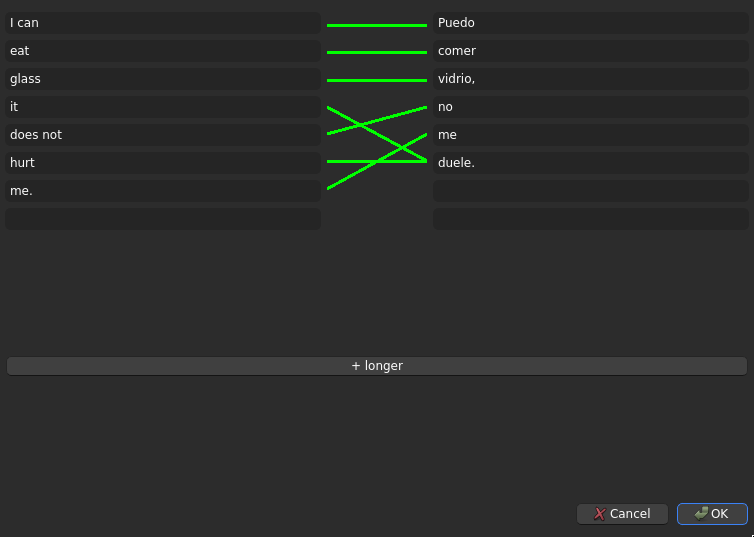
New note types Sentence Translation [n] have fields for words of a sentence in a source language, the same sentence in a target language, and the correspondences between them. n is the number of separated words/phrases in each sentence. These notes make three kinds of cards: Translate, Untranslate, and Advance. The add-on centres around a GUI to conveniently edit these notes, which creates the note types as needed.
Cards
A Sentence Translation [n] note makes three times as many cards as there are non-blank words entered for the target sentence. New cards appear when new words are added to a note. Existing cards go blank, and can be readily deleted, if the target sentence’s word that guided that card is set blank.
In a Translate card, you see the source language’s sentence with a word/phrase in italics, and you answer with the target language’s word:
Q: I can eat glass, it does not hurt me.
A: duele
Untranslate cards are similar, but from target language to source language:
Q: Puedo comer vidrio, no me duele.
A: it hurt
Advance cards teach the target language’s word order, separately from vocabulary. Given a place in the source language’s sentence, you are prompted for the word or phrase that follows in the target language’s order. Together, all Advance cards for a sentence teach the target language’s word order:
Puedo / comer / vidrio, / no / me / duele.
I can / eat / glass, / does not / me. / it hurt
Advance cards mark the word/phrase in question with bold:
Q: I can eat glass, it does not hurt me.
A: I can eat glass, it does not hurt me.
I can eat glass, it does not hurt me.
Editor
In the top menu’s Tools category will be “Edit Sentence Translation”. That action opens the GUI for the note focused in the card browser, if the browser is open, or otherwise a new note.
The editor shows two columns of text fields. Each field should hold a word or phrase, ordered to form a sentence. The source language goes on the left, and the target language on the right.
Different languages often order words differently. To get useful cards out of Sentence Translation notes, you must mark which words from one side translate to which other words on the other. To do so, click and drag in the gutter between columns, from (next to) a word on one side to (next to) a word on the other. A green line will appear between them.
Each word in the target language can correspond to multiple separated words in the source language, like “duele” to “it” and “hurt”. Each source word can only correspond to one target word, or a single contiguous target phrase. If “it does not hurt” were one phrase on the source side, it could not map separately to “no” and “duele”, only to a contiguous (and incorrect) “no me duele”. If you draw a link with an already-matched source word, it replaces that source word’s previous link.
If your sentence (in either language) splits into more words/phrases than there are rows in the editor, click ”+ longer”. This extends the editor, and the note type that will be used when the note is saved.
Notes are only added or changed when you click OK.
Screenshots