anki-preview-slideshow
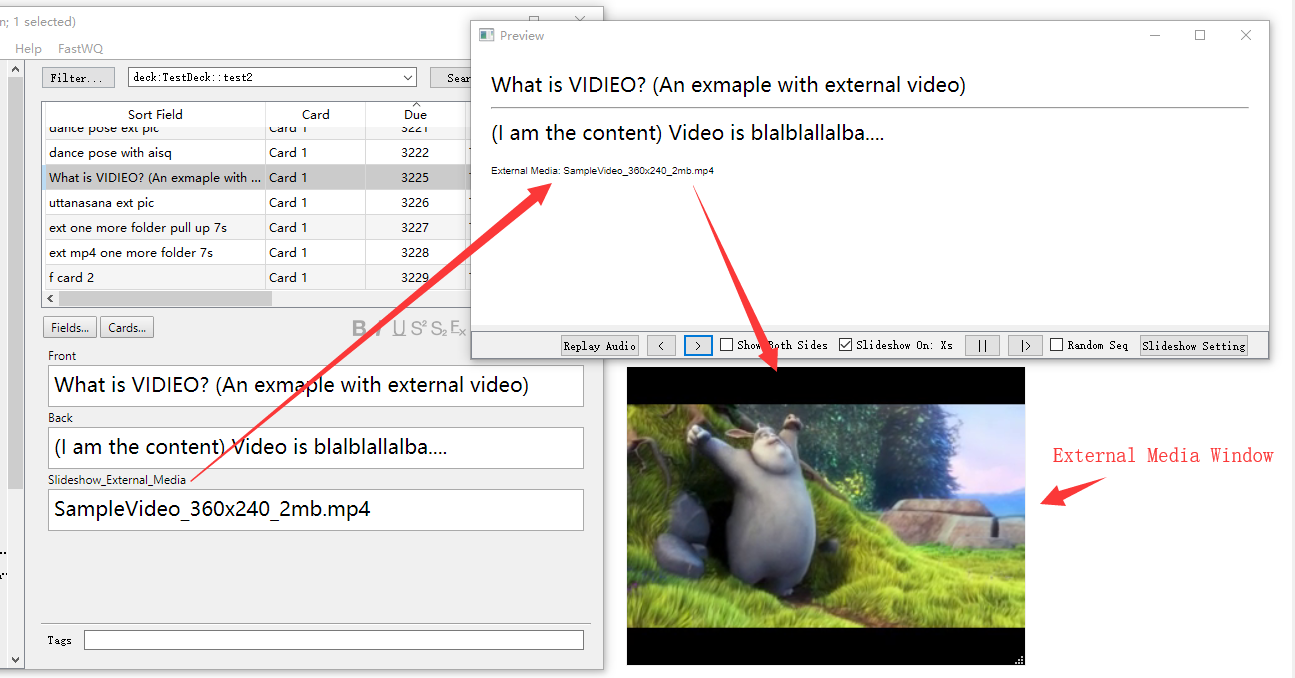
Make Anki preview window as slideshow. For each card, it also introduce a media window to show external media files(not stored in Anki DB) like mp4, mp3, jpg, etc. External media window can be disabled, of course.
Quick Start Guide:
- Installation: https://ankiweb.net/shared/info/90397199
- Click “Browse” -> on Browser window, select target deck or filter out desired cards
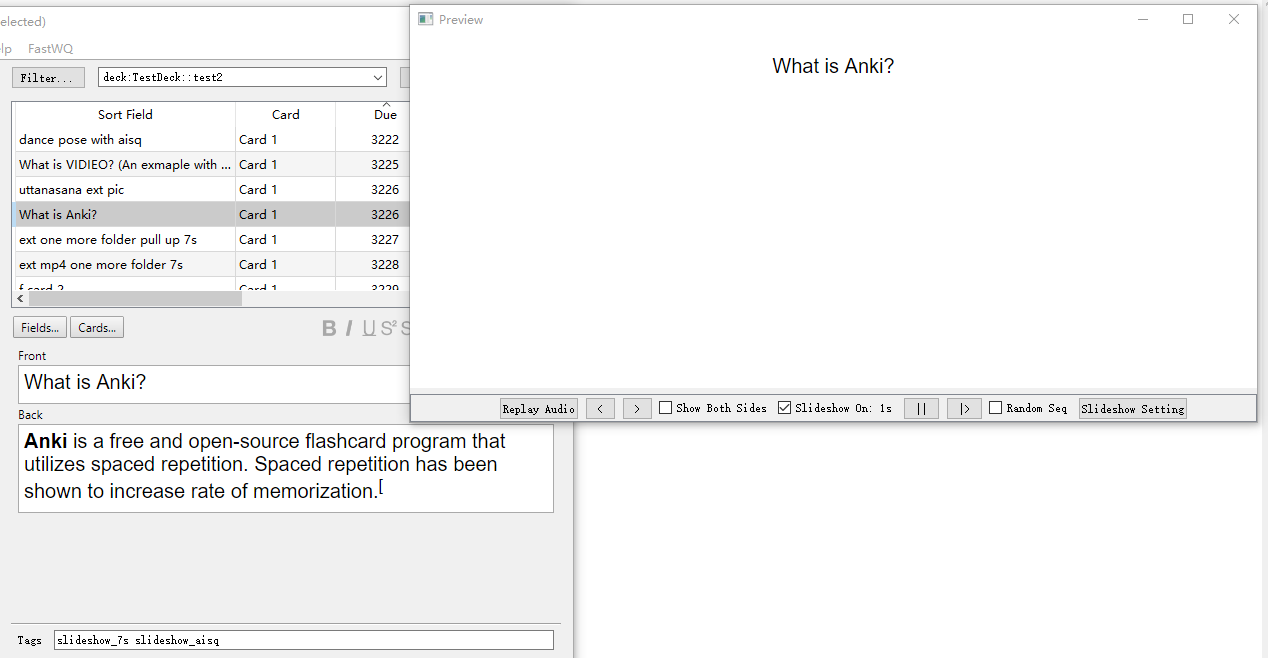
- Click “Preview” to open preview slideshow window
- Click “Slideshow on/off” to check the box and start slideshow
- If mplayer is not availabe in your anki, you will need to install it if you’d like to play video in external window.
Instructions:
- Check/Uncheck “Slideshow On/Off” to start/stop slideshow
- Check/Uncheck “Random Seq” to activate/disable random sequence
- Click ”||” button to pause slideshow
- Click ”|>” button to continue slideshow or go to next slide
- Use tag like “slideshow_Xs” to indicate showing answer for X seconds (no time tag for question) for example, “slideshow_17s” for 17 seconds
- Use tag like “slideshow_audio_replays_X” to indicate replay audio X times before going to next slide (no audio replay tag for question) for example, “slideshow_audio_replays_17” for replay 17 times
- Use tag “slideshow_aisq” to indicate question slide is same with answer slide and answer slide should be skipped.
- To show external media like mp4, jpg, gif. a. Create a field in exact name “Slideshow_External_Media” b. Put the file path for the external media file there like “D:/somefolder/myvideo.mp4” c. Root forder can also be set in settings. Like setting it to “D:/somefolder” then “Slideshow_External_Media” field can work in relative path like “myvideo.mp4”, “sometype/blabla.png” d. With root folder set, if you want to use absolute path accassion occasionally, put ”$$” before the path, like “$$D:/somefolder/myvideo.mp4”
- A trick: to align buttons in preview window left, open preview window, resize it to a very small one, reopen it
- Hover over buttons to see tooltips
- Right click on the toolbox in preview window, or the external media window, to access functions.
Source Code
- Source code can be found on https://github.com/tosimplicity/anki-preview-slideshow
- This add-on is licensed under GPL v3, or higher
Version History
Version 0.8
- compatible with anki 2.1.45+
Version 0.7
- activate Relate to My Doc plugin if available
Version 0.6
- replays audio according to tag
Version 0.5
- adapt to anki version 2.1.41+
Version 0.4
- use set interval when mplayer is not available.
Version 0.3
- fix bug in logging for Anki version between 2.1.20 and 2.1.23
Version 0.2
- Make it compatible with Anki 2.1.24+
- add absolute path marker support while root folder set
Version 0.1
- Initial release
Screenshots
Liên kết hỗ trợ
Reviews (17)
👍 2026-02-12
instructions are way too complicated, i could not get it to work
👍 2024-01-13
I created a simple fork for Anki23 and uploaded it to AnkiWeb.(I still don’t understand how to use Github and how to send pull requests.) [ Preview Slideshow(Frok for 23) ] https://ankiweb.net/shared/info/1621302762?cb=1705150765508
👍 2023-12-19
Does not work anymore: Anki 23.10.1 (fac9e0ee) Python 3.9.15 Qt 6.6.0 PyQt 6.6.0 Platform: Linux-5.15.0-91-generic-x86_64-with-glibc2.35 Flags: frz=True ao=True sv=3 Add-ons, last update check: 2023-12-19 11:11:20 When loading Preview Slideshow: Traceback (most recent call last): File “aqt.addons”, line 245, in loadAddons File “/home/hp/.local/share/Anki2/addons21/90397199/init.py”, line 24, in <module> from .utils import get_path, app_version_micro File “/home/hp/.local/share/Anki
👍 2023-08-03
Great expansion! Thank you so much! I’m just wondering why the Anki creator didn’t add this feature into the standard Anki app.
👍 2022-12-01
omg i loooove thisssssss!!! thank you so much ;)
👍 2022-01-29
This is EXACTLY what I was looking for. I spent hours trying to figure out a way around it only to stumble across this add on. I legitimately love you for making it. Great work.
👍 2021-08-01
Error
An error occurred. Please start Anki while holding down the shift key, which will temporarily disable the add-ons you have installed.
If the issue only occurs when add-ons are enabled, please use the Tools > Add-ons menu item to disable some add-ons and restart Anki, repeating until you discover the add-on that is causing the problem.
When you’ve discovered the add-on that is causing the problem, please report the issue on the add-on support site.
Debug info:
Anki 2.1.45 (355e66e8) Py
👍 2021-01-10
This is brilliant. well done.
👍 2020-12-27
Nice work!
👍 2020-10-04
Good Speed
👍 2020-06-18
Exactly what I was looking for, thank you so very much!
👍 2020-06-16
A really good feature! Thank you very much! But somitimes crashes my Anki, problem occurs a lot when using LaTeX formula.
Add-on version: 0.3
Anki Version: 2.1.26
Python Version: 3.80
👍 2020-05-06
Works fine, but I have the same problem, don’t work in the new beta versions.
Thanks! Comment from author I didn’t expect it will fail on new betas. which beta version are you talking about? And what is the error message?
👍 2020-05-02
Could you have a look at this? thanks
Caught exception:
Traceback (most recent call last):
File “E:\davy\AnkiDataFolder\addons21\90397199\slideshow_thread.py”, line 121, in run
logger.debug(“use answer timeout: ” + self.browser.card._getQA()[‘q’])
AttributeError: ‘Card’ object has no attribute ‘_getQA’
thanks for the reply, i used anki Version 2.1.21 Comment from author Please update to Ver 0.2+
The card previewer implementation is different from anki version 2.1.24. Add-on needs
👍 2020-03-17
Works great.
👍 2020-03-01
Works great—thank you very much. Enjoying using it for hands-free, no-stakes review.
I made some easy edits for anyone who wants a more minimal UI: https://www.codepile.net/pile/2gyNG3o3
👍 2020-01-12
Working well with Version 2.1.15 on linux. Useful when studying but doing physical training at the same time. Easy to adjust, a few possible configs with pause/play, timer, etc. Glad it exists. Thank you!
