This is a fork of Reset card(s) scheduling information / progress with support for Anki 2.1 and other smaller tweaks. All credits for the original add-on go to Jeff Baitis.
DIFFERENCES FROM BUILT-IN ‘RESCHEDULE’ FUNCTION
For most use cases, using Anki’s built-in card rescheduling utility should be sufficient. Where this add-on comes in handy, mostly, is in handling accidentally imported scheduling data from other users. That is because in contrast to Anki’s rescheduling feature it also does away with any recorded lapse and repetition counts.
Please note, however, that neither Anki’s rescheduling feature nor this add-on are capable of removing card review history entries. It is likely that a feature for this will be added to the add-on in the future. For now you might want to check out Remove card history, instead
Reset Card Scheduling also implements a number of smaller convenience features that could make your life easier if you find yourself resetting cards frequently (e.g. resetting entire decks right from Anki’s main screen).
NEW FEATURES IN THIS VERSION
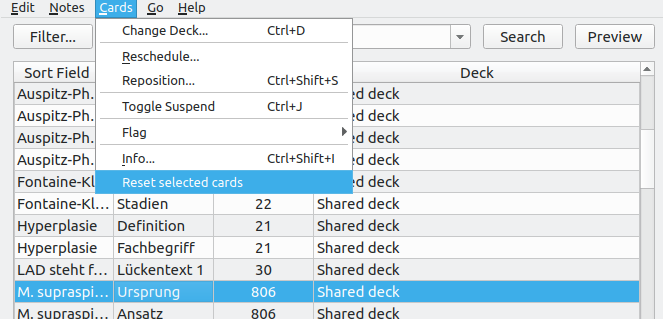
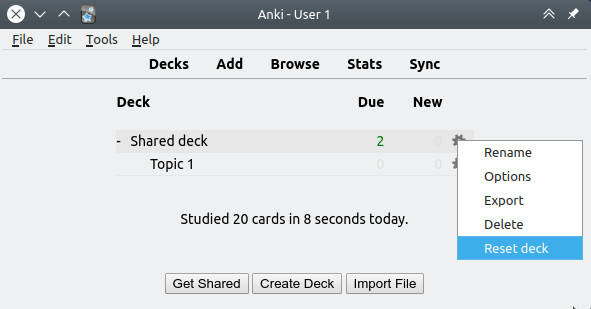
Anki 2.1 compatibility Ability to reset decks right from the deck screen (2.1 exclusive) Ability to reset cards by right-clicking on them in the browser (2.1 exclusive) More checks and safeguards Improved handling of filtered decks (thanks to Dmitry Mikheev)
SCREENSHOTS
CHANGELOG
2018-09-18: v1.1.1 – Added support for V2 scheduler (experimental!) 2018-07-25: v1.1.0 – Initial release of this updated fork 2015-06-18: v1.0.0 – Original release for Anki 2.0
SUPPORT
Please do not report issues or bugs in the review section below. I can only reply to your reviews in a limited fashion, so this is not a good way to strike up a dialog and track issues down. Instead, please report all issues you encounter either by creating a bug report on GitHub, or by posting a new thread on the Anki add-on support forums. Please make sure to include the name of the affected add-on in your report title when you do so.
CREDITS AND LICENSE
Copyright (c) 2015-2016 Jeff Baitis Copyright (c) 2018 Dmitry Mikheev Copyright (c) 2018 Glutanimate
Licensed under the GNU AGPLv3. The code for this add-on is available on GitHub.
MORE RESOURCES
A lot of my add-ons were commissioned by other Anki users. Please feel free to reach out to me if you would like to hire my services for any Anki-related development work (writing an add-on for you, converting existing ones to Anki 2.1, implementing a specific feature): ankiglutanimate [αt] gmail .com.
Want to stay up-to-date with my latest add-on releases and updates? Make sure to follow me on Twitter: @Glutanimate
New to Anki? Feel free to check out my YouTube channel where I post weekly tutorials on Anki add-ons and related topics: / Glutanimate
SUPPORT MY WORK
Writing, supporting, and maintaining Anki add-ons like this takes a lot of time and effort. If Reset Card Scheduling or any of my other add-ons has been a valuable asset in your studies, please consider buying me a coffee.
Each and every contribution is greatly appreciated and will help me maintain and improve my add-ons as time goes by!
Screenshots


Liên kết hỗ trợ
Reviews (25)
👍 2025-06-14
does not work with Anki update
Anki 25.02.6 (6381f184) (ao) Python 3.9.18 Qt 6.6.2 PyQt 6.6.1 Platform: Windows-10-10.0.26100
When loading Reset Card Scheduling: Traceback (most recent call last): File “aqt.addons”, line 250, in loadAddons File “C:\Users\danie\AppData\Roaming\Anki2\addons21\300884351_init_.py”, line 15, in <module> from . import main File “C:\Users\danie\AppData\Roaming\Anki2\addons21\300884351\main.py”, line 21, in <module> from .consts import anki21 File
👍 2025-04-24
New version
-- coding: utf-8 --
""" This file is part of the Reset Card Scheduling add-on for Anki.
Main Module, hooks add-on methods into Anki.
Copyright: (c) 2015-2016 Jeff Baitis <jeff@baitis.net> (c) 2018 Glutanimate <https://glutanimate.com/> License: GNU AGPLv3 <https://www.gnu.org/licenses/agpl.html> """
from future import unicode_literals
from aqt.qt import * from aqt import mw from aqt.utils import askUser, tooltip from aqt.browser import Browser from anki.hook
👍 2025-04-13
please UPDATE it isnt working in new versions
👍 2025-02-15
Nice add-on when it worked in earlier versions, but no longer supported in latest version.
👍 2024-03-13
Anki 23.12.1 (1a1d4d54) (ao) Python 3.9.15 Qt 6.6.1 PyQt 6.6.1 Platform: Windows-10-10.0.19045
When loading Reset Card Scheduling: Traceback (most recent call last): File “aqt.addons”, line 245, in loadAddons File “C:\Users(MY USERNAME)\AppData\Roaming\Anki2\addons21\300884351_init_.py”, line 15, in <module> from . import main File “C:\Users(MY USERNAME)\AppData\Roaming\Anki2\addons21\300884351\main.py”, line 21, in <module> from .consts import anki21 File “C:\Users(MY US
👍 2024-02-17
please, update to new version anki 23.12.1
👍 2024-01-17
There was a post on reddit that someone didn’t find how to fix it after reading the comments, so I created a simple fork (copy) and uploaded it to AnkiWeb. [ Reset Card Scheduling (Fork for Anki 23 by Shige) ] https://ankiweb.net/shared/info/83793850
👍 2024-01-08
“If you just updated Anki and you’re now getting an error, change const.py line 22 to: “addon_path = os.path.dirname(file)” without the quotes, then save and restart Anki.”
IT WORKS !!
👍 2024-01-08
It doesnt work anymore with the new update :(
👍 2023-11-01
If you just updated Anki and you’re now getting an error, change const.py line 22 to: “addon_path = os.path.dirname(file)” without the quotes, then save and restart Anki.
👍 2023-06-15
This is the one. If you want to just set your cards as new, just use this one. I didn’t see any change by using the “Remove card history”.
Anki version: 2.1.65 - It’s working!
👍 2022-12-18
Parabéns Ao desenvolvedor. Resolveu meu problema. Eu tinha parado os estudos e precisava Reiniciar as Estatísticas. Usei outras Extensões, mas só essa Resolveu. Obrigado.
👍 2022-09-26
Just What I Needed
👍 2022-01-04
It’s all right, enough to safe my Anki system from being dumped ^^
-didn’t delete the time values, but it did the job thanks!
👍 2021-12-19
Seems anki fixed the behavior or reschedule and reposition. But you still need something like this to clear off lapses, ease, and stuff. If I don’t do a deck for a while I put it in a sort of “do or die” mode of 1 lapses per leech to suspend every card I don’t remember, then I reschedule them to the top of the queue. But this doesn’t work if the card instantly leeches again because it has stored up the lapses.
I also often tweak my deck builder python to get better sentences and stuff, whi
👍 2021-07-03
Works great, thanks!
👍 2021-06-12
Anki > Quizlet
👍 2020-12-20
Reset ease, reviews, interval, lapses as intended in 2.1.37. If you then want to reset the stats, use this addon: Reset review log (https://ankiweb.net/shared/info/1345711295)
Note that some cards you reviewed in the past may still have an different from the one by default (250%). You can check clicking info for various cards. I would expect this addon to be able to delete this value as if it was a new card. You can still rely on another addon named “Reset Ease”.
👍 2020-10-24
Works perfectly
👍 2020-09-06
It is not working properly in Anki 2.1.33. Cards become new again, but the rev log is not erased.
👍 2020-08-23
In Anki 2.1.30, it takes every non-new card and resets the schedule of them.
When it should reset the schedule of every card (new and old).
The result is that it simply doesn’t reset the deck to the original order of cards.
👍 2020-04-23
I see this add-on is very useful. But I have a question is: If in the card which contains 20 words, I’ve learned 1 one in this, when I use the reset feature, the new words will return is 19 and I lost one word. Could anyone please explain to me why it happen or it is a bug?
Thank so much!
👍 2020-04-21
Just works
👍 2020-02-27
PERFEITO
👍 2020-02-06
So useful!
