This add-on adds speech recognition to your cards to transcribe audio files.
Supported speech-to-text services
Currently supported services are the following:
Deepgram Whisper
Usage
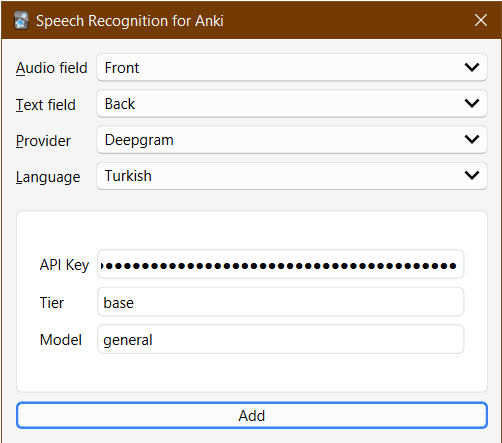
Most speech recognition services require you to register for an API key. Check the docs of your chosen service for details. You can configure your API key from the add-on’s dialog accessible from the editor button ().
Fill-in option
You can paste the transcriptions of audio files in a chosen field to any other field using the editor button or the Notes > Transcribe Selected browser action for bulk processing.
As a template filter
The add-on can also work as a template filter (asr, for “automatic speech recognition” or “Anki speech recognition”), which you put in your card template. E.g:
{{asr:Front}}
The add-on processes any [sound:foo.mp3] tags in the specified field and replaces them with the transcriptions of the audio. The results will be cached to avoid making additional requests to the ASR service in subsequent reviews. Compared to Fill-in option, this has the advantage that newly created notes can make use of the add-on automatically as long as their card template contains the filter.
You can specify the language using the lang option. E.g:
{{asr lang=tr:Front}}
The default language is English (en). Supported languages depend on the service used. For Deepgram, see https://deepgram.com/product/languages/ for a list of supported languages.
The speech-to-text service used can be specified using the provider option. E.g:
{{asr provider=deepgram:Front}}
If you set auto=false, a button will be shown that you can click to show the transcription:
{{asr auto=false:Front}}
This is useful to avoid making a request to the ASR service when not needed, or to simply use the transcription as an optional hint.
You can see a list of each provider’s supported languages by placing something like the following on your template:
{{asr-langs provider=deepgram:}}
This will list each supported language’s code and name. The language code is what you have to provide to the lang option.
Transcription tasks
In the window under Tools > Speech Recognition for Anki > Transcribed Files you can see a list of files transcribed since starting Anki and their status (running, finished successfully or with an error) and the resulting transcriptions.
Advanced
Custom providers
If you know Python, you can integate any ASR service via a custom provider. See user_files/providers/my_provider.py for an example. If your provider is general enough to warrant including in the add-on, please open a pull request!
Changelog
See CHANGELOG.md for a list of changes.
Credit
Icons are adapted from Bootstrap Icons; licensed under the MIT.
Support & feature requests
Please post any questions, bug reports, or feature requests in the support page or the issue tracker.
If you want priority support for your feature/help request, I’m available for hire. Get in touch via email or the UpWork link below.
Support me
Consider supporting me if you like my work:
I’m also available for freelance add-on development:
Screenshots





Liên kết hỗ trợ
Reviews (4)
👍 2024-11-01
There was an error with Deepgram API but developer quickly fixed it.
Thanks so much, great addon!
👍 2024-07-17
Can u please add Thai support? Deepgram supports Thai but it’s not in your extension’s dropdown menu
👍 2024-02-20
When I try to record audio in Anki I get this error invalid syntax (client.py, line 233) or Failed to transcribe rec1708458745.mp3: invalid siytax (client.py, line 233)
and appears written 3 times Transcribing audio… Transcribing audio… Transcribing audio…
Comment from author Anything unclear in the description?
UPDATE: Please post the full error message (with a screenshot if possible) in the support page: https://forums.ankiweb.net/t/speech-recognition-for-anki/24201
👍 2023-01-21
This add-on is amazing! 👏👏
Suggestion, add support for: Microsoft Azure Speech-to-Text Comment from author Added to the todo list.
