Stats Plus allows you to include the Anki graphs inside of other screens. You can choose the ones you want, and order them as you like!
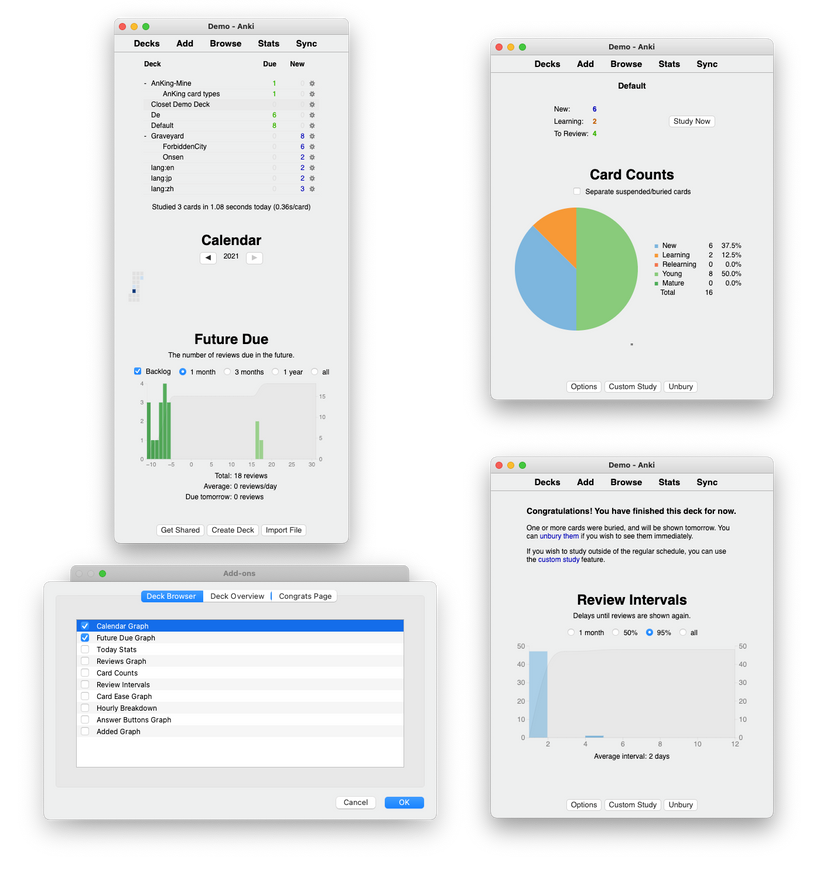
Configure the graphs under “Tools > Add-ons > Stats Plus > Config”. You can add graphs to three different screen: Deck Browser: This is the screen that Anki opens with, and where you see your deck hierarchy (screenshot top left) Deck Overview: When you click on a deck to study it, you first see the Deck Overview. This is where you see the deck description, and have a “Study Now” button (screenshot top right) Congrats Page: This is the screen, where Anki congratulates you, after you finished all cards in a deck (screenshot bottom right)
Support If you like my add-ons, you can consider supporting me. My add-ons will always be freely available for everybody, but what I can offer you is my sincere thanks, and first-hand technical support, if you have any questions/issues with my add-ons. At the same time it allows me to put more time and focus into developing these and making them as powerful and user-friendly as they are. Thanks for considering!
ko-fi.com/hgiesel patreon.com/hgiesel
Screenshots


Liên kết hỗ trợ
Reviews (17)
👍 2024-03-24
Error when starting Anki:
Anki 23.12.1 (1a1d4d54) (ao) Python 3.9.15 Qt 6.6.1 PyQt 6.6.1 Platform: Windows-10-10.0.22631
When loading Stats Plus: Traceback (most recent call last): File “aqt.addons”, line 245, in loadAddons File “C:\Users\User\AppData\Roaming\Anki2\addons21\1009670238_init_.py”, line 1, in <module> from .src import init File “C:\Users\User\AppData\Roaming\Anki2\addons21\1009670238\src_init_.py”, line 5, in <module> from .addon_manager import init_addon_man
👍 2024-02-10
I fixed this add-on a bit for Anki 23+(Qt6) and uploaded it to AnkiWeb. Stats Plus📊 Deck Browser, Deck Overview, Congrats (Fork for Anki 23+ by Shige) https://ankiweb.net/shared/info/146032826 Edit : Error occurs, I failed to Fork ¯_(ツ)_/¯
👍 2024-01-07
I loved
👍 2023-03-02
If I could, I’d rather leave a neutral rating because the add-on works 50-50. When you’re on version 2.1.58, and press the config button, it throws an exception.
👍 2023-02-21
I really like this add-on but does not seem to completely work with 2.1.54 version. The “deck” and “collection” tabs block my decks at the top of anki.
👍 2022-07-13
Breaks Review Heatmap. Don’t install if you use the addon and like to continue to use it.
👍 2022-01-24
Better if compatible with heatmap please colaborate. Or just instead of calendar use heatmap code https://github.com/glutanimate/review-heatmap/issues/133#issuecomment-1003372995
👍 2022-01-01
Works perfect! Awesome addon, thanks.
👍 2021-11-27
Recent anki version 2.1.49 problem with heatmap and stats plus heatmaps tiles does not visual Comment from author Stats Plus has never compatible with Review Heatmap. I actually mention it in comments below.
👍 2021-07-27
The stats only show for the parent deck. I think I might be missing something in the settings.
For reference my decks are separated like this: Parent deck > sub deck 1 > sub deck 2.
I do love seeing the stats front center instead of being hidden. 2 thumbs up and I’ll still use it anyways since it’s a very minor inconvenience.
👍 2021-05-15
Terrific add on. Just wanted to let you know that it seems to add a ” in the Deck Overview screen which I don’t think should be there. Was also wondering if there could be a setting to adjust the size of the graphs a simple scaling option would be amazing. Regardless thanks for this add on :) Comment from author I remember looking into it before, but wasn’t able to fix it. As it doesn’t cause too much trouble, I’ve focused on other things instead :)
👍 2021-03-24
Thanks
👍 2021-03-18
Awesome awesome awesome!!! My congrats screen is so much more informative now!
👍 2021-03-17
Great add-on. I love how configurable it is, I’ve set it up in a way I really like :)
👍 2021-03-17
Amazing work. Really nice clean Add-on. One thing that you could add maybe if u have time, is an option in the tools context menu on top so we can quickly change settings, as of now i have to hunt the addon in a sea of addons to config it. Comment from author Once you’re in the add-on window, you can press “s” to jump to all add-ons starting with S. That can make the search much quicker. Problem with Tools context menu is, if everybody adds their add-on in there, it’s going to be just as messy
👍 2021-03-08
Great add-on, works exactly as advertised.
I love that we can select the order in which the graphs show, something that always bothered me in the stats.
Ps: clicking in the graphs isn’t working (only on the add-on graphs, in the normal stats it’s working). It seems to be conflicting with the review heatmap add-on, I will post the error code at the GitHub page Comment from author Yep, that conflict with Review Heatmap is already known, however it’s something I cannot fix, as Review Heatmap o
👍 2021-03-03
Great work, does what it promises!
Love having the “Added” stats on the deck overview, as it helps motivate me to create cards.
On Anki in general:
-
Regarding the calendar, I still prefer Review Heatmap, since it gives me an overview of what’s ahead (the separation of months in “Continuous Timeline” mode is also very handy).
-
I think it would make sense to use a responsive grid layout on the homescreen (opposed to the current vertical one), to avoid the need for scrolling. Of course, one
