Transfer Scheduling Advanced
an anki add-on to transfer scheduling info from cards to cards in batch.
Changelog
2024.8.2 fix not work when deck name has whitespace. 2024.7.27 fix crash; support long comparing field; during comparing sth-somthing and sb-somebody would be no difference.
Demo
Usage 0. Back up your decks
-
Open this tool from Anki dropdown menu. Tools - Transfer Scheduling Data UI
-
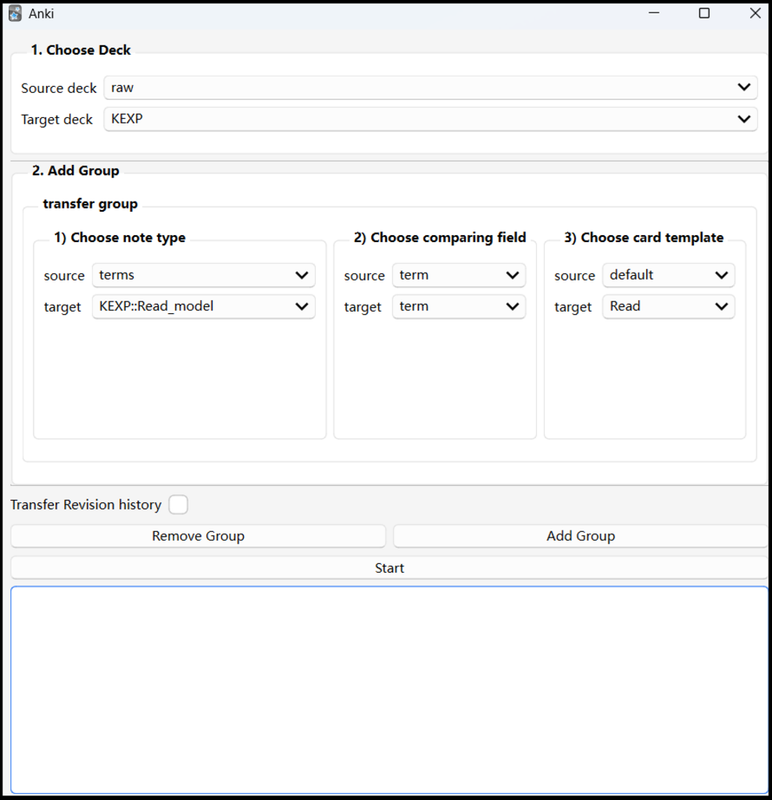
Choose Deck choose the source deck containing the source cards. choose the target deck containing the target cards.
-
Add more detail
in the first transfer group,
choose the note type of source card and target card.
if you don’t know what note type it is a) click the Browser button located at the top of Anki. b) switch to card view by clicking a blue/green switch, make sure it shows “Cards”. c) find the source card you want to transfer from. d) right-click the card, click Info… e) in the pop-up window, Check the Note Type field.
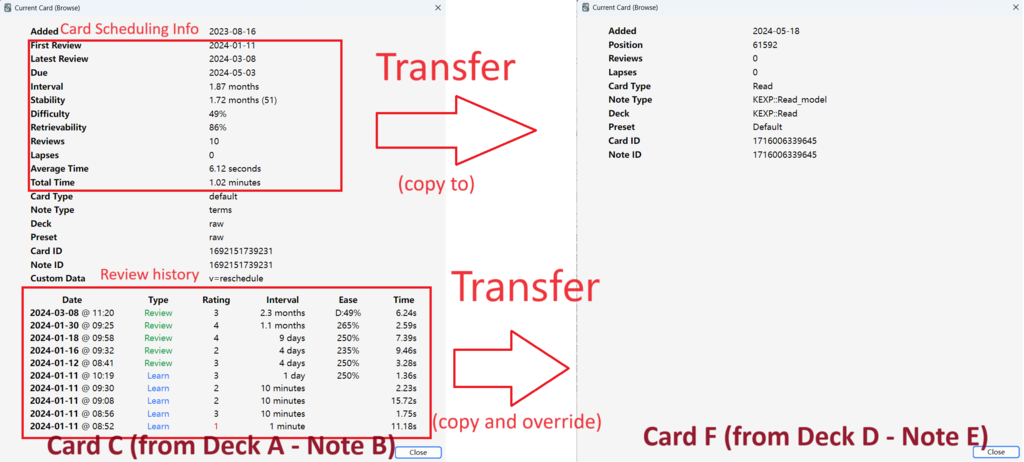
choose a field from source card and target card for comparing. Transfer only occurs in two cards that has matched field. choose the card template of source card and target card. 4. (optional) Click Add Group button if you have more transfer type 5. (optional) Check “Transfer Revision History” if you also want the revision history of source card be transferred.
Warning. the revision history of target card will be overridden.
- Click Start button Note If a source card is new(hasn’t been studied before), it will be skipped.
Screenshots
Liên kết hỗ trợ
Reviews (10)
👍 2025-09-12
Good! It could be better if it’s possible to optionally transfer “suspended” status and “flag” whenever a card has been studied or not.
👍 2025-08-22
Saved me tons of time compared to using this one: https://ankiweb.net/shared/info/94685914.
👍 2025-02-16
Worked as expected. Very useful!
👍 2025-01-11
Worked perfectly! I needed this after realizing a new version of a shared deck had its cards replaced instead of updated, so I couldn’t use the new deck to update my older version. So I renamed my old deck, imported the new version (creating a separate deck), then used this add-on to transfer my scheduling information to the new one. Other add-ons only transfer info for one card at a time, but the batch transfer this has did all 1,000 cards in a few seconds. Life saver! Thanks a ton!
👍 2025-01-02
Worked for me
👍 2024-12-21
I am really not sure what am doing wrong. I’ve got two decks (source and target) containing cards of varying notetype.
I have explicitly provided all the requisite information for the interested notetype and more specifically the comparing fields but the wrong schedule info gets transferred. Am using Anki Version 24.11 (87ccd24e). Any suggestions will be warmly welcomed. Thanks in advance
👍 2024-11-13
Very useful. Thank you!
👍 2024-08-27
This is an incredible add-on that saved me tons of time! Appreciate your effort!
👍 2024-08-01
There was a small error in the code that I fixed and it worked flawlessly! I’ve already contacted the author with the fix through github, otherwise go check github issues for the solution. Comment from author fixed. Thanks for reporting this bug!
👍 2024-06-16
It doesn’t work. Comment from author Please ensure that the target note and the source note have a matching field.
