vi like movements for the anki main screen.
With this you can move in Anki with vi-like keys:
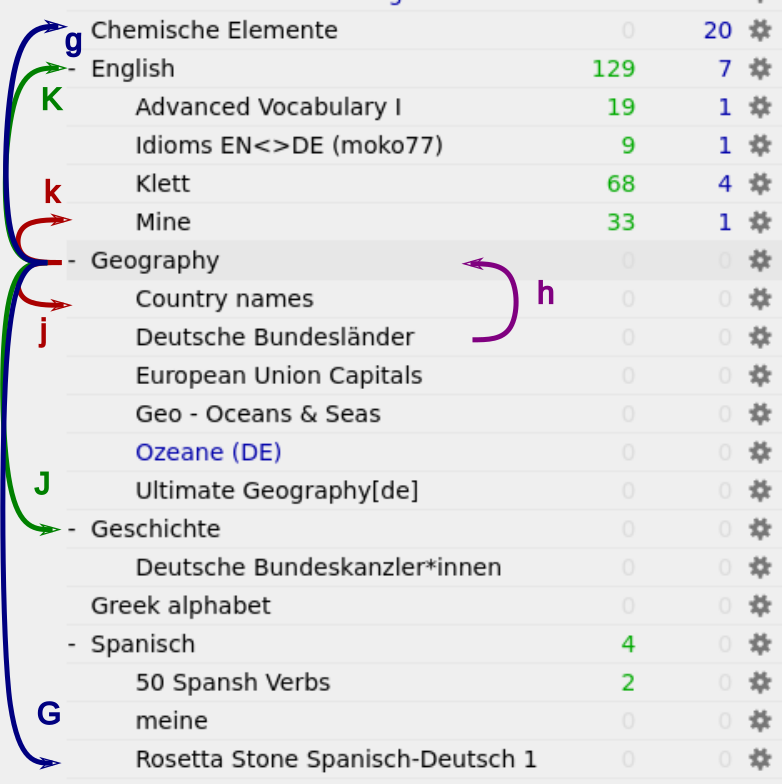
• j one deck down • J one deck down, on the current level in the deck tree • k one deck up • K one deck up, on the current level • h got to parent level (one level higher) • g first deck • G last deck • o open selected deck • + or - to toggle between collapsed state • Return study selected deck
Additionally, these alternative shortcuts are added: • Arrow down one deck down • Page down one deck down, on the current level in the deck tree • Arrow up one deck up • Page up one deck up, on the current level • Home first deck • End last deck
The shortcuts can be configured in the extension settings.
Source Code: https://github.com/Nudin/anki_vimove PRs are welcome!
Screenshots
Liên kết hỗ trợ
Reviews (7)
👍 2024-09-09
Works well on Anki for Arch Linux. Thanks!
👍 2024-06-13
This is good
👍 2022-01-12
very useful
👍 2021-11-06
I’m really thankful for your work. It saves me tons of time.
👍 2021-10-09
absolutely poggers mate. cheers
👍 2021-06-16
Great. Many thanks! If only one could speed it up a bit.
👍 2021-01-05
thanks!
