Anki add-on to sync between WaniKani and an Anki deck
This add-on is based on Anki WaniKani Sync, which is in turn based on the WK3: Tokyo Drift deck. It differs significantly from the former, however, particularly in terms of sync logic, and in the addition of dependency tracking. It also significantly speeds up the initial import of the deck from WaniKani by completing the download of audio and context patterns in the background after the main import of the deck.
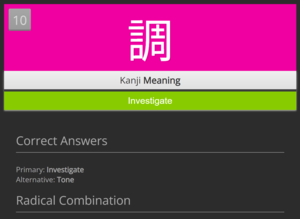
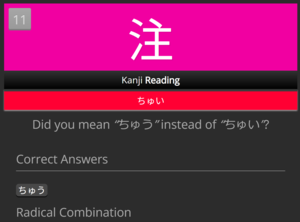
This add-on creates an Anki note for each subject in WaniKani. The study process is very similar to the process on WaniKani:
The add-on tracks dependencies between cards, as well as level completion. By default, cards are suspended if any of their components have not reached maturity or if they are in a level beyond the highest level completed by the user. However, unlike WaniKani, radical cards are unlocked one level early, to make sure that all kanji for a level can be studied as soon as a level is unlocked. This behavior is configurable.
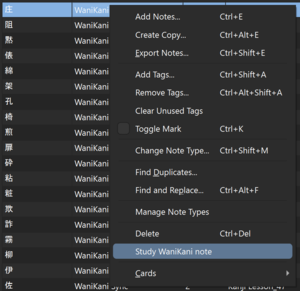
If the user wishes to review a subject before it would typically be unlocked (for instance, after encountering a word or kanji in the wild, or in another learning system), it can be unlocked early (along with all of its dependencies) from the Anki card browser, using the “Study WaniKani note” context menu item:
Each level of dependencies for the unlocked note will be unlocked in 10 minute intervals. So, unlocking a vocab note which depends on a new kanji, which depends on a new radical, will result in the radical being unlocked immediately, followed by the kanji 10 minutes later, followed by the vocab 10 minutes after that (20 minutes in total). This means that, depending on your learn ahead limit, the unlocked note may not be available for review for up to 20 minutes.
The add-on supports bidirectional sync of reviews between Anki and WaniKani. The sync logic is fairly complex, but, in general, reviews will be synced from Anki if they happened after the review became available in WaniKani, or if the review interval in Anki is longer than the interval in WaniKani. Due dates and intervals will be synced from WaniKani to Anki if the WaniKani due date is later than the Anki due date, or if the interval is longer.
After installation, a WaniKani sub-menu will appear in the Tools menu of Anki. This is where you control most actions. The menu items should be self explanatory.
Configuration
Important: The WK_API_KEY config value must be configured in order for this add-on to work.
All configuration values are documented within the config JSON.
Screenshots







Liên kết hỗ trợ
Reviews (1)
👍 2026-01-18
Thank you for this wonderful addon. Would it be possible to migrate review data from WK3: Tokyo Drift deck automatically? I’ve put a fair bit of time into that and can’t find an easy way to migrate that data to this deck. EDIT Thank you. Presently issues are disabled on your repo. Here’s the exported deck (without media. I can upload if need be). https://gofile.io/d/8z2FJP Comment from author It’s certainly possible. I’d be happy to implement it, but I don’t have access to a copy of the To
