The Anki Web Browser is a simple Internet Browser within Anki (as the name suggests). It aims to make it easy when you are studying or editing a card and want to look something up on the internet. You can also use it to open up your system desktop instead of the embedded browser (from version 1.1)
For instance, you are studying a foreign language and suddenly there is a word which you haven’t understood it properly. In such case it’s common to shift to the web browser and make search for the term there. This addon makes this task smoother.
Therefore, this addon provides 2 functionalities:
Search the some text on a website Import text and images directly from a website to a given card Using
The functions of this addon are accessed through the context menu (either right click on mouse or right menu key on the keyboard) or using shortcuts.
Search selected text
While studying or editing a given card:
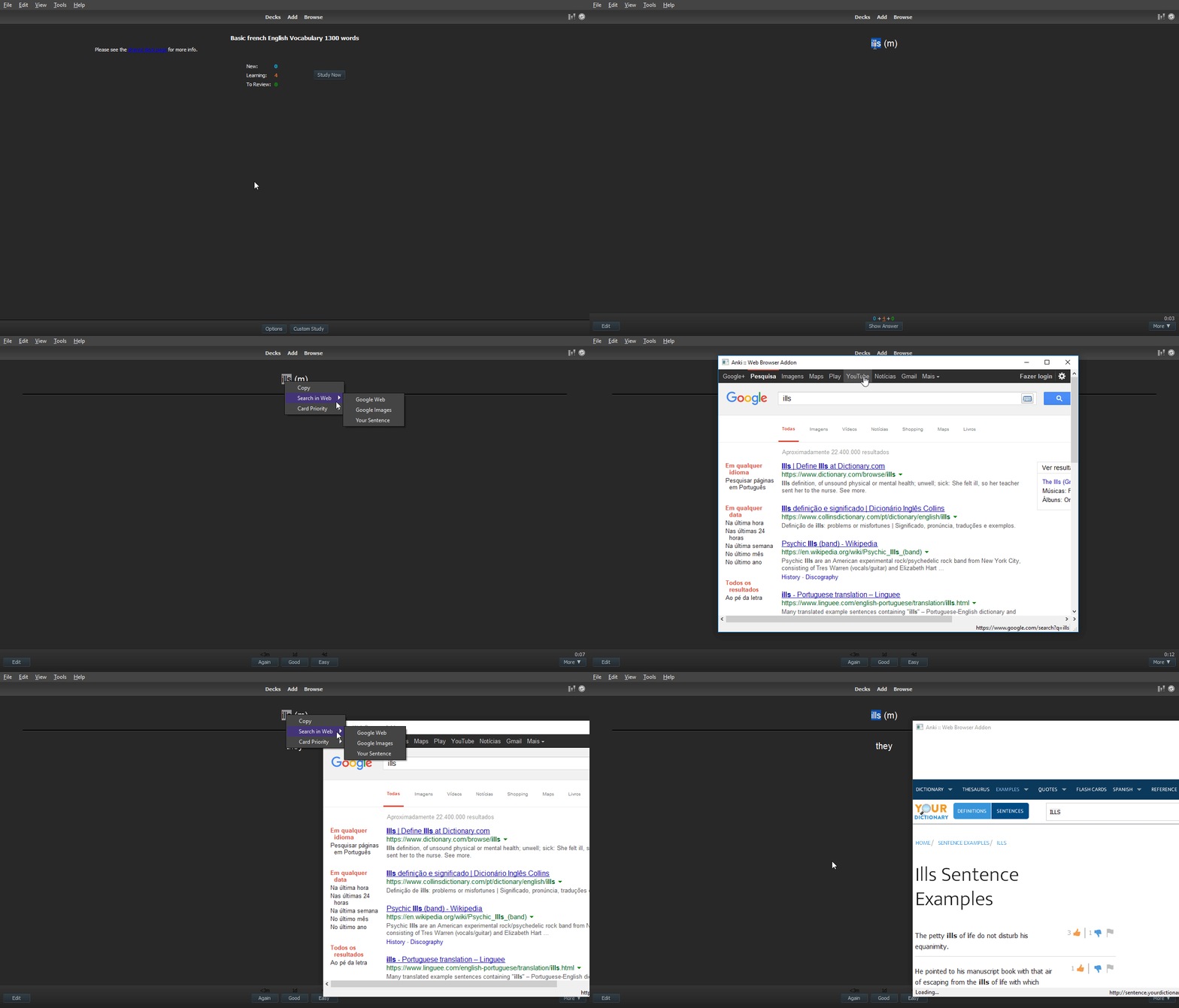
Select a word or sentence Right click (or use the shortcut) Search on Web Select the desired provider Then a new window with the web browser will be opened, if it isn’t opened yet (or a new tab on your external web browser) More detailed documentation (configuration, editing…)
Please check the documentation at Github.
This one here is not complete
Updates
2025.04-1 | 30/Apr/25
Edit notes (cards) directly during the review (It’s possible to add texts only in the review stage) Web Browser attached to main Window (Dock bar) Technical changes: Modified integration with Anki The original integration is legacy. This new way aims to reduce un-expected bugs Change integration with DarkReader
…
Added new shortcuts (back, forward, next / previous tab) (https://github.com/ssricardo/anki-web-browser/wiki/Keyboard-short-cuts)
If you like it, consider buying me a coffee :)
Screenshots

Liên kết hỗ trợ
- Contact Author
- documentation at Github
- https://github.com/ssricardo/anki-web-browser/wiki
- Contact Author
Reviews (27)
👍 2026-01-24
Thank you so much!
👍 2025-11-25
very useful
👍 2025-10-10
dude i love this add on but one thing that renders this sometimes useless is asking to click on this, ” im not a robot puzzles “and trying to solve them for each n every search might aswell search from regular tab Also, i want to ask if i assign something to a field how do i make it go to the beginning of the “extra text” rather then the very bottom??
👍 2025-06-14
Thanks so much for making this great addon.
However, when I added a new search provider: https://en.wikipedia.org/wiki/{} it gave an “Error: Wikimedia Foundation”.
I guess that’s because the URL missed the necessary underscores in the search term. It went to https://en.wikipedia.org/wiki/Empty calories instead of https://en.wikipedia.org/wiki/Empty_calories Comment from author That’s odd. I couldn’t reproduce the issue. Here, when I try accessing with the space, it’s simply redirects to
👍 2025-06-10
works great!!!
👍 2025-06-08
Super!
👍 2025-06-07
Hi I just wanted to take a moment to express my sincere appreciation for the Anki add-on you created. It’s incredibly convenient and has truly enhanced my learning experience. Your hard work and dedication really shine through in this tool, and I’m grateful for the time and effort you put into developing it.
Thank you for making such a valuable contribution to the Anki community!
Best regards, Ramy
👍 2025-04-22
These addons help a lot in studies. thanks!
👍 2025-03-13
Buggy, web search with no selection doesn’t work and there’s no way to fix it.
Anki 24.11 (87ccd24e) (ao) Python 3.9.18 Qt 6.6.2 PyQt 6.6.1 Platform: Windows-10-10.0.26100
Traceback (most recent call last): line 76, in <lambda> return lambda: menuCallback(valueList) line 107, in handleProviderSelection query = self._getQueryValue(webview) line 134, in _getQueryValue return self.prepareNoSelectionDialog(self._currentNote) line 51, in prepareNoSelectionDialog fieldList = no
👍 2025-03-07
Anyone knows how to add perplexity.ai? The following link is not working as expected: https://www.perplexity.ai/search?q={}
EDIT: Thanks for the feedback! I am indeed using the external web-browser and it works flawlessly. Comment from author before post was edited Hi. The URL is correct, but these advanced tools require Cookies and possible some other features which aren’t present in this case. The internal browser is simple. If you really want that site, you could use the option to open the e
👍 2024-12-02
Life saver in med school
👍 2024-05-22
Name: Wikipedia URL: https://en.wikipedia.org/w/index.php?search={}
👍 2024-04-23
Amazing, thank you so much for this add-on. I can use it for a quick lookup of my anki-cards on chatgpt or copilot. Hope this helps.
{ “name”: “ChatGPT”, “url”: “https://chat.openai.com/chat?model=gpt-4&q={}” }, { “name”: “Bing Copilot”, “url”: “https://www.bing.com/search?showconv=1&sendquery=1&q={}” },
👍 2024-04-17
This is great!!! Is it possible to share the link for Bing Translate too? Google doesn’t work for China. I saw the previous comment with Bing Search & Images, very helpful Comment from author You can change to any website that supports URL query. Just go to the configurations -> Providers and add/change the desired
👍 2024-04-06
AMAZING, Love it!! Thanks a lot.💯🔥🙏
🟢For those who prefer Microsoft Bing - Open ‘Anki-Web-Browser config’ from the tools dropdown menu. In it, go to ‘Search provider’ (U will see this option in the buttom) Rename the Google one to Bing, and edit it’s URL to - https://bing.com/search?q={} Rename the Google Images to Bing Images and edit it’s URL to - https://www.bing.com/images/search?q={}
Thats it👍🥂
👍 2024-04-04
save a lot of time
👍 2024-03-28
Great addons !!!
but why your pop-up menu is black? How can I become like that? Mine is blue.
👍 2024-03-23
Version 23.12.1 (1a1d4d54) Python 3.9.15 Qt 5.15.2 PyQt 5.15.5
stopped working since 1 weeks.
👍 2024-03-12
Works well with the newest version of Anki. It really comes in handy when I have to look up for a word with my favourite dictionary. However, if you use the numeral keys to trigger quick search-engine selection, you can no longer user numeral keys to hit the answers button. I’m not sure if it’s a bug or an error on my end, just want to report my experience.
edit: the bug only happens when I edit a field of a card during review using the “Edit Field During Review Cloze” addon.
👍 2023-12-01
Working as of 11/30/2023 on current version 23.10.1 (fac9e0ee) Python 3.9.15 Qt 6.5.3 PyQt 6.5.3
Works well for looking up things on the web quickly, but when trying to copy and paste an image from google, it usually just copies the URL instead of the image. Still, this can be worked around by taking a screen shot of the picture and pasting that into the card instead. Comment from author I wasn’t aware of the image issue. Will try taking a look in the next months
👍 2023-11-22
works perfect with the new update, thanks for the developers!
👍 2023-11-19
Thanks to the developers for taking the time to update Now it works fine in version 23.10.
👍 2023-11-16
it doesn’t work in the new version. Please Fix it Comment from author Please update it
👍 2023-09-21
Super useful for adding images and context sentences to my flashcards! I just wish it also supported adding audio files :(
👍 2023-08-13
Bugged
👍 2023-07-04
Great add-on and super convenient! Just remember when you are customizing your provider you have to restart Anki for it to work properly.
👍 2023-05-03
j’attends de voir
