Latest supports Anki 2.0 and 2.1!
Querying Words and Making Cards, IMMEDIATELY!
Home Page: https://finalion.github.io/WordQuery/ Project repo: https://github.com/finalion/WordQuery. If you have any questions, you can open issues here.
This addon is developed to emancipate you from the tedious work of looking up words in dictionary and pasting the explanations to anki whenever new language-learning cards are to be made.
Support querying in mdx and stardict dictionaries. Mdx and stardict dictionaries are available online and this add-on can’t provide any due to potential copyright infringement. Support querying in web dictionaries (having provided many ones, and more others need to be customized.)
How to Set
Set Local Dictionaries If you do not use local dictionaries, you can skip this step.
- Click menu “Tool”->“WordQuery”, popup the “Options” dialog
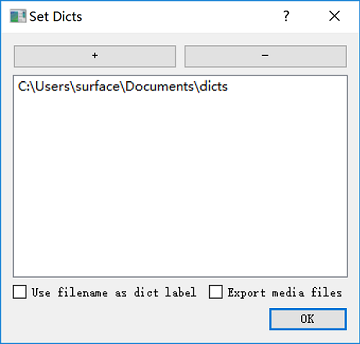
- Click “Dict folders” button, add or remove the dictionary folders (support recursive searching)
- “Use filename as dict label”
- “Export media files” indicates if the audios will be exported.
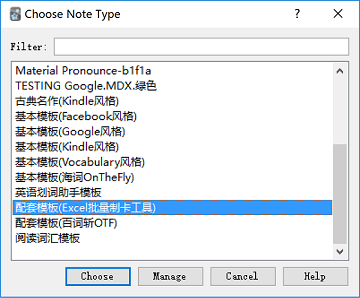
Set Note Type In the “Options” dialog, click “Choose note type” and set the note type you want to use.
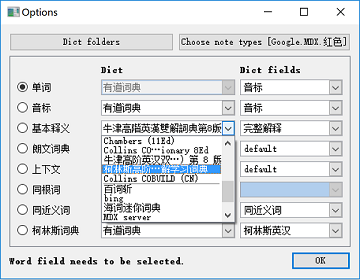
Set the word field Click the radio button to set the word field you want to query.
Set the mappings from note fields to dictionary explanations
The “Dict” comoboxes are used to specify the dictionaries. The “Dict fields” comoboxes are used to specify the available dictionary fields.
How to Use
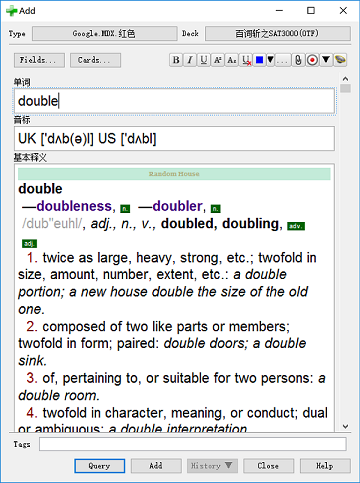
“Add” dialog Once the word to query is ready, click “Query” button or popup the context menu and use relevant commands.
- “Query” button: Query the explanations for all the fields.
- “Query All Fields” menu: Query the explanations for all the fields.
- “Query Current Field” menu: Query the explanation for current focused field.
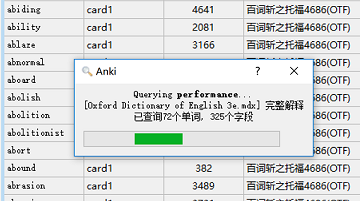
“Browse” window Select single word or multiple words, click menu “WordQuery”->“Query selected”.
All above query actions can be trigged also by the shortcut (default “Ctrl+Q”), but you could change it through the addon’s “Edit” menu.
Service Customization
The advanced users can implement new web dictionary services. See a typical reference for the details.
Other Projects Used
- mdict-query
- pystardict
Screenshots
Liên kết hỗ trợ
- https://finalion.github.io/WordQuery/
- https://github.com/finalion/WordQuery
- here
- customized
- a typical reference
Reviews (29)
👍 2025-04-09
doesnt work
👍 2025-03-09
出现错误:
775418273: 代码无效或该插件无法适用于当前版本的 Anki
👍 2024-10-22
not available
👍 2024-09-21
最新版出現錯誤代碼不能用了,可以修復一下嘛?麻煩了!
👍 2024-03-10
出现错误:775418273: 代码无效或该插件无法适用于当前版本的Anki
最新版的anki不能用 怎么办??
👍 2023-06-11
very useful and greatly help me improved my word vocabulary
👍 2023-05-23
not work now the latest version
👍 2023-04-29
例如:
CONFIG_FILENAME = ‘/Users/fire/road/data/wq_dict/_wqcfg.json’
这一段可以说详细一些吗,我也遇到了这个问题,但没有看明白你的解决方式
👍 2023-01-28
OSError: [Errno 30] Read-only file system
这个问题的解决办法是 找到 context.py 文件
比如我的路径就是
/Users/fire/Library/Application Support/Anki2/addons21/775418273/context.py
然后找到第29行 CONFIG_FILENAME = _wqcfg.json
把它的值改成非系统路径 就ok了,
例如:
CONFIG_FILENAME = ‘/Users/fire/road/data/wq_dict/_wqcfg.json’
👍 2022-09-12
错误
发生了一个错误。请在启动Anki时按住「Shift」键临时禁用插件加载。 如仅在插件启用时出错,请使用「工具」>「插件」功能禁用部分插件后重启Anki, 请重复上述步骤直至找到引起错误的插件。 找到引起错误的插件后,请反馈给插件作者。 调试信息:
Anki 2.1.54 (b6a7760c) Python 3.9.7 Qt 6.3.1 PyQt 6.3.1
Platform: Windows 10
Flags: frz=True ao=True sv=3
Add-ons, last update check: 2022-09-12 21:49:35
Caught exception:
Traceback (most recent call last):
File “C:\Users\Rui\AppData\Roaming\Anki2\addons21\775418273\ui.py”, line 215, in show_fm_dialog
fm_dialog.save()
File “C:\Users\Rui\AppData\Roamin
👍 2022-08-27
good job
👍 2022-07-29
在windows上很好用,换了MacBook报错了,希望作者能够解决相关问题,谢谢!
错误
发生了一个错误。请在启动Anki时按住「Shift」键临时禁用插件加载。 如仅在插件启用时出错,请使用「工具」>「插件」功能禁用部分插件后重启Anki, 请重复上述步骤直至找到引起错误的插件。 找到引起错误的插件后,请反馈给插件作者。 调试信息:
Anki 2.1.54 (b6a7760c) Python 3.9.7 Qt 6.3.1 PyQt 6.3.1
Platform: Mac 12.4
Flags: frz=True ao=True sv=2
Add-ons, last update check: 2022-07-29 13:36:24
相关插件:Word Query
Caught exception:
Traceback (most recent call last):
File “/Users/evaren/Library/Application Support/Anki2/addons21/775418273/ui.py”, line 215, in
👍 2022-05-05
错误
有一个错误发生了.请在按住shift键的同时启动Anki,这样可以临时的禁用您已经安装的插件。
如果仅仅是因为插件引起的问题,请选择工具>插件菜单项来将出错的的插件设置成失效,然后重启Anki,重复以上的步骤直到你发现了具体是哪个插件引起的问题。
当你已经发现是因为插件引起的问题,请在我们的支持网站上 插件支持 上报告问题。
调试信息:
Anki 2.1.49 (dc80804a) Python 3.8.6 Qt 5.14.2 PyQt 5.14.2
Platform: Windows 10
Flags: frz=True ao=True sv=3
Add-ons, last update check: 2022-05-05 14:44:22
Caught exception:
Traceback (most recent call last):
File “C:\Users\YoHa\AppData\Roaming\Anki2\addons21\775
👍 2022-05-04
难用,卡顿啊
👍 2022-04-02
错误
有一个错误发生了.请在按住shift键的同时启动Anki,这样可以临时的禁用您已经安装的插件。
如果仅仅是因为插件引起的问题,请选择工具>插件菜单项来将出错的的插件设置成失效,然后重启Anki,重复以上的步骤直到你发现了具体是哪个插件引起的问题。
当你已经发现是因为插件引起的问题,请在我们的支持网站上 插件支持 上报告问题。
调试信息:
Anki 2.1.49 (dc80804a) Python 3.8.6 Qt 5.14.2 PyQt 5.14.2
Platform: Windows 10
Flags: frz=True ao=True sv=2
Add-ons, last update check: 2022-04-02 12:15:48
Caught exception:
Traceback (most recent call last):
File “C:\Users\mdw\AppData\Roaming\Anki2\addons21\7754
👍 2022-02-16
错误
有一个错误发生了.请在按住shift键的同时启动Anki,这样可以临时的禁用您已经安装的插件。
如果仅仅是因为插件引起的问题,请选择工具>插件菜单项来将出错的的插件设置成失效,然后重启Anki,重复以上的步骤直到你发现了具体是哪个插件引起的问题。
当你已经发现是因为插件引起的问题,请在我们的支持网站上 插件支持 上报告问题。
调试信息:
Anki 2.1.45 (355e66e8) Python 3.8.6 Qt 5.14.2 PyQt 5.14.2
Platform: Mac 10.16
Flags: frz=True ao=True sv=2
Add-ons, last update check: 2022-02-16 21:29:51
相关扩展:Word Query
Caught exception:
Traceback (most recent call last):
File “/Users/zhangyuling/Library/App
👍 2022-01-08
Don’t work more.
👍 2021-10-19
神器啊.收藏啊.必须用
👍 2021-09-25
why
错误
有一个错误发生了.请在按住shift键的同时启动Anki,这样可以临时的禁用您已经安装的插件。
如果仅仅是因为插件引起的问题,请选择工具>插件菜单项来将出错的的插件设置成失效,然后重启Anki,重复以上的步骤直到你发现了具体是哪个插件引起的问题。
当你已经发现是因为插件引起的问题,请在我们的支持网站上 插件支持 上报告问题。
调试信息:
Anki 2.1.44 (b2b3275f) Python 3.8.6 Qt 5.14.2 PyQt 5.14.2
Platform: Windows 10
Flags: frz=True ao=True sv=2
Add-ons, last update check: 2021-09-24 22:23:30
wrapped C/C++ object of type QProgressDialog has been deleted
Traceback (most recent call last):
File
👍 2021-09-21
Looks amazing. But does this work on macOS? Please confirm
👍 2021-09-08
之前用的非常好用,现在似乎程序出了什么问题,会报错,希望早日修复。
👍 2021-08-15
原来不只我一个人发生这个问题
👍 2021-08-09
HELP!!! I don’t know what is going on.
错误
有一个错误发生了.请在按住shift键的同时启动Anki,这样可以临时的忽略掉你已经安装的插件。
如果仅仅是因为插件引起的问题,请选择工具>插件菜单项来将出错的的插件设置成失效,然后重启Anki,重复以上的步骤直到你发现了具体是哪个插件引起的问题。
当你已经发现是因为插件引起的问题,请在我们的支持网站上 add-ons section 上报告问题。
调试信息
Anki 2.1.21 (f1734a47) Python 3.8.0 Qt 5.13.1 PyQt 5.14.1
Platform: Mac 10.16
Flags: frz=True ao=True sv=1
Add-ons, last update check: 2021-08-05 23:18:25
相关扩展:Word Query
Caught exception:
Traceback (most recent call last):
File “aqt/progress.py”, line 73, i
👍 2021-07-26
错误
有一个错误发生了.请在按住shift键的同时启动Anki,这样可以临时的禁用您已经安装的插件。
如果仅仅是因为插件引起的问题,请选择工具>插件菜单项来将出错的的插件设置成失效,然后重启Anki,重复以上的步骤直到你发现了具体是哪个插件引起的问题。
当你已经发现是因为插件引起的问题,请在我们的支持网站上 插件支持 上报告问题。
调试信息:
Anki 2.1.45 (60f6fccc) Python 3.8.6 Qt 5.14.2 PyQt 5.14.2
Platform: Mac 10.16
Flags: frz=True ao=True sv=2
Add-ons, last update check: 2021-07-26 10:38:09
相关扩展:Word Query
Caught exception:
Traceback (most recent call last):
File “/Users/belle/Library/Applicati
👍 2021-05-27
Failed oxford word query
Anki 2.1.42 (8eebfe18) Python 3.8.6 Qt 5.14.2 PyQt 5.14.2
Platform: Windows 10
Flags: frz=True ao=True sv=2
Add-ons, last update check: 2021-05-26 15:47:31
Caught exception:
Traceback (most recent call last):
File “C:\Users\admin\AppData\Roaming\Anki2\addons21\775418273\query.py”, line 324, in run
result = self.query(service_field, word)
File “C:\Users\admin\AppData\Roaming\Anki2\addons21\775418273\query.py”, line 337, in query
return self.servi
👍 2021-03-24
错误
有一个错误发生了.请在按住shift键的同时启动Anki,这样可以临时的禁用您已经安装的插件。
如果仅仅是因为插件引起的问题,请选择工具>插件菜单项来将出错的的插件设置成失效,然后重启Anki,重复以上的步骤直到你发现了具体是哪个插件引起的问题。
当你已经发现是因为插件引起的问题,请在我们的支持网站上 插件支持 上报告问题。
调试信息:
Anki 2.1.35 (84dcaa86) Python 3.8.1 Qt 5.12.6 PyQt 5.12.3
Platform: Windows 7
Flags: frz=True ao=True sv=1
Add-ons, last update check: 2021-03-24 09:59:08
Caught exception:
Traceback (most recent call last):
File “C:\Users\lenovo\AppData\Roaming\Anki2\addons2
👍 2021-03-01
错误
有一个错误发生了.请在按住shift键的同时启动Anki,这样可以临时的禁用您已经安装的插件。
如果仅仅是因为插件引起的问题,请选择工具>插件菜单项来将出错的的插件设置成失效,然后重启Anki,重复以上的步骤直到你发现了具体是哪个插件引起的问题。
当你已经发现是因为插件引起的问题,请在我们的支持网站上 插件支持 上报告问题。
调试信息:
Anki 2.1.35 (84dcaa86) Python 3.8.0 Qt 5.14.2 PyQt 5.14.2
Platform: Windows 10
Flags: frz=True ao=True sv=1
Add-ons, last update check: 2021-03-01 09:01:03
Caught exception:
Traceback (most recent call last):
File “C:\Users\kasum\AppData\Roaming\Anki2\addons2
👍 2021-02-22
Very good,我猜这玩意想流畅使用没点编程经验,不懂python等语言可能很难🤔🤔
👍 2021-01-18
垃圾,一查询就出现错误
