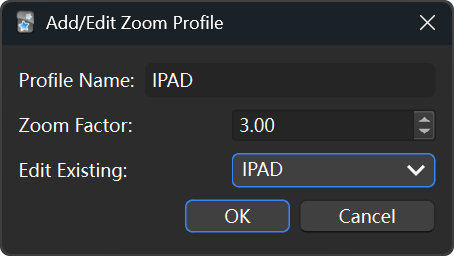
Zoom Profile Manager for Anki
I created this little extension to solve a very specific problem: I need to screen cast full screen Anki (w/ steamlink) to an iPad I mounted on a treadmill to do reviews when walking, and I’m tired of using zoom-in and zoom-out every time
This extension works like the native View-Zoom-in and zoom-out, but allow into you to save and switch between multiple profiles.
I’m just using it on scale one at default and three for iPad.
Key Features: Custom Zoom Profiles: Define multiple zoom profiles with your preferred magnification levels (e.g., “Default” at 1.0x, “Presentation” at 1.5x, “Detailed Study” at 1.2x). Set zoom from 0.5x up to 6.0x. Effortless Switching: Select your desired profile from the “Tools → Zoom Profiles” menu to instantly apply it. Targeted Zooming: Zooms only the card content areas like the native zoom, leaving your Anki toolbar and other UI elements at their normal size. Live Preview: See the effect of your zoom changes in real-time as you create or edit a profile. Easy Management: Add, edit, or delete profiles through a simple and intuitive interface. Persistent Settings: Your profiles and last selected zoom level are saved and automatically applied when Anki starts. How to Use: Install the addon. Go to Anki’s main menu: Tools → Zoom Profiles. From here, you can: Select Profile: Choose an active zoom profile. Add/Edit Profile: Create new profiles or modify existing ones. Adjust the zoom factor and see a live preview! Delete Profile: Remove profiles you no longer need.
Compatible with modern Anki versions (including Anki 2.1.45+ for best results, with fallbacks for older versions).
If you find this plugin useful, consider support me! Please don’t hesitate to share your feedback, ideas or function requests!
Screenshots