The add-on can be used to import a PowerPoint presentation to Anki as formatted text and screenshots after manually converting to HTML using LibreOffice.
It’s just a simple version. It might or might not work.
NOT IMPLEMENTED
- Extracting original images (maybe using python-pptx - https://github.com/thedjdoorn/python-pptx-image-extract)
- Custom field mapping
- Maybe add the ID field to use with Image Occlusion (to do something similar - https://www.reddit.com/r/Anki/comments/ocrgy3/power_point_slide_import_into_anki/).
- Automatically convert from PowerPoint to HTML Document (maybe using LibreOffice from the command line)
HOW TO USE
-
Export a PowerPoint presentation as HTML Document (Impress) using LibreOffice.
1.1. Install LibreOffice - https://www.libreoffice.org
1.2. Open a PowerPoint presentation
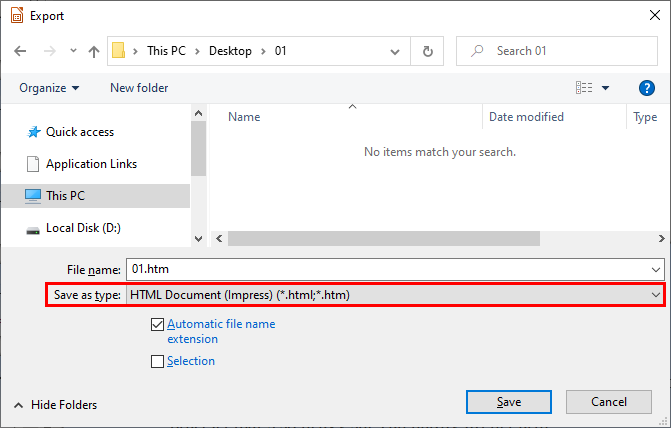
1.3. File > Export, select or create an empty folder for extracted slides, change “Save as type” to “HTML Document (Impress)” and click “Save”.
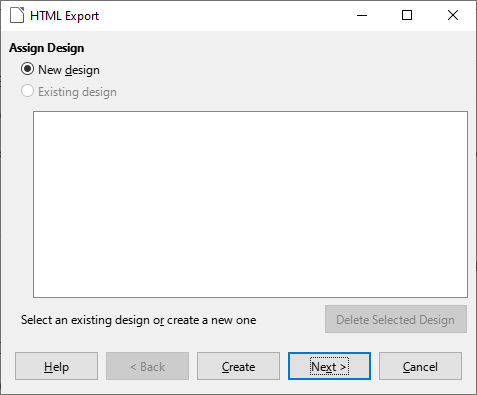
1.4. In the HTML Export dialog either click “Create” or click “Next” a few times to change a screenshot resolution (640 x 480 pixels).
1.5. The folder will contain a single .htm file and a number of .html and .png files.
-
Anki > Tools > Import Slides
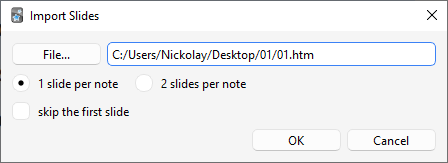
2.1. Select the .htm file.
2.2. Select 1 slide per note or 2 slides per note (front / back) and skip the first slide or not.
2.3. Click “OK” and wait a few seconds for a new deck to be added with the same name as the .htm filename.
ADDITIONAL INFORMATION
The add-on will create a new note type if it doesn’t exist and add new fields if they were renamed or removed.
- Front Text
- Front Screenshot
- Back Text
- Back Screenshot
GitHub - https://github.com/kelciour/import-powerpoint-slides/issues
Nickolay Nonard <kelciour@gmail.com>
Screenshots