This ad-don is just about adding hyperlinks into your fields of your notes. Nothing more.
This add-on adds a dialog to enter hyperlinks (see screenshot below) and some context menu entries for handling hyperlinks. The shortcuts to insert a hyperlink (default Ctrl+Shift+H) and unlink (Ctrl+Shift+Alt+H) can be configured using the configuration window of 2.1: Tools>Add-ons, select the add-on and click on “Config”.
The add-on extended editor for field (for tables, search&replace, …) is also useful to add, delete or edit hyperlinks, i.e. it’s an alternative to this add-on.
This is a partial fork of the add-on Power Format Pack (Copyright 2014-2017 Stefan van den Akker) because it won’t be ported to 2.1 (as of 2018-11).
Styling
If you don’t like how the hyperinks look like during reviews (blue and underlined) you can adjust this by changing some css in the styling section of the card templates for window. To change how hyperlinks look in the editor you need (in Anki 2.1.49) another add-on like https://ankiweb.net/shared/info/181103283 (but this is pretty complicated).
Alternatives
For some uses cases (links to the same site that have a similar url structure) this built-in feature is better: https://apps.ankiweb.net/docs/manual.html#dictionary-links
bugs, errors, feedback
Please do not use reviews for bug reports or support requests. I don’t get notified of your reviews, and properly troubleshooting an issue through them is nearly impossible (formatting is limited and I can’t reply multiple times). If you find a bug let me know in the official anki support forum, on github.
The source code is available on github.
Credits
- Stefan van den Akker (the original code for Anki 2.0)
- Arthur Milchior (all the changes in the version from 2020-04-03, mainly the optional config with a GUI with the add-on Graphical form to change add-on configuration).
Versions
- 2023-06-18 (2.1.50+ only) fix hyperlink sometimes inserted at the beginning of a field; if clipboard or selected text is an url put it in the hyperlink dialog in the url field (issues 20,21)
- 2023-04-30 (2.1.50+ only) fix a bug occuring in 2.1.50+, new option in dialog to prepend https/https
- 2022-05-23 fix for 2.1.50/qt6: fix “open url” etc context entries.
- 2022-02-09 fix for 2.1.50 context menu
- 2022-01-26 fix 2.1.50 for qt5
- 2021-12-05 version for 2.1.50, thanks @zjosua for the update.
- 2021-11-21 add “when problems occur” section to config.md
- 2021-07-10 some cleanup for 2.1.45
- 2020-07-29 partially reverse change from 2020-06-15, at least sometimes keep the surrounding formatting, see issue 7.
- 2020-06-18 fix latest release: rename a function everywhere …
- 2020-06-16 added editor context menu “open URL” (in browser), can be switched off/hidden in the add-on config - renamed a config option - made a context menu entry optional - yesterdays addition is optional - strip whitespace around links
- 2020-06-15 try to deal with illegal characters in URL(”), remember window size
- 2020-04-03 optional config with a GUI with the add-on Graphical form to change add-on configuration
- 2019-10-20 improve interoperability
- 2019-10-15 manifest.json
- 2019-04-11 added context menu entries (experimental)
- 2018-11-03 initial release
Screenshots
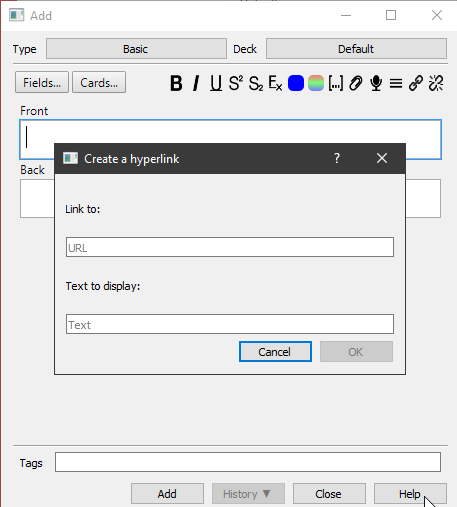
Liên kết hỗ trợ
Reviews (25)
👍 2025-11-05
Nice. I recommend putting the hotkey onto Str + K, as this is the normal hyperlink hotkey and changing the default to https instead of http. All in all it is very convenient though. Thanks!
👍 2025-10-01
really good it helps me sooooo much!!! ty xx
👍 2025-08-25
An Amazing addon!
👍 2025-04-16
Great tool - used it for over a year now, wouldn’t be without it.
👍 2025-03-03
Very convenient, but I think anki should have this feature built in
👍 2025-01-25
Excelent
👍 2024-10-10
Nice and simple. Should be default
👍 2024-07-30
Thank you! Amazing add-on.
👍 2024-04-14
How do I configure the hyperlinkn shortcut? Comment from author you are probably the first one in over five years to ask this.
I explain this in the second paragraph of this addon: “The shortcuts … can be configured using the configuration window of 2.1: Tools>Add-ons, select the add-on and click on “Config”. ” This place is also the place where you find the shortcut config for most addons.
Given that the download page of each addon on ankiweb under the section “Download” has the sentence “A
👍 2023-12-27
Works great, brilliant work!
👍 2023-09-18
it works!
👍 2023-08-17
Open URL is super handy
👍 2023-07-27
I use it a lot
👍 2023-07-25
Works great
👍 2023-07-21
Great but note that the “Cmd+Shift+H” shortcut for inserting a hyperlink collides with the shortcut for viewing the history, which is also “Cmd+Shift+H” (on a mac). This becomes an issue once there is a history, i.e., you have added more than one card. I needed to change the default. I suggest the default shortcut should instead be “Cmd+K” as this is the standard shortcut for inserting a hyperlink on Google and Apple platforms.
Also there should be no default hyperlink prefix in my opinion a
👍 2023-06-25
“add hyperlink” works like a magic! I wouldn’t pack much information in this handy way, “Ctrl+Shift+H”, without this addon. This saves my continuous work with Anki!
👍 2023-06-12
It’s a very good add ons !!
It is possible to create a hyperlink text for several note in one click. I have thousand of cards et i would like add hyperlink for example for all note are contain “dogs”. Sorry for my english. Tank you ! Comment from author this is not possible with my add-on.
maybe with https://docs.ankiweb.net/browsing.html?highlight=replace#find-and-replace ? Before you try this make sure to know how to restore a backup.
with specialized add-ons or dedicated javascript
👍 2023-05-17
not work on Anki 2.1.62 version Comment from author yes it does. At least it worked for me and I got no similar report to yours.
When you run into problems: Post in the official support thread at https://forums.ankiweb.net/t/add-hyperlink-official-thread/540 Only if you post there I’m notified about your message.
👍 2022-09-27
Please add it to make it look like this ▶▶▶ https://wampi.ru/image/RWfxiWf ◀◀◀ Here is the link how it should look, if it’s not difficult, you can add it so that you can create them yourself and add text and pictures to them, it would be necessary for me
👍 2022-08-23
Perfect. Thanks a lot.
👍 2022-08-10
One small issue, when asking it not to count suspended cards, it still counts it towards final percentage and matured percentage. Would appreciate a fix for that.
👍 2022-07-16
very useful and handy add-on, especially for visual learners who want to add links to outside resources.
👍 2022-06-16
Essential
👍 2022-05-08
Works great. Thanks!
👍 2022-05-02
Exactly what i was looking for
