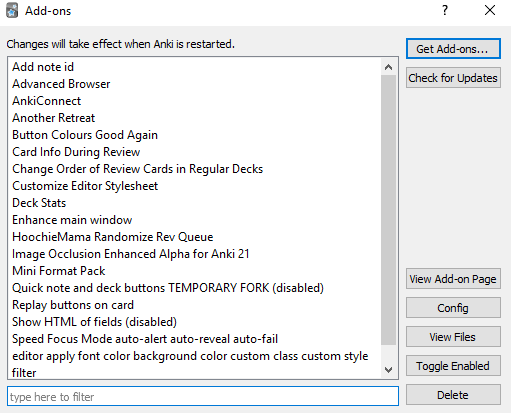
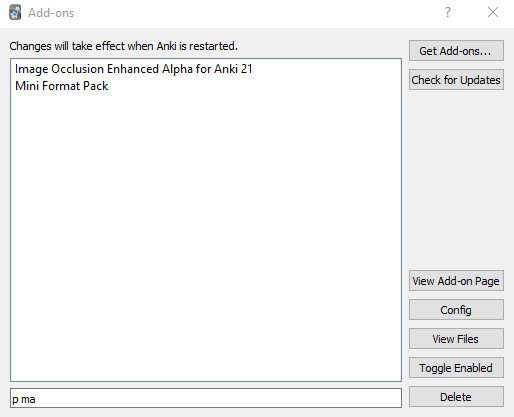
This add-on adds a filter bar below the add-on list. Might be useful if you have many add-ons.
unfiltered:
filtered:
If this add-on ever causes an error you might have the problem that this error might make the add-on dialog (where you can disable or delete add-ons) unusable. In this case you would have to delete this add-on from outside of Anki: Go to your profile folder (for locations see here) and delete the folder 561945101 (this is the number of this add-on) from the folder addons21.
bugs, errors, feedback Please do not use reviews for bug reports or support requests. I don’t get notified of your reviews, and properly troubleshooting an issue through them is nearly impossible (formatting is limited and I can’t reply multiple times). If you find a bug let me know in the official anki support forum. As always: Use it at your own risk.
Caveat/Limitation for the add-on for Anki versions before 2.1.56: Some users report that sometimes for add-ons that have a config the config button is falsely greyed out when filtering with this add-on. In this case you can still access the add-on config by double clicking the addon name in the list (if you use Anki 2.1.14 or newer). Sometimes it’s the other way round: For add-ons that don’t have a config the config button is falsely not greyed out. Then you’ll get the an info box that no config is available just as you did in Anki 2.1.11 or earlier (before 2019-04-23). Both are minor nuisances so they are not fixed at the moment.
Versions
2023-10-18 fix for Anki 23.10 or later 2023-06-15 (.56+ only) show correct add-on when clicking “View Add-on Page”, the config button should no longer be greyed out 2021-12-06 fix for Anki 2.1.50 with pyqt6 only 2020-05-08 added Ctrl+F shortcut to focus search bar (only for Anki 2.1.20+) 2020-01-22 fix for Anki 2.1.20+ 2019-02-25 initial release
Screenshots
Liên kết hỗ trợ
Reviews (24)
👍 2024-10-28
This should be definitely added to Anki as a default feature, idk why it isn’t yet
👍 2024-08-16
Has provided very useful oversight! Especially in versions prior to 2.1.20 when the add-on window wasn’t sorted by enabled → disabled
edit 2020-05-08: Any thoughts on a shortcut for this, e.g., Ctrl+F?
edit 2024-10-16: Thanks for the fix of 2023-06-15! Comment from author before post was edited I just uploaded a new version that has the “Ctrl+F” shortcut. Please update. If you run into a problem please let me know.
👍 2024-03-28
So simple yet so useful, thanks a lot for this💯
👍 2023-11-22
Should be part of vanilla Anki
👍 2023-08-06
thank you
👍 2023-06-22
It is very very helpful!!!!
👍 2023-04-17
Is there a GitHub or other place I can report issues? Please respond with a link if there is or how else we should contact you. Comment from author I missed your review so I’m answering late. The best place is the thread in the anki forum linked from the top right of the add-on page. I once had a github repo for this add-on but have since deleted it because I always forgot to push the latest changes to it …
👍 2022-10-06
Simple and useful
👍 2021-11-29
Mandatory add-on for everyone with 20+ Add-ons
Thank you so much for this !
👍 2021-11-25
Must have addon
👍 2021-09-01
Thanks
👍 2021-08-03
Great, thanks a lot!
👍 2021-04-01
Should be implemented in Anki, must have add-on
👍 2021-03-24
Simple and works. Thank you for this addon.
👍 2021-03-23
Thanks
👍 2020-08-11
Really useful. Should be built-in !
👍 2020-07-24
Great JOB
👍 2020-06-30
IT MUST BE BUILT-IN
👍 2020-05-22
I wonder why there has to be a add-on to do this. This feature should be built-in, shouldn’t it?
👍 2020-03-04
Adds a lot of convenience. Thanks!
👍 2020-01-22
Nice!!
👍 2019-12-08
Works well. Thanks.
👍 2019-07-24
I have no idea how I missed this when I check the addon page daily. Thank you so much!
👍 2019-02-24
Works well for me so far! Have you considered submitting this as a PR to Anki? I could see this being a great fit.
