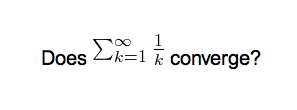
By default, Anki renders LaTeX and includes the final images as-is. However, the bounding box of the resulting image might not necessarily coincide with the actual baseline of the equation. Using the widely available preview.sty, one can access the depth — the offset from the baseline — of the generated image and correct for that.
The Anki manual sports a picture of the default PNG rendering:
I’ve generally found it to be a bit better with SVGs + some CSS that just vertically centres the pictures:
This add-on gives a further improvement upon that:
In comparison with 1337660446, this add-on was written from scratch and tested with Anki 2.1+.
To use the add-on, you will need to include preview.sty in your LaTeX preamble:
% Header \documentclass{article} \usepackage[active,tightpage]{preview} % XXX \usepackage{xcolor} \begin{document} \setlength{\parindent}{0in} \setlength{\abovedisplayskip}{0pt} % XXX better bounding boxes \begin{preview} % XXX
% Footer \end{preview} % XXX \end{document}
If you use PNG output and not SVG output (which I would however advise against) then you will need to further adjust the LaTeX build process to include a —depth argument in the call to dvipng. For that, I suggest using 937148547.
Screenshots