NOTE: This add-on is no longer maintained. It may not work on newer Anki versions.
Anki Excel Sync GitHub link
An addon that lets you add cards and edit them via Excel. It batch syncs all excel files in a directory, and all notes that has specified tags. Creates an excel file per each tag.
Note: Currently does not work with Anki v2.1.25+. Supports only .xlsx files. (Microsoft Excel file) Notes cannot have more than two tags with selected super-tag. (Super-tag is the top-most level of hierarchical tags. Super-tag of tag science::physics::var would be science) If there are formulas in excel files, the formula itself will be seen as values, not computed values. Images put directly into excel files will not be loaded into Anki. Use Anki to put images inside notes. If you delete, rename, or modify a note type, Excel -> Anki will not work until Anki -> Excel runs. Import your edited excel files before changing note type. If you find any bugs, please report them here instead of in the comments. I do not get any notification from the comments. Alternatively, you could message me on reddit u/bluegreenmagick.
Setup
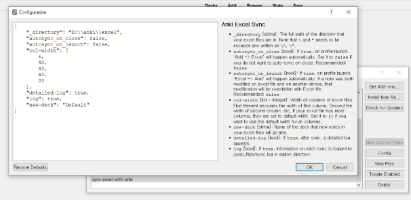
After downloading the add-on, restart Anki. Edit config set _directory. (Tools > Addon > Anki Excel Sync > Config) The excel files will be written to the directory, and searched from the directory. It is recommended to set it to an empty directory - other excel files in the directory will be deleted.
In the directory, make sub-directories with the names, the super-tags of notes you wish to sync.
Excel File Format
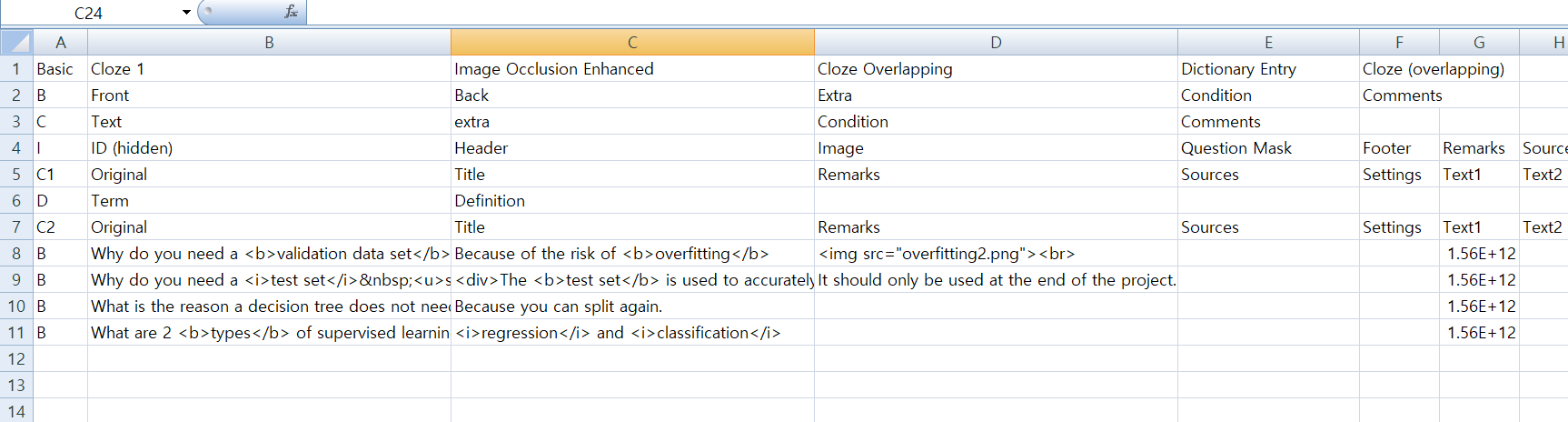
1st row: Names of note types.
<b>2nd row~</b>: note-type-rows. Each row represents one note type. <b>1st column</b>: designator of note type. Can be any sequence of letters. <b>2nd column~</b>: name of fields in note type. *Must be the same as the name of fields of note type in Anki, or it will not work.
<b>n+2 row~</b>: note-rows. Each row represents one note. <b>1st column</b>: designator of this note’s note type specified in note-type-rows <b>2nd column</b>: value for each fields. *The order must be the same as the order specified in the note-type-row. *You can leave it blank if you want. <b>Last column</b>: note id in Anki. *The addon will automatically fill this cell in, so there is no need to put anything here. If it doesn’t exist, creates new note.
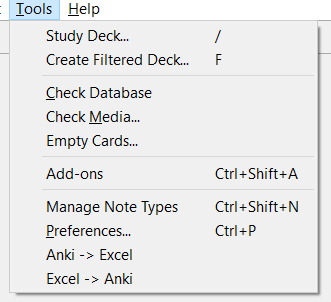
Obviously, you aren’t expected to type all the note type stuff. Intended use is to run ‘Anki -> Excel’ first, then edit / add notes on it.
Screenshots
Liên kết hỗ trợ
Reviews (27)
👍 2024-12-13
Workaround for Anki 24.11 issue loading below!
Fantastic add-on! I had a bunch of cards I added using AnkiWeb. It added a lot of extraneous HTML which I could not easily strip out. This was affecting the display of my cards since it included br, p, and span tags. This add-on let me strip them easily. I still need to investigate it further to see if it can help me with other editing changes I need to make.
ETA = As of the Anki 24.11 version released in December of 2024, the addon breaks again.
👍 2024-08-25
I recently discovered an incredible app that can synchronize changes between the app and CSV or Excel files in real-time. This isn’t just importing or exporting, it’s true synchronization of flashcards, ensuring that learning progress is never lost. https://play.google.com/store/apps/details?id=pl.gocards
👍 2023-11-25
I love this plugin and it works quite well. I did notice it stopped working if you update to the Qt6 version of anki but here is an easy fix for anyone that may want to get it working again.
Open the file at %appdata%\Anki2\addons21\1832015432\ankiExcelSync\menu.py
Change line 1 from “from PyQt5.QtWidgets import QAction” to “from PyQt6.QtGui import QAction”
👍 2023-03-31
Deletes excel files without leaving a trace
👍 2023-02-17
Great! The future is promising.
👍 2023-01-05
Here is a simple tutorial for the Add-on(Anki Excel Sync):
①Anki→Tools→Add-ons→Anki Excel Sync→Config
Edit the second line to→ “_directory”: “E:\anki2excel”,
Then the penultimate line── “new-deck”: “Default”
If you don’t have a deck named “Default” but you have a deck named AAA, you can create a new deck called Default or change the penultimate line to “new-deck”: “AAA”. DO NOTE THAT name of deck is case-sensitive here! Take a look at your deck to see if it’s name
👍 2022-11-06
Good!! It wasn’t easy to config it. But now it’s work.
👍 2022-02-09
Looks very important tool. plz update it as it does not work with current version of anki.
👍 2022-01-06
Super useful. Took me hours to figure out how to use it. But it’s totally worth it. If you got “0 notes”pop-up too, try this page:https://github.com/BlueGreenMagick/sync-excel-with-anki/issues/13
👍 2021-10-08
Fantastic for mass input, especially if running OCR or conversion software for notes.
👍 2021-08-30
This guy is a wizard. This doodad saved my butt.
The instructions above totally worked for me; just make sure that you change the default deck in config to one of your actual decks. Also, to reiterate instructions: after making the destination folder and pointing to it in config, make a folder inside the destination folder for each tag you want the program to make a spreadsheet for.
Thanks a ton, dude!
👍 2021-08-28
Please explain better how to user this.
8/28/2021 still too confusing to use.
👍 2021-06-29
Great add-on while I was using Anki 2.1.25. Now it is no longer compatible with newer Anki versions (2.1.44). When I use it now, I get the following:
Anki 2.1.44 (b2b3275f) Python 3.8.6 Qt 5.14.2 PyQt 5.14.2
Platform: Mac 10.16
Flags: frz=True ao=True sv=2
Add-ons, last update check: 2021-06-27 23:51:54
Add-ons possibly involved: Anki Excel Sync
I hope it gets updated one day as it is an extremely useful tool!
👍 2021-05-01
great, it took my time to understand how to use it, but once i get it, it saved lots of time.
one of my favourite add ons.
👍 2020-12-09
Please make available for Version 2.1.35… Comment from author Works now!
👍 2020-08-17
Works great!!!
👍 2020-05-10
Круто, надеюсь, сработает
👍 2020-04-25
Seems great so far! I’m looking at writing a python script to add some audio file names to notes via excel, and this is the exact thing I needed as the inbetween :)
👍 2020-04-25
Looks great, but got a little problem.
Import Anki -> Excel works fine. But using Excel -> Anki shows an error
raise Exception(“ERROR: No deck exists with name %s”%decknm)
Exception: ERROR: No deck exists with name default
I’m using this configuration. What is my mistake? Help is greatly appreciated..
{
“_directory”: “D:\Anki_Excel”,
“autosync_on_close”: false,
“autosync_on_launch”: false,
“col-width”: [
6,
60,
60,
20
]
👍 2020-04-18
Super! Thanks a lot! For users, go to “https://github.com/BlueGreenMagick/sync-excel-with-anki/blob/master/screenshot/excel%20format.png” since the explanations are more clear to configure it (especially for the folders to create)
👍 2020-03-22
This add on is great, it saves me a lot of time in card making, and one optimization suggestion is, can you specify which deck to put each note in the Excel ? Because now I could just put all my notes into the default deck, and then open the browser to manually change some of my notes into the another deck. Because in Anki, different decks correspond to different decks options. So I think it’s important to add this . I hope it’s admissible. Thank you.
👍 2020-03-19
workflow porn <3
👍 2020-03-13
There were times when it worked a little differently than I expected, but it’s very convenient once I get used to using it.
👍 2019-12-29
So far so good - works well.
Important tip: create a new directory to use as the target for this sync app. If your first Anki -> Excel sync is to an existing directory that already contains other non-related files, the app will remove all of those files (including recursively from any subdirectories) without prompting or warning, and without using the system Recycle Bin. I had about a thousand work-in-progress photoshop, premiere, and python files purged out of my “D://Working” directory, mu
👍 2019-12-13
Haven’t tried. but great idea. Could use it with google sheet or not? Comment from author Only .xlsx files can be used. You will need to download google sheet in excel file.
👍 2019-11-21
havent got the time to try it, but the concept is too dope
👍 2019-10-18
thank you

