An Anki add-on that enhances card creation by integrating AI and external APIs to provide rich content for your flashcards.
Anki² Features Quick Start Installation Usage Configuration Obtaining API Keys Bing Image Search API Forvo API OpenAI API Contributing License Features
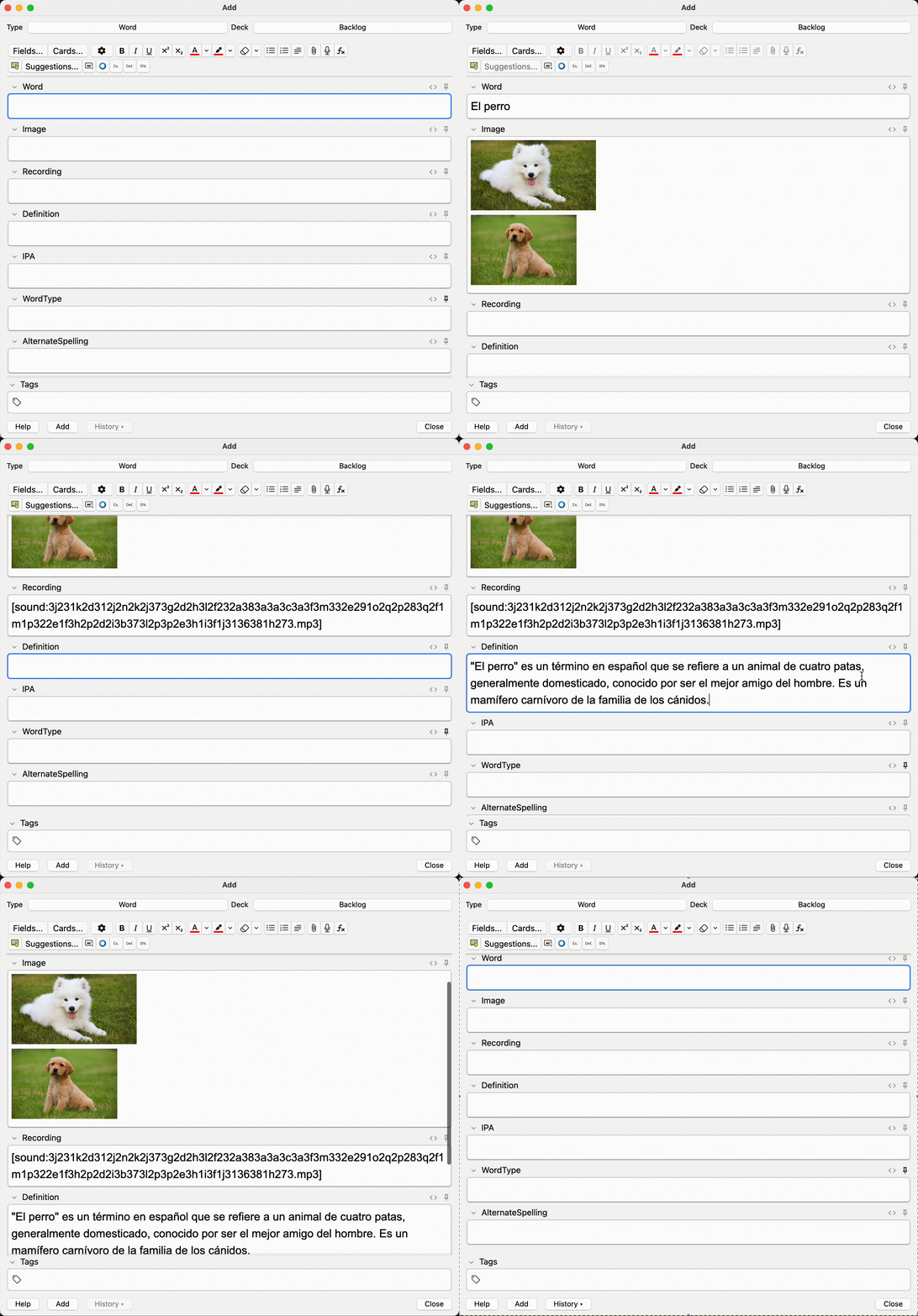
🖼️ Images
Fetch relevant images from Bing Image Search Automatically download and embed in cards Configurable number of images per card
🗣️ Pronunciations
Get native speaker pronunciations from Forvo Support for 40+ languages
🤖 AI-Powered Content
Generate example sentences Create concise definitions Generate IPA transcriptions Adjustable difficulty levels (A1-C2) Quick Start Installation
From AnkiWeb:
Open Anki Tools → Add-ons → Get Add-ons… Paste code: [addon_code] Restart Anki
From Source:
Clone repository
git clone https://github.com/jqhoogland/ankisquared.git
make install
Usage Open Anki and navigate to the card editor Type your word/phrase in the front field Use the toolbar buttons or keyboard shortcuts: Ctrl+Shift+1: Add images Ctrl+Shift+2: Add pronunciation Ctrl+Shift+3: Add example sentences Ctrl+Shift+4: Add definition Ctrl+Shift+5: Add IPA Configuration Tools → Add-ons → Anki² → Config Configure your API keys: { “bing_api_key”: “your-bing-api-key”, “forvo_api_key”: “your-forvo-api-key”, “openai_api_key”: “your-openai-api-key” }
Obtaining API Keys Bing Image Search API Sign up for a Microsoft Azure account Create a Bing Images Search resource in the Azure portal and select the Free F1 tier. Go to “Manage keys” in your resource Copy either Key 1 or Key 2 as your bing_api_key Forvo API Register for a Forvo account Subscribe to an API plan (they offer a free trial) Get your API key from your Forvo account dashboard Use this as your forvo_api_key OpenAI API Create an OpenAI account Go to API Keys Click “Create new secret key” Copy the key immediately (you won’t be able to see it again) Use this as your openai_api_key
Note: Keep your API keys secure and never share them publicly. The add-on stores them locally in your Anki configuration.
Contributing User Guide Configuration API Documentation Contributing Guide License
MIT License - see LICENSE file
Screenshots




Liên kết hỗ trợ
Reviews (2)
👍 2025-08-22
Sadly doesn’t seem to work on the latest Anki Version (v. 25.02.7). I get an error message when I start Anki with this addon enabled:
The following add-ons failed to load: Anki Autofill fields with images audio and AI suggestions They may need to be updated to support this version of Anki. Click the Check for Updates button to see if any updates are available. You can use the Copy Debug Info button to get information that you can paste in a report to the add-on author. For add-ons that don
👍 2025-01-06
Description looks awesome, but I have this error message:
Anki 24.11 (87ccd24e) (ao) Python 3.9.18 Qt 6.6.2 PyQt 6.6.1 Platform: Windows-10-10.0.19045
When loading Anki Autofill fields with images audio and AI suggestions: Traceback (most recent call last): File “aqt.addons”, line 250, in loadAddons File “C:\Users\Vitalii\AppData\Roaming\Anki2\addons21\517882364_init_.py”, line 10, in <module> from ankisquared.gui.editor_menu import did_load_editor ModuleNotFoundError: No module na
