Auto Images — Anki Add-on
Adds images to notes using multiple providers:
Google Custom Search JSON API (image search) Nadeshiko (image + audio, picks sentence length of your choice) Google GenAI (Imagen) image generation
Press one key while reviewing to update the current note, run over selected notes from the Browser, or over an entire deck from Tools.
If it’s useful please star so employers think I’m cool.
Menu entries in Anki:
Tools → Auto Images (Google) (run over a deck) Browser → Edit → Auto Images (Google) (run over selected notes) Install Import the addon through Anki Update config with your API keys Before using the mid-review hotkey, make sure to run it at least once through the browser as the review hotkey will use your last used settings from there Getting API Keys Google API key from this link: https://developers.google.com/custom-search/v1/overview (Please keep in mind if you do more than 100 a day with google it will charge you) CX Key from here: https://programmablesearchengine.google.com/controlpanel/create Nadeshiko API key here: https://nadeshiko.co/settings/developer (I personally use nadeshiko the most) Configure In Anki go to: Tools → Add-ons → Auto Images → Config { “append_photo_suffix”: true, “ddg_locale”: “ja-jp”, “default_replace”: false, “google_api_key”: “REPLACE_WITH_YOUR_GOOGLE_API_KEY”, “google_cx”: “REPLACE_WITH_YOUR_GOOGLE_CX”, “google_genai_api_key”: “REPLACE_WITH_YOUR_GENAI_API_KEY”, “google_genai_aspect_ratio”: “1:1”, “google_genai_model”: “models/imagen-4.0-fast-generate-001”, “google_genai_person_generation”: “ALLOW_ALL”, “google_genai_prompt_template”: “create an image to demonstrate the meaning of {term}”, “nadeshiko_api_key”: “REPLACE_WITH_YOUR_NADESHIKO_API_KEY”, “nadeshiko_audio_field”: null, “nadeshiko_base_url”: “https://api.brigadasos.xyz/api/v1”, “nadeshiko_image_field”: null, “nadeshiko_max_length”: 0, “nadeshiko_min_length”: 6, “nadeshiko_query_suffix”: "", “provider_preference”: [ “google” ], “query_prefix”: "", “query_suffix”: "", “reviewer_hotkey”: “Ctrl+Shift+G”, “reviewer_hotkey_genai”: “Ctrl+Shift+U”, “reviewer_hotkey_nadeshiko”: “Ctrl+Shift+Y” }
Note: The bundled config.json is a fallback for defaults. If you edit it, Anki’s add-on configuration (set via the dialog above) will still take precedence.
default_replace: If true, overwrite the Target Field instead of appending. query_prefix / query_suffix: Prepended/appended to the field text when searching. append_photo_suffix: When true, UI defaults to adding a suffix like イラスト to Google queries. provider_preference: Search order for backfill. Any of “ddg”, “yahoo”, “google”. ddg_locale: Locale passed to DuckDuckGo (e.g., ja-jp). google_api_key / google_cx: Required for Google Custom Search (image). reviewer_hotkey: Quick-add Google image on current card. Default Ctrl+Shift+G. reviewer_hotkey_nadeshiko: Quick-add Nadeshiko image+audio. Default Ctrl+Shift+Y. reviewer_hotkey_genai: Quick-generate image via Google GenAI. Default Ctrl+Shift+U. nadeshiko_: API key and options. The add-on requests the longest sentence directly from the API (descending length) and uses the first result. nadeshiko_min_length / nadeshiko_max_length: Optional length bounds forwarded to the API. max_length=0 disables the upper bound. Defaults favor slightly longer-than-single-word results. google_genai_: Settings for Imagen generation (model, aspect ratio, person generation policy, prompt template).
Notes on quota:
Google CSE requires both google_api_key and google_cx. The dialog shows a convenience counter (out of 100/day) and stores it in user_files/quota.json (Pacific Time rollover). You are responsible for your own quota limits. Usage Open the dialog, choose a deck (Tools) or select notes (Browser). Enter Query Field (source text). Provider: Google: also select Target Field for the image. Nadeshiko: select image/audio/sentence fields; the API returns the longest sentence for the query within your configured length range, and the add-on will also write the sentence text. Gemini (Google GenAI): select Target Field; generates an image with the configured prompt template. Options: Replace existing, and an optional query suffix for Google (defaults to イラスト). Click Run. The add-on saves media to Anki and writes <img src=”…”> or [sound:…] accordingly.
While reviewing (hotkeys):
Google image: Ctrl+Shift+G Nadeshiko image+audio: Ctrl+Shift+Y Google GenAI image: Ctrl+Shift+U
Hotkeys use the last settings chosen in the dialog (per provider).
Nadeshiko hotkey specifics:
Always overwrites image and audio fields when present, and also overwrites a sentence field with the returned sentence text. Sentence field precedence: Sentence → Text → Front → Expression → the selected query field (if available).
Google/GenAI hotkeys: always overwrite the target image field.
If keys are missing, the dialog will warn you.
Logs Rotating logs are written to user_files/auto-image.log. If Google is used, a simple daily quota counter is kept at user_files/quota.json (Pacific Time rollover). Test without Anki (optional)
You can fetch images to a folder from the command line for quick testing:
python test_fetch_images.py —query “猫” —count 5 —out test_images —provider google
This respects config.json (Google keys).
Example Attribution
Inspired by the design and UX flow in the Yomitan backfill add-on: https://github.com/Manhhao/backfill-anki-yomitan
Screenshots
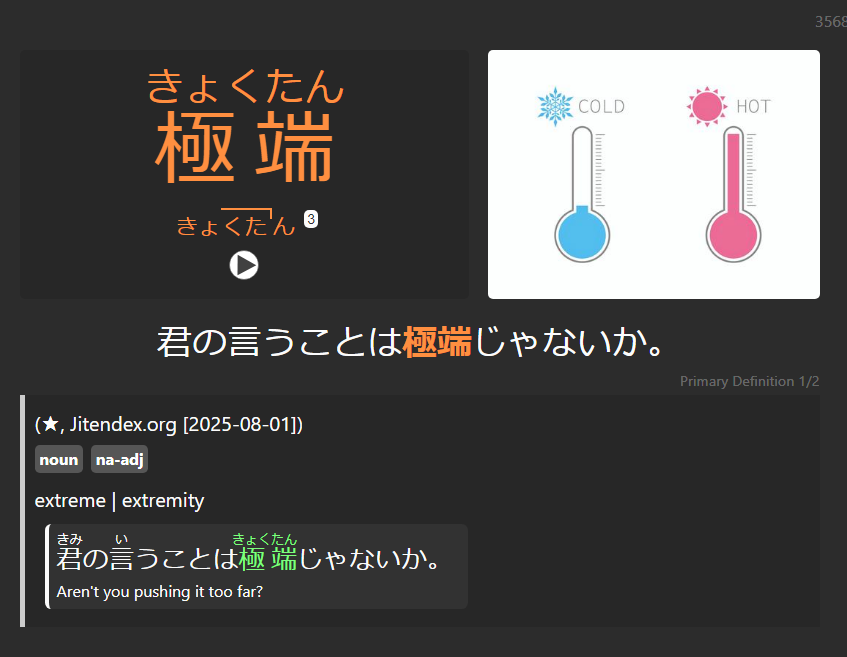
Liên kết hỗ trợ
Reviews (5)
👍 2026-02-02
tolong tambahkan satu provider lagi yaitu immersionkit ini (image + audio + sentence). nadeshiko seringkali mengalami down. saya harap ini bisa dipertimbangkan. https://apiv2.immersionkit.com/search?q=%E6%82%AA%E3%81%84&index=&exactMatch=false&limit=0&sort=sentence_length%3Aasc
👍 2026-01-13
Can you add a field for nadeshiko for english translation
👍 2025-11-11
Extremely helpful for language learning. Thank you.
👍 2025-11-02
THANK YOU VERY MUCH!
👍 2025-10-02
very useful
