AnkiOCR
Anki 2.1 addon to generate OCR text from images inside of Anki notes/cards. Note that this is only designed for computer generated text, not handwritten.
The aim of this addon was to generate searchable text for image-heavy notes, it is not intended to produce high quality, perfectly ordered text!
Features
- Convert many notes at once
- Undo changes very easily
- Multilanguage support via configuration of detection languages
This is currently in beta stage, please submit a bug report on GitHub if bugs are found, or you want to raise a feature request.
Installation
AnkiOCR depends on the Tesseract OCR library.
If you’re on Windows or Mac, teseract is bundled with the addon
If you’re on Linux carefully follow the instructions here
Source code available at my GitHub
This program is distributed in the hope that it will be useful but WITHOUT ANY WARRANTY.
Usage
-
Open the card browser and select the note(s) you want to process. Use the search bar at the top, select tags, decks, etc.
-
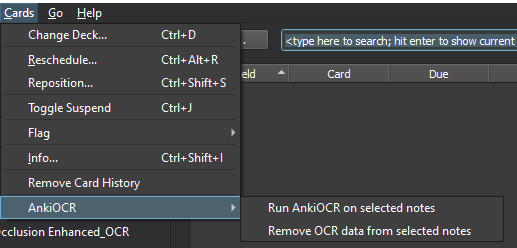
On the toolbar at the top, select ‘Cards’, then ‘AnkiOCR’, and select ‘Run AnkiOCR on selected notes’, as shown below
-
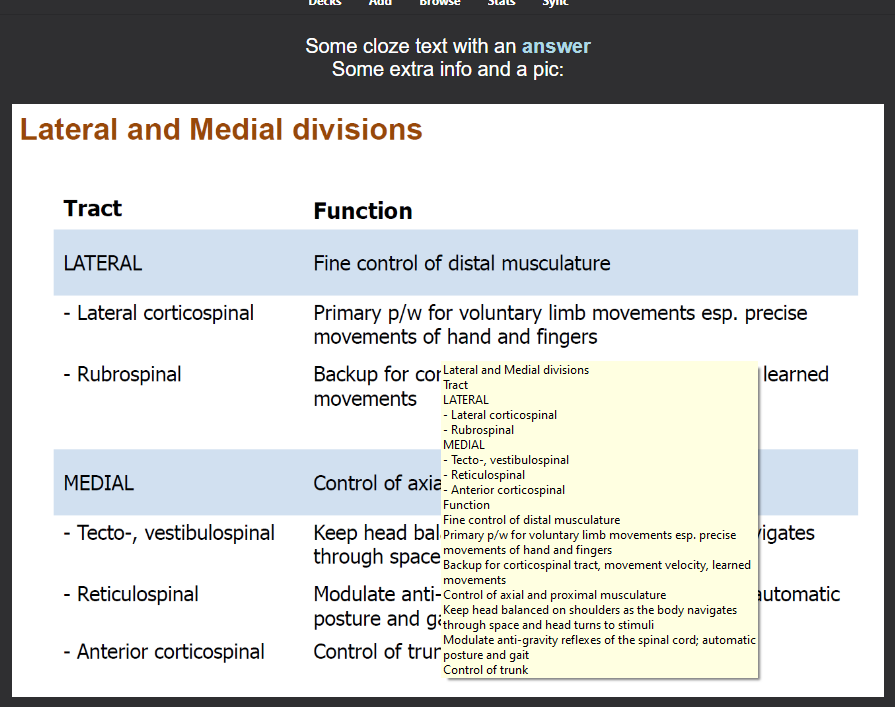
After processing, each of the images in the note will have the ocr data embedded in the
titlehtml tag, viewable as a tooltip: -
If you want to remove the OCR data from any notes, select them and then use the “Remove OCR data from selected notes” option in the menu shown above
If you wish to have the OCR data outputted to a separate ‘OCR’ field on the note, which will modify your note types in your deck, you can set the text_output_location config option to new_field
If you want to add new languages, you need to download the appropriate language data from here.
Known issues
- Will not work with handwritten text, this probably wont change as the library its based on is not optimised for handwritten text
- Images with differently sized text, and/or images with low resolution text, may not process properly. If you have examples that you think should have been processed, please raise a GitHub issue so I can look into it
- Note that for versions of anki prior to 2.1.41, the addon is locked to AnkiOCR version 0.5.3, due to breaking changes in the Anki API
Changelog
-
0.7.1 - 2021-09-19
- Removing Chinese, German, French and Spanish language data to reduce filesize
- Updating readme with link to language data
-
0.7.0 - 2021-09-19
- Updating vendorised pytesseract
- Updating mac tesseract dependencies
- Updated build script for tesseract for mac
- The above fixes #27, #28, #29
-
0.6.1 - 2021-09-17
- Attempting to fix error where image does not exist
- Improved exception display to end user if processing fails unexpectedly, adding debug info
-
0.6.0 - 2021-09-13
- Fixes #26, thanks @bwhurd for the bug report
- Other small fixes to support Anki 2.1.41 and beyond
- Drop support for Anki versions prior to 2.1.41, but it should still work.
-
0.5.3 - 2021-09-04
- Fix raising of KeyError when img src is not found, thanks @thiswillbeyourgithub for the fix!
-
0.5.2 - 2021-05-22
- Fix error on some Linux environments, see https://github.com/cfculhane/AnkiOCR/issues/20 , thanks to user thiswillbeyourgithub for the fix!
-
0.5.1 - 2021-05-02
- Hotfix to include accidentally gitignored tesseract mac libs
-
0.5.0 - 2021-05-02
- Added bundled tesseract for Mac, no longer any need to install it separately
- Split out
tessdatato its own folder, allowing easier installation of new languages - Change in the way note ID’s are processed, no longer limited to 1000 cards
- Fixed issue causing a crash in anki versions > 2.1.40
- Added some log text that will appear when invalid notes are encountered during a processing run
-
0.4.3 - 2021-01-22
- Hotfix for config.json syntax error
-
0.4.2 - 2021-01-19
- Add
num_threadsconfig option to allow manual setting of number of threads - Add
use_batchingconfig option to allow disabling of batching for those for which this causes performance issues - Added more unit tests to releasing new versions
- Fixed an issue where OCR text containing ”::” would break clozes, now cleans duplicate colons in text
- Add
-
0.4.1 - 2021-01-01
- Reduced batch_size default to 5 to improve the progress bar updating frequency and feel of speed
- added total time readout to final message on completion
- added ability to cancel during processing
-
0.4.0 - 2020-12-31
- Major feature update, now is multithreaded for roughly a 10x speed improvement
- Complete refactor of code for readibility and maintability
- Addition of basic unit tests for OCR section of codebase
- Improved progress bar messaging
-
0.3.1 - 2020-10-11
- Config setting for
text_output_locationis now read properly when starting OCR class - More detailed exception readout when exception occurs during processing
- Config setting for
-
0.3.0 - 2020-10-06
- New method for storing the ocr text, now stores it in title attr of the img html tag
- Handle old verions of Anki not having different progressbar.update()
-
0.2.6 - 2020-10-06
- Handle old verions of Anki not having different progressbar.update()
-
0.2.5 - 2020-10-06
- Add alternate import method for Collection due to API changes in Anki
-
0.2.4 - 2020-10-05
- Changed order of operations so that OCR is attempted before notes are modified to eliminate risk of database errors
- Updated path to tesseract executable for mac and linux
-
0.2.3 - 2020-10-05
- HOTFIX for tesseract cmd path on Mac
-
0.2.2 - 2020-10-05
- Removed the install file for Tesseract-OCR for windows, now that the binaries themselves are included.
- Updated the initial message the user sees to notify re: the database change message Anki will show.
-
0.2.1 - 2020-10-05
- HOTFIX for Fixing tesseract executable detection
-
0.2.0 - 2020-10-05
- Now packaged with windows binaries for Tesseract-OCR, no install necessary!
- Added flag in config.json to indicate valid tesseract exec
- Updates to README to reflect above changes
-
0.1.0 - 2020-10-05
- Initial Release
Screenshots
Liên kết hỗ trợ
- Contact Author
- the Tesseract OCR library
- carefully follow the instructions here
- my GitHub
- appropriate language data from here.
Reviews (28)
👍 2026-01-07
HUGEEEE HUGE HUGE TIME SAVER DUDE HOLY. I OWE YOU BIG TIME. Works so well!!
👍 2024-11-08
Hey I just wanted to thank you for your hard work, it doesn’t go unnoticed.
I do a lot of occlusions on powerpoints and this has been invaluable. Keep it up
👍 2024-02-04
If you want it to work on the current Anki version you gotta download this version:
AnkiOCR (Fork for Anki 23 by Shige) https://ankiweb.net/shared/info/546383173
Just writing this in case you missed the comment of the creator.
👍 2024-01-21
I created a simple Fork(Copy) for Anki 23(qt6) and uploaded it to AnkiWeb.(If the original add-on has been updated to Anki 23.10, this fork is not required.)
AnkiOCR (Fork for Anki 23 by Shige) https://ankiweb.net/shared/info/546383173
👍 2023-12-31
最棒的插件之一! 利用这款插件加上cid插件, 我能让沉默的图像遮挡重换新生, 和我所有的卡联系到一起.
第二次编辑: 如果”new_field”能够支持的话, 那就更好了! 这是我使用过的最有用的插件.
👍 2023-12-17
https://github.com/cfculhane/AnkiOCR/issues/45
- Raised an issue
- Is not updated for Anki dec 2023
- Still uses PyQt5
- PyQt5 is not bundled in Anki 2023
👍 2023-02-23
Works perfectly for it’s designed purpose!
👍 2023-02-07
AMAZING !!! Thank You So Much !!
👍 2022-09-04
MADE MY LIFE SM EASIER
👍 2022-08-28
Great!
👍 2022-04-27
Great!
👍 2022-02-16
work only when searching in browser but not real text
i want a text to be read by tts
👍 2022-01-18
Works really well!
However, I had encounter some problem when I tried to download the tessarct-ocr file
How do I import the language file into Anki after downloading from the github page?
Thanks for your contribution on such a great addon!
👍 2022-01-14
Works perfectly
👍 2021-12-31
It’s useful!
👍 2021-10-21
worked perfect when text_oytput_location was “tooltip”. Howver, when I tried to change it to new_field I got the following error.
A fatal error occurred, and Anki must close. Please report this message on the forums.
Anki 2.1.48 (fb07bad3) Python 3.8.6 Qt 5.14.2 PyQt 5.14.2
Platform: Mac 10.15.2
Flags: frz=True ao=True sv=?
Add-ons, last update check: 2021-10-20 10:26:51
Caught exception:
Traceback (most recent call last):
File “aqt/progress.py”, line 54, in handler
File “aqt/u
👍 2021-10-20
Hi, this addon does not load up for me.. pls help. Im on 2.1.25. The message I get after I download is below:
An add-on you installed failed to load. If problems persist, please go to the Tools>Add-ons menu, and disable or delete the add-on.
When loading ‘AnkiOCR’:
Traceback (most recent call last):
File “aqt/addons.py”, line 211, in loadAddons
File “/Users/Library/Application Support/Anki2/addons21/450181164/init.py”, line 6, in <module>
from . import gui
File “/User
👍 2021-10-02
I want the output of the OCR in the same field.
So that I can remove the image later.
how to do this.
👍 2021-10-01
Excellent add-on! Super useful for finding info in IO cards and anatomy in general.
👍 2021-09-16
Been waiting for something like this! I use the image occlusion plugin for 99% of my notes. This should make it very easy to search for and find individual notes for reference. Thank you for building and updating this! Such a great and valuable service.
👍 2021-09-13
one of my favorite anki addons
👍 2021-08-27
This is great! thank you so much for sharing
👍 2021-08-18
Love this addon, but it is not yet compatible with 2.1.45+. Comment from author It is now compatible, try reinstalling it
👍 2021-08-14
Anki 2.1.46 not working.but it works best in my Anki 2.1.35
An add-on you installed failed to load. If problems persist, please go to the Tools>Add-ons menu, and disable or delete the add-on.
When loading ‘AnkiOCR’:
Traceback (most recent call last):
File “aqt\addons.py”, line 217, in loadAddons
File “C: \Users AppData\Roaming\Anki2\addons21\450181164_init__.py”, \Users\AppData\Roaming Anki2\addons21\450181164\gui.py”, line
line 6, in <module>
from. import gui
File “C:
👍 2021-07-24
Hi, thanks for sharing! This addon looks very useful, but I’ve got an error message like this:
System:
mac OS
Anki:
Version 2.1.41
Error encountered during processing, attempting to stop AnkiOCR gracefully. Error below:
Traceback (most recent call last):
File “/Users/owlowiscious/Library/Application Support/Anki2/addons21/450181164/gui.py”, line 56, in on_run_ocr
ocr.run_ocr_on_notes(note_ids=selected_nids)
File “/Users/owlowiscious/Library/Application Support/Anki2/add
👍 2021-06-16
Surprisingly accurate and very helpful for searching cards.
👍 2021-05-24
I have more than 10k notes made from images in PDF and now with your addon I can do research on them. Thank you so much!
👍 2021-05-07
caused a crash, I wish I could rate this more negative t hatn this Comment from author Some information would help me solve the cause of the crash, please reply here or raise an issue on the Github, thanks!
