AnkiPA
This project is an Anki addon for pronunciation assessment. You can record your own voice when studying a flashcard and get an overview of what your pronunciation looks like!
How it works
When you are reviewing a flashcard and press Ctrl + W AnkiPA starts to record your voice and then send the data to Azure Speech Services to get an pronunciation assessment based on their service.
For Mac the command will be Cmd + W. It can be changed in the settings.
Installation
Open Anki and go to Tools -> Add-ons -> Get Add-ons… -> Place the code below and then click OK.
86363097
Configuring your API key
To use this addon you will need an Azure API key. You can create an free account at Azure Portal. After logging into your account, go to Speech services and create a new resource, selecting the region of the endpoint. Once created the resource you will be able to find your API key.
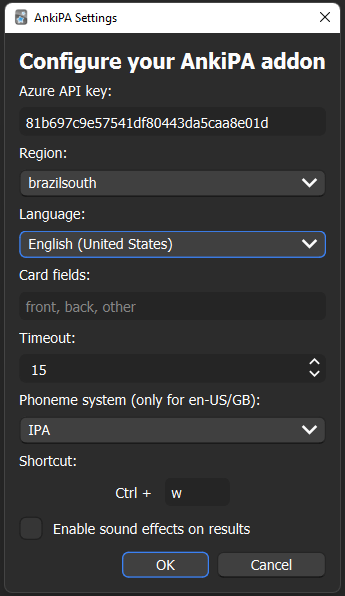
With that informations you need to open your Anki and go to Tools and then AnkiPA Settings. A window will appear and there you place your key and select the region and also choose the language that you will be evaluating your pronunciation.
Settings In the settings besides the API configs you will find some other options:
Card fields: a comma separated list of the fields to be used as text source for evaluating the pronunciation, prioritazed by order. If none of them be found the first one will be used. The field names are case sensitive. Timeout: how many seconds a pronunciation assessment can last Phoneme system: only for en-US/GB, it defines how the syllables will be shown Shortcut: your preferred shortcut to start recording your voice Enable sound effect: sounds based on pronunciation score Text extraction method: Choose how AnkiPA extracts text from your cards:
- Auto (DOM first, then fields): Tries to extract visible text from the card DOM first, falls back to field extraction
- DOM only: Only uses DOM extraction (useful for cards with dynamic/rotating content)
- Fields only: Traditional field-based extraction (default behavior) CSS selectors for DOM extraction: Comma-separated CSS selectors to find text in the card DOM. Useful for custom card templates. Default: #sentences-inner .fr, .sentence.fr, .fr.sentence, [data-sentence], .example-sentence
Supported languages AnkiPA relies on Azure Pronunciation Assessment, which supports multiple languages and different accents for English, Spanish and French.
The addon update the supported languages automatically, and the newly added ones will appear on the options when Microsoft releases them.
You can check the current supported languages here
Results
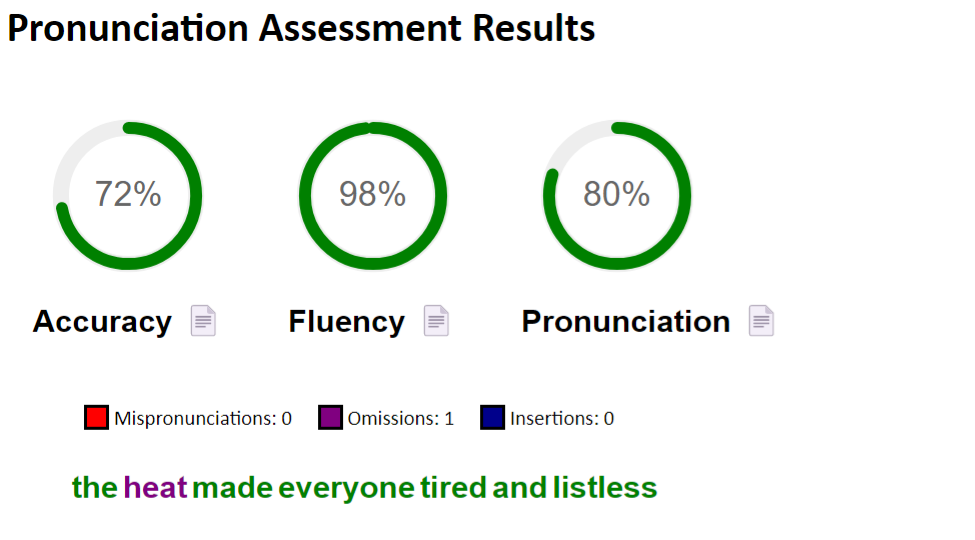
After clicking on Save button, in few seconds a popup screen will appear showing details about your pornunciation. It shows the percentage scores for accuracy, fluency and overall pronunciation , the amount of errors you committed and what words your pronounced correctly. When you hover your mouse in the words you can see details about the phonemes. The result screen looks like this:
Source code: Github
If you are interested in having the same functionality in your Android phone check this app: https://github.com/warleysr/pronki
Screenshots
Liên kết hỗ trợ
Reviews (11)
👍 2025-08-27
Anki 25.07.5 (7172b2d2) (ao) Python 3.13.5 Qt 6.9.1 PyQt 6.9.1 Platform: macOS-12.7.6-x86_64-i386-64bit-Mach-O
Traceback (most recent call last): File “/Users/mima1234/Library/Application Support/Anki2/addons21/86363097/init.py”, line 459, in start_assessment AnkiPA.test_pronunciation()
File "/Users/mima1234/Library/Application Support/Anki2/addons21/86363097/ankipa.py", line 65, in test_pronunciation
cls.DIAG = RecordDialog(mw, mw, cls.after_reco

### 👍 2025-03-26

It was very challenge for me cuz i don't know anything 🥲 ( I struggled to find key and how to make it )
Finally i can make it and it is very useful!! thank you for making this one!
even I spend more than 3hrs, it's worth it 😍😍

### 👍 2024-05-08

There was a network error recognizing your speech.

• Check if your API credentials are correct.

• Verify if your internet connection is working properly.

• Try to increase the Timeout parameter in Settings.

• Also check Azure Speech services status in your region: status.azure.com/en-gb/status

### 👍 2024-04-20

Very nice!!

### 👍 2024-03-20

Amazing work

### 👍 2024-02-18

it is giving this error

There was a network error recognizing your speech.

• Check if your API credentials are correct.

• Verify if your internet connection is working properly.

• Try to increase the Timeout parameter in Settings.

• Also check Azure Speech services status in your region: status.azure.com/en-gb/status

### 👍 2024-02-13

Thanks for this amazing Add-on. I have been using Anki for improving my English Skills (vocabulary, listening, grammar) since 2018. Now, I'll be able to work on my pronunciation and get some feedback how it has been. I'm also using my Speech Service key to generate audio from text through other useful add-on: AwesomeTTS. Thanks a lot!

### 👍 2023-08-22

Awesome add-on! It's simply perfect! It even includes a statistic that saves the overall results of your pronunciations! You've earned a like, a star on GitHub, and one more follower!

### 👍 2023-01-13

There was a service error recognizing your speech. Try again
Comment from author
Sorry, this message was not clear. Please update your addon and follow these steps:


1. Check if your microphone is working well and recording clearly.

2. Make sure the text that you are pronuncing is in the correct field and configured language. Take a look at the Settings.

3. Check debug.json file in your addon's folder and contact me on GitHub if you need help.

### 👍 2023-01-08

Haven't tested but great idea, hope it works well!

### 👍 2022-11-05

good add-on for improving user's pronounciation.
